


Precise Pair Trading Pro MT5 Settings Review 2026
Most Expert Advisors I’ve come across over the years fall into the same predictable categories. There are the trend-followers that chase momentum, the scalpers that fight for every pip, and the grid systems that average into losing positions hoping for a reversal. But when I first looked at Precise Pair Trading Pro MT5, something felt different. This EA doesn’t try to predict whether Gold or the Euro will move up or down. Instead, it watches the statistical relationship between two correlated instruments – typically EURUSD and XAUUSD – and waits for that relationship to temporarily drift outside its normal range. When that happens, the Expert Advisor steps in with a hedged pair trade: one position long on one symbol and short on the other. The profit comes from the convergence, not from directional forecasting. In this review, I’ll break down the entire setting panel, explain what each category actually does, and give you a realistic picture of how this system behaves in live trading conditions in 2026.
• Download Now – Precise Pair Trading Pro MT5
• More Update – Telegram Channel
• Our Support – Telegram Support
Precise Pair Trading Pro MT5 Setting Panel
The setting panel in Precise Pair Trading Pro MT5 is refreshingly straightforward compared to some EAs that bury you under dozens of confusing parameters. You’ll find everything organized into logical sections: strategy controls, entry and exit thresholds, correlation filtering, risk management, and time-based restrictions. The panel is designed to be practical rather than overwhelming, and most settings can be understood without a PhD in mathematics. What I appreciate is that the developer didn’t hide critical parameters behind obscure labels – everything is clearly named and reasonably explained.
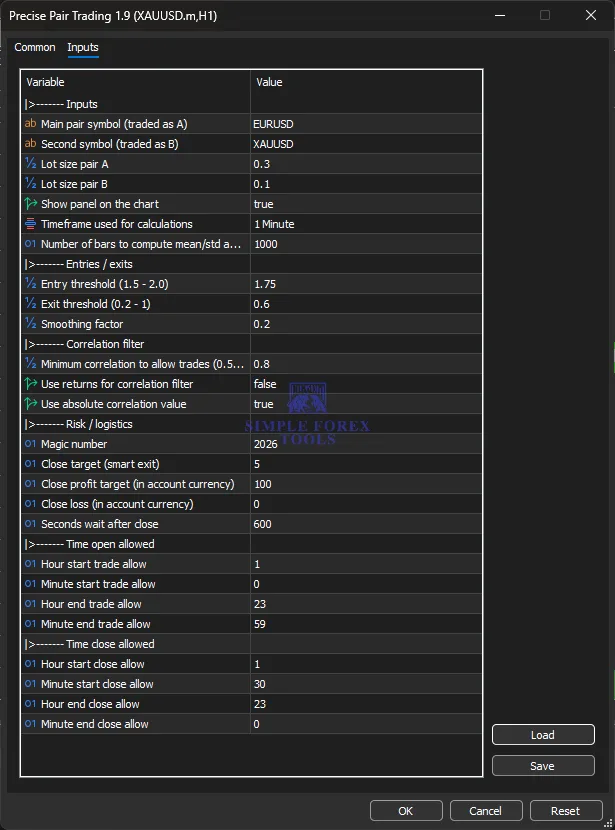
Core Strategy Settings of Precise Pair Trading Pro EA
This is where the heart of the EA lives. The core strategy settings define which instruments the EA trades and how it sizes those positions. The EA operates on a pair-trading principle: it monitors two symbols simultaneously and opens hedged positions when their price relationship deviates beyond a statistical threshold. The primary symbol is typically set to EURUSD, and the secondary symbol is XAUUSD – a pairing that has historically shown a meaningful statistical relationship. The lot sizes for each pair are set independently, which gives you flexibility to adjust exposure based on each instrument’s volatility. The EA also includes a panel display option that shows real-time information on the chart – a small but useful feature for monitoring what the system is doing.
• ab Main pair symbol (traded as A) → EURUSD
• ab Second symbol (traded as B) → XAUUSD
• % Lot size pair A → 0.3• % Lot size pair B → 0.1
• Show panel on the chart → true
• Timeframe used for calculations → 1 Minute
• 01 Number of bars to compute mean/std a… → 1000
Indicator Settings
The indicator settings control how the EA identifies trading opportunities. The EA uses a statistical approach rather than traditional technical indicators like moving averages or RSI. It calculates the mean and standard deviation of the relationship between the two symbols over a specified number of bars, then identifies when the current relationship deviates beyond a defined threshold. The entry threshold determines how far the relationship needs to drift before the EA considers opening a trade – typically set between 1.5 and 2.0. The exit threshold, on the other hand, determines how much the relationship needs to revert before the EA closes the trade. The smoothing factor helps filter out market noise and prevents the EA from reacting to every minor fluctuation.
• % Entry threshold (1.5 – 2.0) → 1.75
• % Exit threshold (0.2 – 1) → 0.6
• % Smoothing factor → 0.2
Correlation Filter Settings
This is one of the more sophisticated aspects of the EA. The correlation filter ensures that trades only occur when the two instruments maintain a defined statistical relationship. If correlation drops too low, the pair-trading logic becomes unreliable because the instruments are no longer moving together in a predictable way. The minimum correlation setting is set at 0.8, which is quite high – it means the EA only trades when the relationship between EURUSD and XAUUSD is strong. There’s also an option to use returns for the correlation filter, which changes how correlation is calculated, and an option to use the absolute correlation value. In practice, keeping these at the default settings (false for returns, true for absolute value) is the safer approach for most traders.
• % Minimum correlation to allow trades (0.5… → 0.8
• Use returns for correlation filter → false
• Use absolute correlation value → true
Risk / Logistics Settings
The risk and logistics section handles the operational side of the EA. The magic number is simply an identifier that lets you run multiple instances of the EA on different charts without them interfering with each other. The smart exit settings control how the EA manages its take-profit and stop-loss levels. The close target determines the overall profit target for the pair trade, while the close profit target and close loss target are specified in account currency. What’s interesting here is that the EA doesn’t use a fixed stop-loss in the traditional sense – it relies on the statistical exit threshold to determine when to close a losing position. The seconds wait after close setting adds a delay between trades, which prevents the EA from jumping back into the market immediately after exiting a position.
• 01 Magic number → 2026
• 01 Close target (smart exit) → 5
• 01 Close profit target (in account currency) → 100
• 01 Close loss (in account currency) → 0
• 01 Seconds wait after close → 600
Time Filter / Session Control Settings
Time filters give you control over when the EA is allowed to open and close trades. This is particularly useful if you want to avoid certain trading sessions or restrict activity to periods when the market is most active. The EA separates trade opening and trade closing into distinct time windows, which is a thoughtful design choice. For example, you might allow trades to open during the London and New York sessions but restrict closing during low-liquidity periods. The current settings allow trading from 1:00 to 23:59, which is essentially the entire day, with a slightly narrower window for closing from 1:30 to 23:00. In practice, many traders narrow these windows to avoid the illiquid periods around the daily close.
• 01 Hour start trade allow → 1
• 01 Minute start trade allow → 0
• 01 Hour end trade allow → 23
• 01 Minute end trade allow → 59
• 01 Hour start close allow → 1
• 01 Minute start close allow → 30
• 01 Hour end close allow → 23
• 01 Minute end close allow → 0
Recommended Timeframe & Currency Pair Settings
The EA is designed to work on the M1 (1-minute) timeframe, which aligns with its statistical arbitrage approach. The pair-trading logic relies on short-term deviations in the relationship between EURUSD and XAUUSD, and the M1 timeframe provides sufficient granularity to capture these opportunities without introducing excessive noise. The primary symbol is typically set to EURUSD, with XAUUSD as the secondary symbol. However, the EA can theoretically work with other correlated pairs – you could experiment with EURUSD and GBPUSD, for example – but the developer’s testing and the live signal are both based on the EURUSD-XAUUSD pairing. I’d recommend sticking with this combination unless you have a strong reason to deviate.
Account Requirement & Risk Settings
Before running this EA on a live account, it’s worth understanding the financial requirements. The live signal runs on an IC Markets account with 1:30 leverage – the standard European regulated leverage limit – which is a far cry from the extreme 1:1000+ ratios some signals rely on. Achieving strong returns at 1:30 leverage requires actual trade quality, not just aggressive position sizing. The deposit load on the live signal approaches 99%, meaning the EA uses virtually all available margin while positions are open. This is how it achieved such strong growth on a relatively small starting balance, but it also means the account experiences meaningful equity swings. For most traders, I’d recommend starting with a larger account or smaller position sizes than the signal uses. A minimum account of $500 to $1,000 is reasonable, but starting conservatively and gradually increasing exposure as you build confidence makes far more sense than mirroring the signal’s aggressive sizing from day one.
VPS & Execution Settings
Like any Expert Advisor, Precise Pair Trading Pro MT5 benefits from reliable execution. A Virtual Private Server (VPS) is strongly recommended for running this EA, particularly because the strategy relies on precise entry and exit timing based on statistical thresholds. The EA doesn’t use overly complex execution logic, but it does need stable connectivity to monitor the relationship between two symbols continuously. The developer recommends testing with real tick data in the MT5 Strategy Tester for reliable results, because spread behavior and execution quality vary between brokers. What works on one broker’s feed may behave differently on another. I’d suggest choosing a VPS provider with low latency to your broker’s servers and ensuring your VPS has sufficient resources to run MT5 without interruptions.
Practical Summary
So who is this EA actually for? In my view, Precise Pair Trading Pro MT5 is best suited for traders who understand statistical concepts and are comfortable with a strategy that doesn’t trade frequently. The EA is only actively in trades about 8% of the time – it’s selective and patient. This isn’t a system for traders who want to see constant activity or who get nervous when the EA sits idle for days. The strategy is moderate in its risk profile – it’s not a reckless grid system, but it’s also not ultra-conservative. The maximum drawdown on the live signal sits around 24%, which is reasonable given the growth achieved. The best market conditions for this setup are periods when EURUSD and XAUUSD maintain a strong statistical relationship – essentially, normal market conditions without extreme dislocations. What traders should be careful about is the annual recalibration requirement. The developer himself notes that pair-trading strategies need light annual recalibration using the most recent 12 months of data, because the relationship between Gold and the Euro evolves over time. This isn’t a major overhaul, but it does mean the EA isn’t truly set-and-forget. If you’re willing to spend a short session each year refreshing the EA, this is a reasonable trade-off.
Frequently Asked Questions (Precise Pair Trading Pro MT5 EA FAQ)
1. What is the best currency pair for this EA?
The EA is specifically designed for trading EURUSD and XAUUSD together as a pair. The developer’s testing and the live signal are both based on this combination. While you could theoretically experiment with other correlated pairs, sticking with EURUSD and XAUUSD is the recommended approach.
2. What timeframe should I use?
The EA is designed to run on the M1 (1-minute) timeframe. This provides sufficient granularity for the statistical arbitrage logic without introducing excessive noise.
3. Do I need a VPS to run this Precise Pair Trading Pro?
Yes, a VPS is strongly recommended. The EA needs stable connectivity to monitor the relationship between two symbols continuously. Choose a VPS with low latency to your broker’s servers for optimal execution.
4. Does this EA use grid or martingale strategies?
No. This is one of the EA’s key strengths. It doesn’t use averaging techniques to rescue losing trades – there’s no grid, no martingale, and no recovery ladder. The EA holds a maximum of one position per trading symbol.
5. Is this EA suitable for beginners?
It depends. The setting panel is relatively straightforward, and the strategy logic is explained clearly. However, beginners should understand the concept of statistical arbitrage and be comfortable with a strategy that doesn’t trade frequently. I’d recommend running the EA on a demo account for several weeks before deploying it live.
6. What leverage and account size do I need?
The live signal runs at 1:30 leverage. A minimum account of $500 to $1,000 is reasonable, but I’d recommend starting with a larger account or smaller position sizes than the signal uses. The deposit load on the signal approaches 99%, so most traders should consider more conservative sizing.
7. Is this Precise Pair Trading Pro good for gold trading?
Yes, but indirectly. The EA trades XAUUSD (Gold) as part of a paired position with EURUSD. It doesn’t trade Gold directionally – it trades the relationship between Gold and the Euro. This is a different approach than most Gold-focused EAs.
8. Does the Precise Pair Trading Pro EA MT5 require annual updates or recalibration?
Yes. The developer recommends a light annual recalibration using the most recent 12 months of data, because the statistical relationship between Gold and the Euro evolves over time. This isn’t a major overhaul – it’s tweaking parameters to match current market conditions.

Forex Fury MT5 Settings Review & Analysis 2026
Gold Trend X MT5 Settings Review & Analysis 2026
Quantum OmniGold MT5 Settings Review & Analysis 2026
My Orden Robot MT5 Settings Review & Analysis 2026
G101 EA Scalper MT5 Settings Review & Analysis 2026
Gold Zilla AI MT4 EA Settings Review & Analysis 2026
