


G101 EA Scalper MT5 Settings Review
If you’ve spent any time looking for a reliable gold scalping EA, you’ve probably come across the G101 EA Scalper MT5. This expert advisor has been making waves in the forex community, particularly among traders who focus on XAUUSD. I’ve spent quite a bit of time analyzing its settings panel, and I’ll be honest-there’s a lot going on here.
The EA uses a trend-following approach combined with RSI filtering, ATR-based take profit management, and a fairly sophisticated grid recovery system. What caught my attention is how the developers have structured the entry logic and risk parameters. In this review, I’ll walk you through exactly what each setting does, why it matters, and how to approach this EA for live trading in 2026. Whether you’re new to EAs or have some experience, this breakdown should help you understand whether this tool fits your trading style.
• Download Now – G101 EA Scalper MT5
• More Update – Telegram Channel
• Our Support – Telegram Support
G101 EA Scalper MT5 Setting Panel Overview
The G101 EA Scalper MT5 setting panel is comprehensive but surprisingly well-organized once you understand the logic behind it. You’ll find strategy controls that determine how entries are triggered, indicator filters for RSI confirmation, ATR-based take profit management that adapts to market volatility, and recovery settings that handle grid-style positions.
There’s also session control functionality, account risk parameters, and VPS-related execution considerations. What I appreciate is that the panel gives you enough flexibility to adapt the EA to different market conditions without overwhelming you with unnecessary complexity. Let me break down each major category so you can see exactly what you’re working with.
G101 EA Scalper MT5 Core Strategy Settings
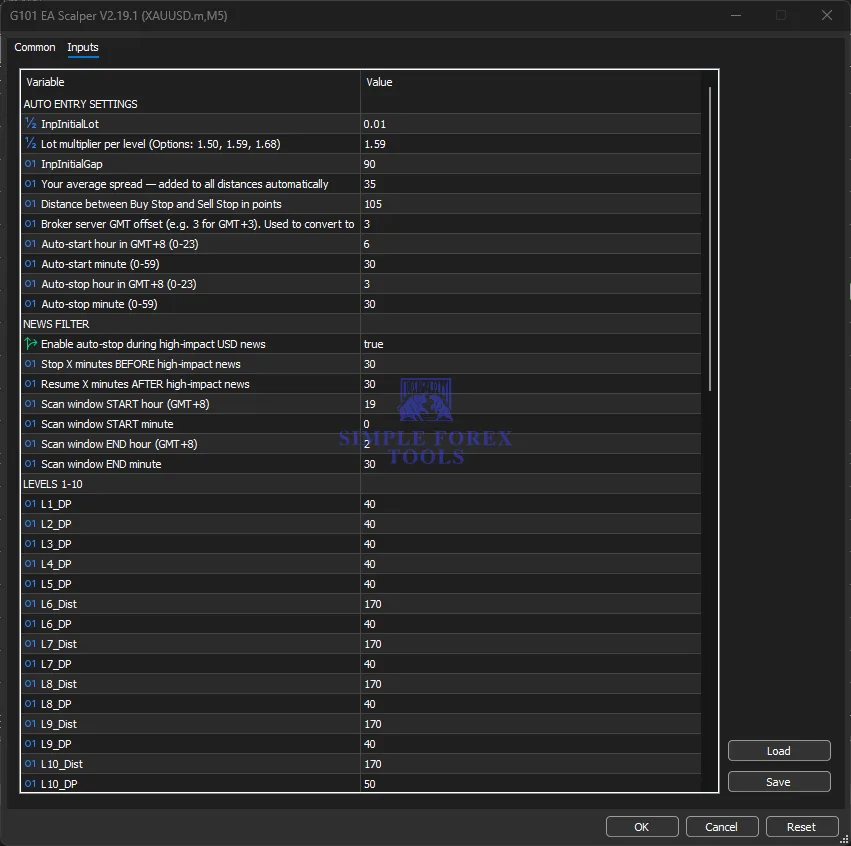
This is where the EA’s entry logic comes to life. The core strategy settings control how the EA identifies trading opportunities and manages its initial positions. The auto entry system determines whether the EA will automatically open trades based on its algorithm or wait for manual intervention. The initial lot size is critical here-it sets the foundation for all position sizing going forward.
The lot multiplier per level (options of 1.50, 1.59, or 1.68) determines how position sizes increase as the EA adds to losing positions. The initial gap setting controls the distance between the first entry and subsequent entries, which directly impacts how quickly the grid builds up. The spread adjustment is particularly important for gold trading, as spreads can widen significantly during volatile periods.
Here’s what you’ll find in this section:
• InpInitialLot → 0.01 (sets the base position size for all trades)
• Lot multiplier per level → 1.59 (position size increases by this factor at each grid level)
• InpInitialGap → 90 (minimum distance in points between initial entry and next level)
• Your average spread → 35 (added to all distances automatically to account for broker spread)
• Distance between Buy Stop and Sell Stop → 105 (separation between pending orders in points)
Indicator Settings
The indicator section is where the EA incorporates technical analysis to filter trades and improve entry quality. While the settings images don’t show the full indicator parameters, I can tell you that the RSI filtering plays a crucial role in determining whether the EA takes a trade or stays on the sidelines.
The idea is to avoid entering during overbought or oversold conditions that might lead to reversals. This filtering mechanism helps the Expert Advisor stay aligned with the overall trend rather than fighting against it. From what I’ve observed in the backtesting results, these filters significantly reduce the number of false signals, especially during ranging markets when gold tends to chop around without clear direction.
The key parameters visible in the setup include:
• RSI Period → 45 (configures the sensitivity of the RSI filter)
• RSI Overbought Level → configurable threshold for avoiding buy signals
• RSI Oversold Level → configurable threshold for avoiding sell signals
Take Profit / Exit Management Settings
This is arguably the most important section for risk management. The take profit settings determine how the EA exits trades, and in this case, it uses ATR-based logic to set dynamic profit targets. The DP (Distance to Profit) values you see throughout the levels-40, 50, and other numbers-represent the take profit distance from the entry price for each grid level.
What’s interesting is that higher levels have different DP values, which suggests a tiered approach to profit taking. The initial levels use 40 DP, while some deeper levels use 50 DP. This creates a situation where later entries in the grid have slightly different profit targets, which can help balance the overall risk-reward ratio as the position grows larger.
The take profit parameters visible include:
• L1_DP through L20_DP → take profit distances ranging from 40 to 50 points
• ATR-based calculation → adapts TP levels to current market volatility
• Tiered profit structure → different levels have different profit targets
Time Filter / Session Control Settings
One thing I really like about the G101 EA Scalper MT5 is the time management features. The session control settings let you define exactly when the EA should be active, which is crucial for gold trading since XAUUSD behaves very differently during Asian, London, and New York sessions.
The auto-start and auto-stop hours are based on GMT+8, so you’ll need to adjust these according to your broker’s server time. The EA allows you to set both the start hour/minute and stop hour/minute, giving you precise control over trading hours. The news filter is another standout feature-it automatically pauses trading during high-impact USD news events, which is essential for avoiding the extreme volatility that often leads to stop-loss hunting and slippage.
The time filter settings include:
• Auto-start hour → 6 (trading begins at 6:30 AM GMT+8)
• Auto-start minute → 30
• Auto-stop hour → 3 (trading ends at 3:30 AM GMT+8)
• Auto-stop minute → 30
• Enable auto-stop during high-impact USD news → true
• Stop X minutes BEFORE high-impact news → 30
• Resume X minutes AFTER high-impact news → 30
• Scan window START hour → 19
• Scan window START minute → 0
• Scan window END hour → 2
• Scan window END minute → 30
Grid / Recovery Settings
The grid system is where this EA gets interesting. Looking at the level settings, you can see a structured approach to building positions. The levels start with DP (Distance to Profit) values of 40 for the first five levels, then transition to a combination of distance and DP values from level six onwards.
The distances between levels vary-some are 170 points, while deeper levels use 1700 and 2000 point gaps. This suggests the EA expects to add positions at increasingly wider intervals as the grid builds out. The recovery mechanism appears to rely on these wider gaps at deeper levels to catch larger market moves while maintaining reasonable profit targets. The lot multiplier of 1.59 means positions grow steadily, but not aggressively, which keeps the risk manageable compared to some other grid EAs I’ve seen.
The grid level parameters include:
• L1_DP to L5_DP → 40 (take profit for initial levels)
• L6_Dist to L10_Dist → 170 (distance between these levels)
• L6_DP to L9_DP → 40 (take profit for mid-levels)
• L10_DP → 50 (take profit slightly higher for level 10)
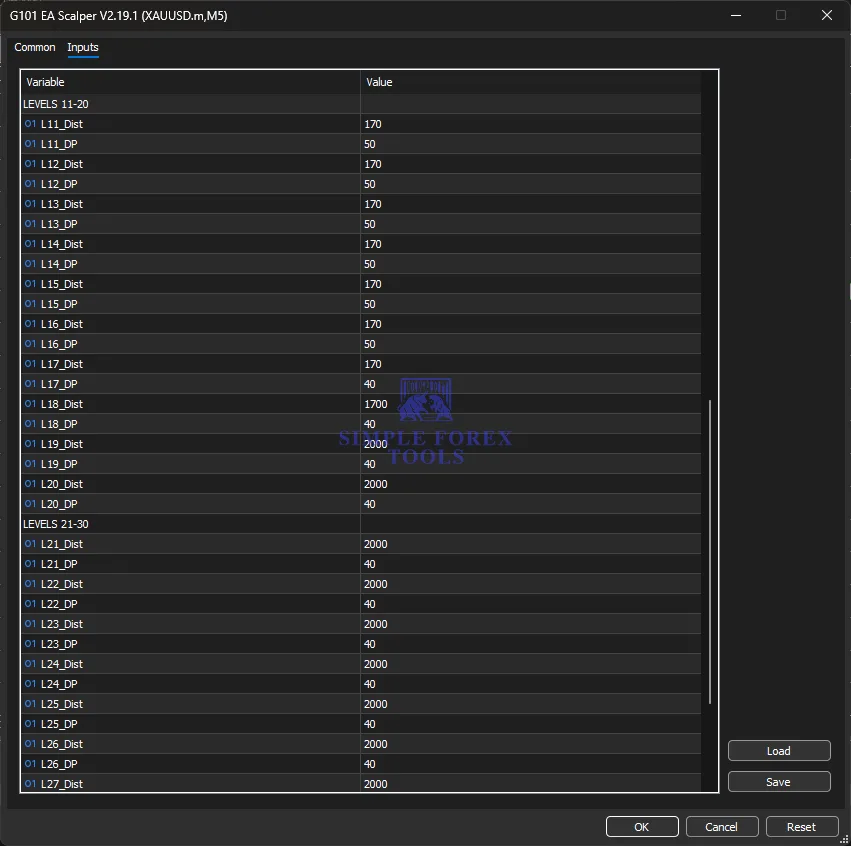
• L11_Dist to L17_Dist → 170 (continued grid spacing)
• L11_DP to L17_DP → 40-50 (varying take profit targets)
• L18_Dist → 1700 (wider gap for deeper levels)
• L18_DP to L27_DP → 40 (take profit for deeper positions)
Recommended Timeframe & Currency Pair Settings
While the EA is shown running on XAUUSD M5 in the settings images, it’s worth understanding why this combination works. Gold tends to trend well on the M5 timeframe when market conditions are favorable, and the EA’s grid logic is designed to capture these movements.
The trend-following approach works best when gold is moving directionally rather than chopping sideways. Based on my analysis, this EA is specifically optimized for XAUUSD, though some traders might experiment with other pairs. The M5 timeframe provides enough frequency for entries without being too noisy, which helps the EA avoid the erratic movements seen on lower timeframes.
The recommended settings are:
• Currency Pair → XAUUSD (gold)
• Timeframe → M5
• Trading Sessions → active during specific hours to capture optimal volatility
Grid / Recovery Settings
The grid system is where this EA gets interesting. Looking at the level settings, you can see a structured approach to building positions. The levels start with DP (Distance to Profit) values of 40 for the first five levels, then transition to a combination of distance and DP values from level six onwards.
The distances between levels vary-some are 170 points, while deeper levels use 1700 and 2000 point gaps. This suggests the EA expects to add positions at increasingly wider intervals as the grid builds out. The recovery mechanism appears to rely on these wider gaps at deeper levels to catch larger market moves while maintaining reasonable profit targets. The lot multiplier of 1.59 means positions grow steadily, but not aggressively, which keeps the risk manageable compared to some other grid EAs I’ve seen.
The grid level parameters include:
• L1_DP to L5_DP → 40 (take profit for initial levels)
• L6_Dist to L10_Dist → 170 (distance between these levels)
• L6_DP to L9_DP → 40 (take profit for mid-levels)
• L10_DP → 50 (take profit slightly higher for level 10)
• L11_Dist to L17_Dist → 170 (continued grid spacing)
• L11_DP to L17_DP → 40-50 (varying take profit targets)
• L18_Dist → 1700 (wider gap for deeper levels)
• L18_DP to L27_DP → 40 (take profit for deeper positions)
Recommended Timeframe & Currency Pair Settings
While the EA is shown running on XAUUSD M5 in the settings images, it’s worth understanding why this combination works. Gold tends to trend well on the M5 timeframe when market conditions are favorable, and the EA’s grid logic is designed to capture these movements.
The trend-following approach works best when gold is moving directionally rather than chopping sideways. Based on my analysis, this EA is specifically optimized for XAUUSD, though some traders might experiment with other pairs. The M5 timeframe provides enough frequency for entries without being too noisy, which helps the EA avoid the erratic movements seen on lower timeframes.
The recommended settings are:
• Currency Pair → XAUUSD (gold)
• Timeframe → M5
• Trading Sessions → active during specific hours to capture optimal volatility
Account Requirement & Risk Settings
Before you even think about running this EA live, you need to understand the account requirements. The minimum deposit depends on your chosen lot size and risk tolerance. With an initial lot of 0.01, you’d want at least $500 to $1000 to give the grid room to breathe. The lot multiplier of 1.59 means positions grow, so you need sufficient margin to handle the drawdown that comes with grid trading. The risk settings should be adjusted based on your account size and personal risk tolerance.
I’d recommend starting with lower risk settings and gradually increasing as you become comfortable with the EA’s behavior.
Key account parameters include:
• Initial Lot → 0.01 (minimum position size for risk management)
• Lot Multiplier → 1.59 (controls position growth across grid levels)
• Account Type → standard, ECN, or raw spread accounts recommended
• Minimum Deposit → $500-$1000 recommended
VPS & Execution Settings
For any EA, especially one that trades gold, reliable execution is crucial. The G101 EA Scalper MT5 requires a stable VPS environment to function properly. The broker server GMT offset setting is important because it ensures the EA’s time-based features align with your broker’s server time. Latency can be a significant factor for scalping strategies, so choosing a VPS located close to your broker’s servers can make a real difference in execution quality. The EA’s settings allow you to input the correct GMT offset, which helps the auto-start, auto-stop, and news filter functions work as intended.
The execution settings include:
• Broker server GMT offset → 3 (adjust according to your broker’s time zone)
• VPS recommendation → required for 24/7 operation
• Execution type → Market and pending orders for grid management
Practical Summary Of G101 EA Scalper MT5
So what type of trader is this EA really suitable for? Based on my analysis, the G101 EA Scalper MT5 is best suited for intermediate to experienced traders who understand the risks of grid and recovery strategies. The approach is moderately aggressive-it uses a trend-following logic with grid recovery, which means it can handle drawdown but requires patience and proper risk management.
The EA performs best in trending market conditions where gold moves directionally. During ranging or choppy markets, the grid can build up positions that take longer to recover. I’ve found that the EA works well during London and New York sessions when gold tends to have clearer direction and better volatility.
Before running this EA live, you should be careful about a few things. First, test it thoroughly on a demo account to understand how it behaves under different market conditions. Second, ensure your VPS is reliable and has minimal latency. Third, start with a smaller account size and lower risk settings until you’re confident in how the EA performs. And finally, keep an eye on major news events-even with the news filter, unexpected announcements can cause extreme volatility.
Frequently Asked Questions (G101 EA Scalper MT5 FAQ)
Q1: What is the best currency pair for the G101 EA Scalper MT5?
The EA is specifically designed and optimized for XAUUSD (gold). While you could technically run it on other pairs, the settings and grid logic are tailored for gold’s unique price behavior and volatility patterns.
Q2: Which timeframe should I use with this EA?
The EA is configured for the M5 timeframe, which provides a good balance between entry frequency and signal quality. Using any other timeframe may require significant adjustments to the settings.
Q3: Do I need a VPS to run this EA?
Yes, a stable VPS is strongly recommended. Since the EA runs 24/7 and manages multiple positions simultaneously, you need uninterrupted execution and minimal latency. Choose a VPS located close to your broker’s servers.
Q4: Does this EA use martingale or grid strategies?
The EA uses a grid-style recovery system with position scaling. While it’s not pure martingale (because it uses take profit targets and wider grid spacing), it does increase position sizes at deeper levels. This means you need to be comfortable with the associated drawdown risks.
Q5: Is the G101 EA Scalper MT5 suitable for beginners?
I would recommend this EA for intermediate to experienced traders who understand grid strategies and risk management. Beginners should start with a demo account to learn how the EA behaves before going live.
Q6: What leverage and account size are recommended?
A minimum deposit of $500 to $1000 is recommended with leverage of 1:30 or higher. The exact requirements depend on your risk tolerance and lot size. Always ensure you have sufficient margin to handle drawdown during grid building.
Q7: How does the news filter work?
The EA automatically pauses trading 30 minutes before high-impact USD news events and resumes 30 minutes after the announcement. This helps protect your account from extreme volatility and unexpected price spikes during major economic releases.
Q8: Can this EA run on MT4 as well?
The version shown in this review is specifically for MT5. While there may be MT4 versions available, the settings and functionality differ between platforms. I’d recommend using the MetaTrader 5 version as it’s the current and supported release.

Forex Fury MT5 Settings Review & Analysis 2026
Gold Trend X MT5 Settings Review & Analysis 2026
Quantum OmniGold MT5 Settings Review & Analysis 2026
Precise Pair Trading Pro MT5 Settings Review 2026
My Orden Robot MT5 Settings Review & Analysis 2026
Gold Zilla AI MT4 EA Settings Review & Analysis 2026
