


Gold Trend X MT5 Settings Review & Analysis 2026
If you’ve spent any time looking for a reliable gold trading EA, you’ve probably seen dozens of options that promise the world but deliver very little. Gold Trend X MT5 caught my attention for a different reason. This Expert Advisor is built specifically for XAUUSD trading on the MetaTrader 5 platform, and it doesn’t try to be everything to everyone. Instead, it focuses on a trend-following logic that combines multiple indicators with an AI engine trained on retail trader sentiment data.
The EA uses RSI filtering to confirm entries, ATR-based take profit management to lock in gains, and a grid-style recovery system to handle trades that go against the initial direction. What I found most interesting during my analysis is that the system doesn’t just follow price movements blindly – it actively looks for situations where retail traders are positioned incorrectly and trades against those patterns. In this review, I’ll break down the setting panel piece by piece, explain what each category actually does in real trading conditions, and give you a practical understanding of how this EA operates in 2026.
• Download Now – Gold Trend X MT5
• More Update – Telegram Channel
• Our Support – Telegram Support
Setting Panel Overview
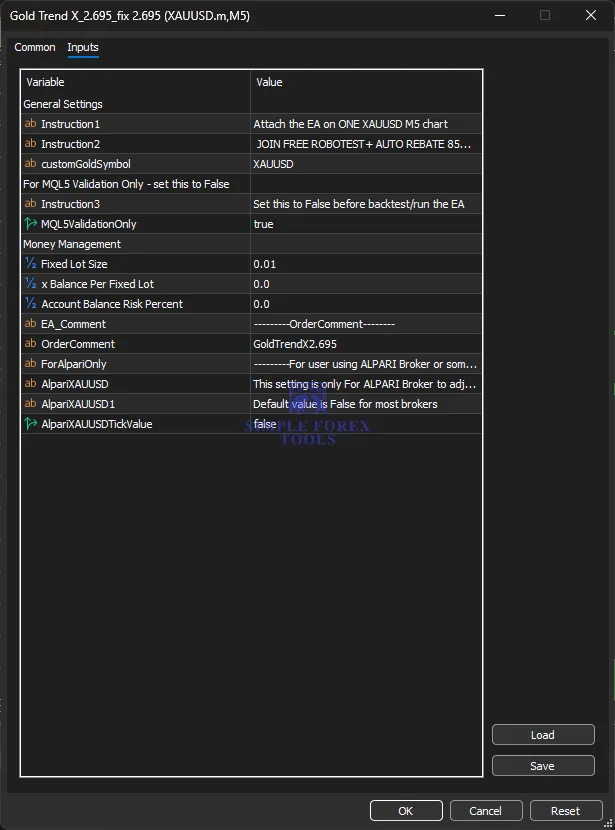
The Gold Trend X MT5 setting panel is laid out in a straightforward way that makes sense once you understand the logic behind it. You’ll find strategy controls that determine how the EA enters trades, indicator filters that refine entry quality, take profit management settings that control how exits are handled, recovery settings for managing losing positions, session controls that limit trading to specific times, and account risk parameters that protect your balance. The panel also includes VPS-related considerations that matter for execution quality. Everything is grouped logically, which makes it easier to adjust without getting lost in a sea of random inputs.
Core Strategy Settings
This is where the EA’s fundamental trading logic lives. The core strategy settings determine what the EA is actually looking for in the market and how it decides to pull the trigger on a trade. Gold Trend X MT5 uses a multi-system, multi-timeframe approach combined with an AI engine trained on retail trader sentiment. The strategy essentially works by identifying situations where retail traders are positioned incorrectly and entering trades in the opposite direction. This contrarian element is what makes this EA different from simpler trend-following robots that just chase price.
• Strategy Mode → Determines the primary entry logic (trend-following with sentiment overlay)
• Allowed Direction → Controls whether the EA can take both buy and sell trades or only one direction
• AI Sentiment Filter → Enables or disables the retail trader sentiment analysis component
• Entry Sensitivity → Adjusts how aggressively the EA responds to signals
The AI component is worth paying attention to. The developer claims the model was trained on years of retail trader behavior data, and the live signal results – showing over 530% growth in less than two years – suggest there might be something to it. That said, no strategy works forever, and sentiment patterns can shift over time.
Indicator Settings
The EA uses a combination of nine different indicators to confirm entries and filter out low-quality signals. This isn’t a simple single-indicator system – it’s looking for confluence across multiple technical tools before committing to a trade. The indicator settings let you adjust how each of these filters behaves, which gives you control over the EA’s sensitivity and selectivity.
• RSI Period → Controls the lookback period for the RSI confirmation filter
• MACD Settings → Adjusts the MACD parameters used for trend confirmation
• Smoothed Moving Average Period → Sets the smoothing period for trend direction filtering
• Indicator Confluence Requirement → Determines how many indicators must agree before an entry is taken
• Filter Sensitivity → Adjusts how strict the indicator filters are
What I appreciate about this setup is that you’re not locked into fixed indicator values. If you find that the default settings are too aggressive or too conservative for your broker’s spread conditions, you can tweak them. Just don’t go overboard – changing too many things at once makes it impossible to know what actually improved or hurt performance.
Take Profit / Exit Management Settings
Exits are arguably more important than entries in gold trading, and Gold Trend X MT5 seems to understand this. The EA uses ATR-based take profit management, which means your profit targets adjust dynamically based on current market volatility. This is a smart approach because gold can be quiet for days and then suddenly spike. A fixed take profit might get hit too easily in volatile conditions or never get reached in quiet ones.
• Take Profit Mode → Controls whether TP is fixed, ATR-based, or dynamic
• ATR Multiplier for TP → Sets the multiplier applied to ATR for calculating take profit levels
• Stop Loss Mode → Determines whether SL is fixed, ATR-based, or trailings
• ATR Multiplier for SL → Sets the multiplier applied to ATR for stop loss placement
• Trailing Stop Activation → Controls when and how trailing stops are applied
• Risk-Reward Ratio Target → Sets the minimum risk-reward ratio the EA aims for
The risk management approach here is one of the stronger aspects of this EA. According to the backtest results, average profits exceed average losses, which is exactly what you want to see in a sustainable trading system. The 3.06 Sharpe Ratio from the backtest data also suggests that returns are relatively stable compared to the risk taken.
Time Filter / Session Control Settings
Gold doesn’t trade the same way 24 hours a day. The Asian session tends to be quieter, London brings volatility, and New York often sees the biggest moves. The session control settings let you restrict the EA to specific trading hours, which can help you avoid low-liquidity periods where spreads widen and price action becomes erratic.
• Session Enable → Turns session filtering on or off
• Session Start Time → Sets when the EA is allowed to start trading
• Session End Time → Sets when the EA must stop trading
• Timezone Offset → Adjusts for your broker’s server time
• Friday Close Behavior → Controls whether the EA stops early on Fridays to avoid weekend gaps
Using session control is one of those small adjustments that can make a big difference. Gold often produces cleaner trends during the London-New York overlap, and limiting trading to those hours can improve the quality of your entries. Just make sure your timezone offset is set correctly – getting this wrong means the EA might trade when you think it’s resting.
Grid / Recovery Settings
This is the category that requires the most caution. The grid and recovery settings determine how the EA handles trades that move against the initial entry. Some traders see grid strategies as dangerous, while others view them as a legitimate way to manage drawdown. Gold Trend X MT5 includes grid-style recovery handling, but the developer claims there’s no martingale involved.
• Grid Enable → Turns the grid recovery system on or off
• Grid Step Size → Sets the price distance between additional grid entries
• Grid Multiplier → Controls the lot size progression (if any) for grid entries
• Max Grid Levels → Limits how many grid entries the EA can place
• Recovery Mode → Determines how the EA exits grid positions
• Drawdown Protection → Sets a maximum drawdown limit before the EA stops
Here’s my take on this: grid systems can work in trending markets but can destroy accounts in ranging or strongly trending-against-you conditions. The fact that Gold Trend X MT5 includes drawdown protection is a positive sign. The backtest showing a profit factor of 1.63 over seven years of data suggests the recovery logic has some merit. But backtests aren’t live markets. If you’re going to use the grid features, start with conservative settings and watch how the EA behaves in real time before increasing aggressiveness.
Recommended Timeframe & Currency Pair Settings
Gold Trend X MT5 is designed exclusively for XAUUSD – it’s not a multi-pair EA. The recommended timeframe is M5, and the EA should be attached to a single XAUUSD M5 chart. Trying to run it on other pairs or timeframes will likely produce unpredictable results.
• Symbol → XAUUSD (fixed, not adjustable)
• Timeframe → M5 (required for proper execution)
• Supporting Indicator → Must be attached to the same chart
The developer provides the necessary supporting indicator files, which makes setup straightforward. Don’t skip this step – the EA won’t function correctly without the supporting indicator attached to the chart.
Account Requirement & Risk Settings
The money management section of the panel controls how much risk the EA takes on each trade. This is where you protect your account from catastrophic losses. The settings are flexible enough to accommodate different account sizes and risk tolerances.
• Fixed Lot Size → Sets a fixed position size for every trade
• Balance Per Fixed Lot → Adjusts lot size based on account balance (auto-sizing)
• Account Balance Risk Percent → Sets the percentage of account balance risked per trade
• Order Comment → Labels orders for easy identification in your trading history
• EA Comment → Identifies the EA version in the chart
The live signal for Gold Trend X MT5 started with an initial deposit of $2,411.61 and grew to over $11,723.37 in profit – a 507% gain. That doesn’t mean you should expect the same results, but it does show what’s possible with the right market conditions. A profit factor of 1.63 over the testing period suggests the strategy is profitable on balance, but there will be losing streaks. The worst losing streak on the live signal was 12 consecutive losses, so you need to be psychologically prepared for that.
VPS & Execution Settings
Gold trading is execution-sensitive. Spreads can widen during news events, slippage can occur during volatile moves, and poor execution can turn a winning strategy into a losing one. The VPS and execution settings help you optimize how the EA interacts with your broker.
• VPS Recommendation → The EA should run on a VPS for 24/7 operation
• Execution Mode → Controls how orders are sent to the broker
• Slippage Protection → Sets maximum allowable slippage
• Spread Limit → Defines the maximum spread the EA will trade in
• Order Retry Count → Sets how many times the EA retries failed order placements
If you’re serious about running this EA live, a VPS isn’t optional – it’s a requirement. Your home computer might lose internet connection, restart for updates, or slow down during peak hours. A VPS eliminates these variables and ensures the EA runs continuously.
Practical Summary
So who is Gold Trend X MT5 actually for? Based on what I’ve seen, this EA is best suited for intermediate traders who understand gold’s unique behavior and are comfortable with a moderate-to-aggressive risk profile. The strategy isn’t a conservative scalper – it’s a trend-following system with recovery elements that can experience significant drawdowns during ranging markets.
The best market conditions for this EA are trending environments where gold is making clear directional moves. Choppy, range-bound markets will likely produce more losing trades and trigger the recovery system more frequently. The backtest covering seven years of data suggests the strategy performs well over the long term, but there will be extended periods of underperformance.
What should you be careful about? First, the grid/recovery settings. Start conservative and increase risk gradually as you gain confidence in how the EA behaves with your broker. Second, don’t over-optimize. The default settings exist for a reason – they represent the developer’s best attempt at a balanced configuration. Third, monitor your broker’s execution quality. Gold is more execution-sensitive than many other instruments, and poor fills can destroy the EA’s edge.
The EA’s transparency is worth mentioning. The developer provides live signal results with real money, not just backtested projections. That’s a green flag. The requirement to run the EA on a single XAUUSD M5 chart with a supporting indicator makes the setup clear and repeatable. And the fact that the developer shares the necessary indicator files directly rather than making users figure it out themselves shows a commitment to user experience.
Frequently Asked Questions (FAQ)
1. What’s the best currency pair for Gold Trend X MT5?
The EA is designed exclusively for XAUUSD (Gold). It’s not a multi-pair system, and running it on other pairs will likely produce unpredictable results. Stick with XAUUSD on the M5 timeframe.
2. What timeframe should I use?
The EA is designed to run on the M5 timeframe. Attach it to a single XAUUSD M5 chart and make sure the supporting indicator is also attached.
3. Do I need a VPS to run this EA?
Yes, absolutely. A VPS ensures the EA runs 24/7 without interruptions from internet drops, computer restarts, or performance issues. Running a gold EA without a VPS is asking for trouble.
4. Does this EA use martingale or grid strategies?
The EA includes grid-style recovery handling, but the developer states there’s no martingale involved. That said, grid elements do exist, so you should understand how they work before going live. The drawdown protection settings give you some control over how aggressive the recovery system can be.
5. Is Gold Trend X MT5 suitable for beginners?
Beginners can use it, but they should start with conservative settings and a demo account first. Understanding how the grid/recovery system works and how gold behaves in different market conditions is important before risking real money. The strategy isn’t a simple “set and forget” system – it requires monitoring.
6. What account size do I need?
The live signal started with around $2,400, but you could start with less if you use micro lots. The fixed lot size setting lets you control position sizing based on your account balance. A good rule of thumb is to risk no more than 1-2% of your account per trade.
7. What leverage should I use?
Leverage depends on your broker and risk tolerance. Gold typically requires lower leverage than major forex pairs due to its higher volatility. Start with lower leverage (like 1:100 or less) and adjust based on how the EA performs with your account size.
8. Does this EA work in all market conditions?
No strategy works in all conditions. Gold Trend X MT5 performs best in trending markets where gold is making clear directional moves. Choppy, range-bound markets will likely produce more losing trades. The backtest data covers seven years, which includes various market regimes, but past performance doesn’t guarantee future results.

Forex Fury MT5 Settings Review & Analysis 2026
Quantum OmniGold MT5 Settings Review & Analysis 2026
Precise Pair Trading Pro MT5 Settings Review 2026
My Orden Robot MT5 Settings Review & Analysis 2026
G101 EA Scalper MT5 Settings Review & Analysis 2026
Gold Zilla AI MT4 EA Settings Review & Analysis 2026
