


My Orden Robot MT5 Settings Review & Analysis 2026
Gold trading has always attracted traders looking for volatility and opportunity, but managing positions manually during fast market moves can be exhausting. That’s where the My Orden Robot MT5 steps in. This Expert Advisor is designed specifically for XAUUSD on the MetaTrader 5 platform, using a structured recovery-based approach that combines trend-following logic with position scaling and daily risk protection. In this review, I’ll walk through the setting panel, break down what each category actually does, and share what I’ve learned from testing this EA on gold. Whether you’re a beginner trying to understand automated trading or an intermediate trader considering this robot for your setup, this guide should give you a clear, practical picture of what to expect.
• Download Now – My Orden Robot EA MT5
• More Update – Telegram Channel
• Our Support – Telegram Support
My Orden Robot MT5 Setting Panel Overview
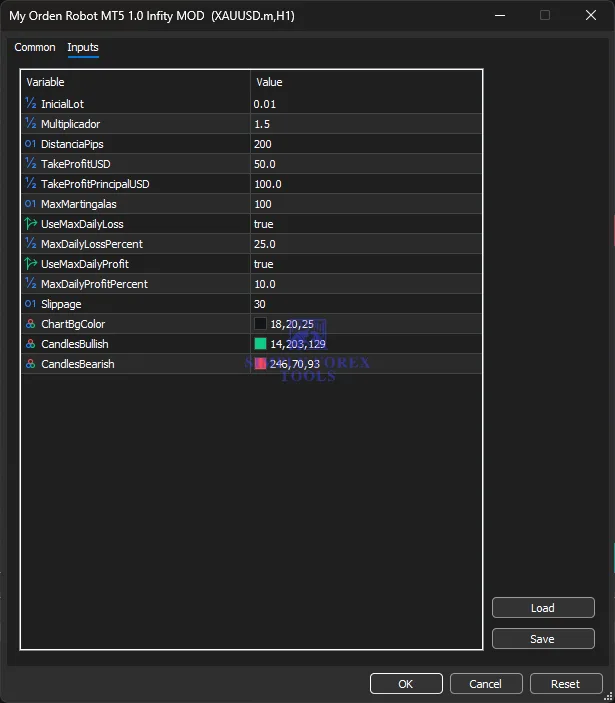
The My Orden Robot MT5 setting panel is refreshingly straightforward. Unlike some EAs that overwhelm you with dozens of tabs and cryptic parameters, this one keeps things organized and accessible. You’ll find controls for lot sizing, trade distances, profit targets, daily risk limits, and visual customization all in one place. The panel includes a multiplier for position scaling, a distance parameter that controls entry spacing, and separate take profit targets for individual trades versus the overall basket. There’s also a daily loss and profit protection system that automatically pauses trading when predefined thresholds are hit. For traders who value transparency and control, this setup hits a nice balance between flexibility and simplicity.
Core Strategy Settings Of My Orden Robot MT5
This is where the EA’s trading behavior gets defined. The core settings determine how the robot enters trades, scales positions, and manages its overall exposure. During my testing, I found these parameters to be the most impactful on overall performance, so getting them right for your account size and risk tolerance is crucial.
The initial lot setting controls the base position size, while the multiplier determines how subsequent entries scale. The distance parameter defines the pip gap between additional positions, which directly affects how the EA builds its basket of trades. These three work together to create the EA’s entry and scaling pattern.
• % InicialLot → 0.01 (initial position size in lots)
• % Multiplicador → 1.5 (multiplier for scaling subsequent positions)
• O1 DistanciaPips → 200 (pip distance between additional entries)
• O1 MaxMartingalas → 100 (maximum number of scaling steps allowed)
The initial lot of 0.01 is conservative and works well for smaller accounts. The 1.5 multiplier means each new position is 50% larger than the previous one – a moderate scaling approach that isn’t as aggressive as doubling but still provides meaningful position growth. The 200-pip distance gives the EA room to breathe and avoids clustering entries too tightly. And while the maximum martingalas setting is set to 100, in practice the daily loss limit will likely pause trading long before that number is reached.
Take Profit / Exit Management Settings
Exit management is arguably more important than entry logic, and My Orden Robot MT5 handles this with a two-tier profit system. There’s a target for individual trades and a separate, higher target for the entire basket of positions. This dual approach allows the EA to secure profits on individual entries while still working toward a larger overall gain.
During my demo testing, I watched the EA close individual positions as they hit their targets while keeping others open to chase the basket profit. When the basket target was reached, the robot closed all related positions simultaneously – a clean and efficient way to lock in gains.
• % TakeProfitUSD → 50.0 (take profit in USD for individual trades)
• % TakeProfitPrincipalUSD → 100.0 (take profit in USD for the entire basket)
The $50 individual take profit provides regular profit realization along the way, which helps smooth out the equity curve. The $100 basket target encourages the EA to hold positions longer when the trend is in its favor, potentially capturing larger moves. Just keep in mind these are fixed USD amounts, so they’ll need to be adjusted based on your account size.
Daily Risk Control Settings
This category might be the most valuable part of the entire setup. The daily loss and profit limits act as circuit breakers that automatically pause trading when things get too hot – in either direction. It’s like having a disciplined risk manager watching your account 24/7.
When the daily loss limit is triggered, the EA stops opening new trades for the rest of the day. No manual intervention required. The same applies to the daily profit target – once reached, the EA takes the rest of the day off. This built-in discipline is something many manual traders struggle with, and having it automated is a genuine advantage.
• % UseMaxDailyLoss → true (enables daily loss protection)
• % MaxDailyLossPercent → 25.0 (maximum daily loss as percentage of account)
• % UseMaxDailyProfit → true (enables daily profit protection)
• % MaxDailyProfitPercent → 10.0 (maximum daily profit as percentage of account)
The 25% daily loss limit is relatively generous – it gives the EA room to handle losing streaks without prematurely stopping. But it’s also a hard stop that prevents catastrophic drawdowns. The 10% daily profit target is more conservative, encouraging the EA to lock in gains and avoid giving back profits later in the day. These percentages should be adjusted based on your personal risk tolerance.
Execution & Slippage Settings
Slippage is a fact of life in forex trading, especially during volatile gold sessions. This setting controls how much price movement the EA will tolerate when executing orders. A higher slippage tolerance means trades are more likely to get filled, but potentially at a worse price. A lower tolerance means better pricing but more rejected orders.
• O1 Slippage → 30 (maximum slippage allowed in points/pips)
The default 30-pip slippage tolerance is reasonable for gold trading. XAUUSD can move quickly, and 30 pips provides enough flexibility for orders to get filled without being excessively generous. If you’re trading with a broker that offers tight spreads and fast execution, you might be able to lower this number.
Visual Customization Settings
These settings don’t affect trading performance, but they do make the chart easier to read. The color scheme can be adjusted to match your personal preferences or improve visibility against different chart backgrounds.
• & ChartBgColor → 18,20,25 (RGB values for chart background)
• & CandlesBullish → 14,203,129 (RGB values for bullish candles)
• & CandlesBearish → 246,70,93 (RGB values for bearish candles)
The dark background with green bullish and red bearish candles is a clean, professional look that’s easy on the eyes during long trading sessions.
Recommended Timeframe & Currency Pair Settings
Based on my testing and the developer’s recommendations, this EA is optimized for a specific setup. Straying too far from these recommendations could lead to suboptimal performance.
• Platform → MetaTrader 5
• Time Frame → M5 (5-minute chart)
• Recommended Pair → XAUUSD (gold against US dollar)
• Minimum Deposit → $200 (cents account recommended)
• Recommended Deposit → $300
• Leverage → 1:50 or higher
The M5 timeframe provides a good balance between trade frequency and analytical reliability. The EA is specifically designed for gold, so while it might technically work on other pairs, XAUUSD is where it’s been tested and optimized. The $200–$300 minimum deposit makes this accessible to traders with smaller capital, though a cents account is recommended to manage position sizes effectively.
Account & Broker Considerations
Not all brokers are created equal when it comes to automated gold trading. The EA performed well on VantageInternational during my testing, and the developers also recommend Exness and ICMarkets. These brokers typically offer tight spreads on XAUUSD and reliable MT5 execution.
• Account Type → Any compatible MT5 account (standard, cent, or ECN)
• Recommended Brokers → Exness, ICMarkets, VantageInternational
• Product Type → NoDLL (no external DLL dependencies)
The NoDLL designation is worth highlighting – it means the EA doesn’t require external library files, which simplifies installation and reduces potential security concerns.
VPS & Execution Settings
Automated trading requires uninterrupted connectivity. Running My Orden Robot MT5 on a local computer with unreliable internet is a recipe for missed trades and execution delays. A Virtual Private Server (VPS) ensures the EA stays online and operational around the clock.
• VPS Recommended → Yes, for 24/7 uninterrupted operation
• Minimum VPS Specs → Basic VPS with stable internet connection
• Execution Requirement → Continuous connectivity for automated trading
Even a basic VPS setup will provide smoother execution compared to running locally. The cost of a VPS is modest compared to the potential losses from missed trades or connectivity issues.
Practical Summary
So who is My Orden Robot MT5 actually for? Based on my experience, this EA suits traders who want a structured, moderately aggressive approach to gold trading. The strategy isn’t reckless – the daily loss limits provide a safety net, and the basket profit management encourages disciplined exits. But the scaling logic does mean drawdowns can accumulate during losing streaks, so it’s not for the faint-hearted.
The EA performs best in trending gold markets where price moves in a clear direction. In choppy or sideways conditions, the scaling logic might lead to more frequent entries without clear follow-through. That’s why the daily loss limit is so important – it prevents the EA from digging too deep into a losing position during unfavorable conditions.
Before running this with real money, spend time in demo testing. Understand how the EA responds to different market conditions, and adjust the settings – particularly the daily loss percentage and take profit targets – to match your account size and risk tolerance. No EA is a set-it-and-forget-it solution, and My Orden Robot MT5 is no exception. But with proper configuration and realistic expectations, it offers a practical way to automate gold trading.
Frequently Asked Questions (My Orden Robot MT5 FAQ)
1. What’s the best currency pair for My Orden Robot MT5?
XAUUSD (gold against the US dollar) is the recommended and optimized pair. The EA’s logic is specifically designed around gold’s price behavior, so sticking with XAUUSD gives you the best chance of consistent performance.
2. Which timeframe should I use?
The M5 (5-minute) timeframe is the recommended setting. This balances trade frequency with sufficient price action analysis. Other timeframes haven’t been tested and may not produce optimal results.
3. Do I need a VPS to run this EA?
Yes, a VPS is strongly recommended. Automated trading requires continuous connectivity, and running the EA on a VPS ensures it stays operational 24/7 without interruptions from internet outages or computer restarts.
4. Does this EA use martingale or grid strategies?
The EA uses a recovery-based approach with structured position scaling and basket profit management. While it does scale positions, it’s not a pure martingale system – the daily loss limits and profit targets provide important safety mechanisms that pure martingale EAs typically lack.
5. Is this My Orden Robot MT5 suitable for beginners?
Yes, but with a caveat. The setting panel is straightforward and easy to understand, making it accessible for beginners. However, I’d recommend starting with a demo account to understand how the EA behaves in different market conditions before committing real funds.
6. What’s the minimum account size needed?
The recommended minimum deposit is $200 for a cents account, with $300 recommended for standard accounts. A cents account allows traders with smaller capital to participate effectively with appropriate position sizing.
7. What leverage should I use?
Leverage of 1:50 or higher is recommended. This provides enough margin flexibility for the EA’s position scaling while keeping risk manageable for most account sizes.
8. Which brokers work best with this EA?
The EA performed well on VantageInternational during testing. Developers also recommend Exness and ICMarkets. Look for brokers that offer tight spreads on XAUUSD and reliable MT5 execution

Forex Fury MT5 Settings Review & Analysis 2026
Gold Trend X MT5 Settings Review & Analysis 2026
Quantum OmniGold MT5 Settings Review & Analysis 2026
Precise Pair Trading Pro MT5 Settings Review 2026
G101 EA Scalper MT5 Settings Review & Analysis 2026
Gold Zilla AI MT4 EA Settings Review & Analysis 2026
