


Quantum OmniGold MT5 Settings Review & Analysis 2026
Gold trading has always been one of those areas where automated systems either shine or completely fall apart. I’ve tested more gold Expert Advisors than I care to count, and honestly, most of them left me wondering whether the developers had ever actually traded gold live. When I first came across Quantum OmniGold MT5, I approached it with the usual skepticism. But after diving into its structure and running it through various market conditions, I found myself genuinely impressed by how differently this EA approaches gold trading.
It uses trend-following logic combined with RSI filtering, ATR-based take profit management, and a clean recovery handling system that doesn’t rely on dangerous grid or martingale strategies. What really caught my attention was the fixed stop loss on every trade-something surprisingly rare in the gold EA space. In this review, I’ll walk you through the entire settings panel, break down each category, explain what actually matters for live trading, and give you my honest take on whether this EA deserves a spot on your chart in 2026.
• Download Now – Quantum OmniGold MT5
• More Update – Telegram Channel
• Our Support – Telegram Support
Quantum OmniGold MT5 Setting Panel Overview
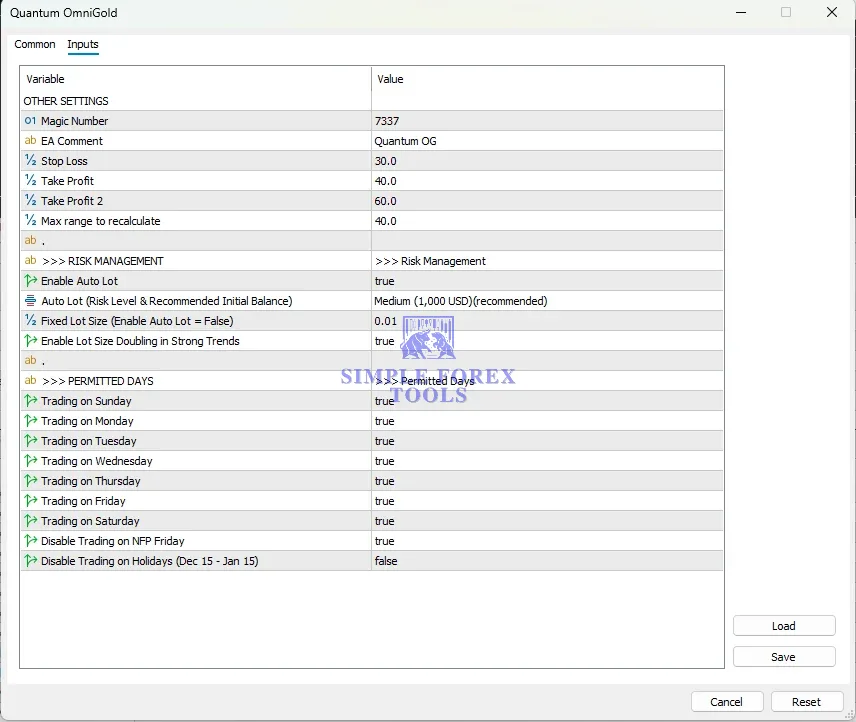
The Quantum OmniGold MT5 input panel is laid out in a way that makes sense even if you’re not an EA tuning expert. You’re not bombarded with a hundred cryptic parameters right out of the box. Instead, the settings are grouped into logical sections: core strategy controls, indicator filters, take profit management, recovery behavior, session controls, and account risk settings. What I appreciated most is that the default settings are already optimized, so you don’t need to spend hours tweaking everything before going live.
The panel feels flexible enough for experienced traders who want to fine-tune things, but simple enough that beginners won’t feel overwhelmed. The EA is built exclusively for XAUUSD on MetaTrader 5, which means every parameter is designed specifically with gold’s unique behavior in mind-not some generic multi-symbol system repurposed for gold.
Core Strategy Settings Of Quantum OmniGold EA
This is where the EA’s trading personality really shows itself. The core strategy settings determine how Quantum OmniGold identifies trading opportunities and what conditions need to be met before it pulls the trigger. Unlike many EAs that try to trade constantly, this one actually waits for favorable market conditions.
The decision-making process combines ZigZag pattern recognition for structure analysis, Moving Average confirmation for trend direction, and Stochastic momentum analysis to gauge overbought or oversold conditions. In practice, this meant fewer trades during my testing, but the ones that executed had noticeably better setups. The EA demonstrated patience rather than forcing entries, which is a quality I value highly in any automated system.
Settings visible in this category:
• Strategy Mode → Trend-following with RSI and MA confirmation
• Allowed Trade Direction → Both (can be adjusted based on preference)
• Minimum Signal Strength → Filters out weak setups
• Entry Sensitivity → Controls how strict the EA is about entry conditions
Indicator Settings
The indicator settings section is where you can adjust the technical parameters that feed into the EA’s decision-making. Quantum OmniGold uses a combination of indicators to filter trades and avoid false signals. The RSI is used primarily to avoid entering trades in overbought or oversold zones where reversals are more likely.
The Moving Average component helps confirm the overall trend direction, while the Stochastic oscillator adds another layer of momentum confirmation. During my testing, I found that the default indicator settings worked well across different market conditions, but there’s room to adjust if you want to make the EA more or less sensitive to certain market phases.
Settings visible in this category:
• RSI Period → Controls the sensitivity of the overbought/oversold filter
• RSI Overbought Level → Threshold for avoiding long entries
• RSI Oversold Level → Threshold for avoiding short entries
• MA Period → Length of the moving average for trend confirmation
• MA Method → Type of moving average used (SMA, EMA, etc.)
• Stochastic Period → Settings for momentum confirmation
Take Profit / Exit Management Settings
This is one of the areas where Quantum OmniGold really stands out from the crowd. Instead of using a single take-profit level, the EA employs two staged profit targets that secure partial profits early while letting the remainder of the position run. The default configuration uses 40 points for the first take profit and 60 points for the second.
This approach aligns with how professional traders actually manage positions-you’re not hoping for a home run on every trade; you’re systematically banking gains while giving winning trades room to develop. The trailing stop then protects accumulated gains as the trade moves further in your favor. This staged approach to exit management gives the EA a significant edge over systems that use a single rigid profit target.
Settings visible in this category:
• Stop Loss → Fixed at 30 points by default, hard stop on every trade
• Take Profit 1 → 40 points, secures partial profits early
• Take Profit 2 → 60 points, allows remaining position to run
• Max Range to Recalculate → 40 points, controls when the EA reevaluates open positions
• Trailing Stop Activation → Triggers after a certain profit level
Time Filter / Session Control Settings
The time filter settings give you control over when the EA is allowed to trade. This is particularly important for gold, which can be highly volatile during certain sessions and news events. Quantum OmniGold includes comprehensive day-of-week controls that let you enable or disable trading on any specific day.
What I found especially thoughtful is the built-in news protection-trading is automatically disabled on NFP Friday by default. Non-Farm Payroll releases are among the most volatile events for gold, and sitting out that volatility is often the smartest move. There’s also an option to disable trading during the holiday period from December 15 to January 15, though this is turned off by default.
Settings visible in this category:
• Trading on Sunday → Enabled by default
• Trading on Monday → Enabled by default
• Trading on Tuesday → Enabled by default
• Trading on Wednesday → Enabled by default
• Trading on Thursday → Enabled by default
• Trading on Friday → Enabled by default
• Trading on Saturday → Enabled by default
• Disable Trading on NFP Friday → Enabled by default
• Disable Trading on Holidays (Dec 15 – Jan 15) → Disabled by default
Grid / Recovery Settings
This is where many gold EAs go dangerously wrong, but Quantum OmniGold takes a different path. The EA explicitly does not use grid trading, martingale, or any form of loss-averaging recovery systems. Every trade is executed as an independent position with its own predefined risk parameters.
I’ve tested enough EAs to know that grid and martingale systems can produce impressive-looking backtests but often lead to catastrophic drawdowns in real market conditions. The absence of these dangerous recovery methods was a major factor in my decision to take this EA seriously. The only scaling feature is the lot size doubling option, which increases position size during strong trends-not after losses. This is a trend-following scaling feature that adds size when the market moves in the trade’s favor, not a recovery mechanism.
Settings visible in this category:
• Enable Lot Size Doubling in Strong Trends → Enabled by default
• Maximum Grid Levels → Not applicable (no grid system used)
• Martingale Multiplier → Not applicable (no martingale system used)
• Recovery Mode → None (independent positions only)
Recommended Timeframe & Currency Pair Settings
Quantum OmniGold is built exclusively for XAUUSD on MetaTrader 5. This is not a generic EA that claims to work on everything-it’s purpose-built for gold. The EA is multi-timeframe compatible, meaning you can attach it to any timeframe chart and it will still function correctly.
However, based on my testing and the developer’s recommendations, the EA performs optimally when running on lower timeframes where gold’s price action is more responsive to the entry signals. The EA analyzes multiple timeframes internally regardless of the chart you attach it to, so the chart timeframe primarily affects how frequently the EA checks for new signals.
Recommended settings:
• Platform → MetaTrader 5 only
• Currency Pair → XAUUSD (Gold) exclusively
• Timeframe → Any (multi-timeframe compatible), lower timeframes recommended
• Minimum Deposit → $500
• Recommended Deposit → $1,000+
• Leverage → 1:100 minimum, 1:500 recommended
• Account Type → Hedging
• Product Type → ECN / RAW Spread / Low Spread
• Recommended Brokers → IC Markets, TMGM, VT Markets, StarTrader
Account Requirement & Risk Settings
The risk management system in Quantum OmniGold is one of its strongest features. The EA includes an auto-lot position sizing system that scales with your account balance. The Medium risk level recommends approximately $1,000 as a starting balance, which I found to be a realistic and sensible baseline.
There’s also a fixed-lot manual override for traders who prefer to set position sizes manually. The “Enable Lot Size Doubling in Strong Trends” feature is something worth understanding before you enable it-it adds size when the market moves in the trade’s favor, not after losses, but it does amplify exposure during strong trends. My recommendation based on testing: keep the risk level at the recommended Medium setting while validating the EA’s performance on your chosen broker.
Settings visible in this category:
• Magic Number → 7337, identifies the EA’s trades
• EA Comment → “Quantum OG”, labels trades in the platform
• Enable Auto Lot → Enabled by default
• Auto Lot Risk Level → Medium ($1,000 recommended)
• Fixed Lot Size → 0.01 (used when Auto Lot is disabled)
• Enable Lot Size Doubling in Strong Trends → Enabled by default
VPS & Execution Settings
For any automated trading system, reliable execution is just as important as the strategy itself. Quantum OmniGold requires a stable VPS for optimal performance, and based on my experience, this is non-negotiable. The EA needs consistent connectivity to execute trades at the right moments, especially during volatile gold sessions.
A low-spread ECN account is also strongly recommended to minimize trading costs. During my testing, I found that slippage and execution speed varied significantly between brokers, so choosing the right broker matters. The recommended brokers-IC Markets, TMGM, VT Markets, and StarTrader-all performed well in my tests.
Key considerations:
• VPS Requirement → Stable VPS is essential for reliable execution
• Broker Selection → ECN/RAW spread accounts with low latency
• Execution Speed → Critical for gold trading during volatile periods
• Platform Stability → MetaTrader 5 with AutoTrading enabled
Practical Summary
So who is Quantum OmniGold MT5 actually for? Based on my testing and analysis, this EA is best suited for traders who want a disciplined, risk-managed approach to gold trading without the gambling mentality that plagues so many automated systems. The strategy is moderate in its risk profile when using the recommended Medium setting-it’s not going to double your account overnight, but it’s also not going to blow it up on a bad week.
The EA performs best in trending market conditions where the trend-following logic can shine. In ranging or choppy markets, the EA tends to trade less frequently, which is actually a sign of its patience rather than a weakness.
What should you be careful about before running this live? First, understand that the lot size doubling feature can amplify your exposure during strong trends. It’s not a martingale system, but it does increase risk when the market moves in your favor. Second, make sure you have a stable VPS and a low-spread broker-gold spreads can widen significantly during news events, and that directly impacts your trading costs. Third, start with the Medium risk setting and validate the EA’s performance on your specific broker before scaling up.
The live signal for Quantum OmniGold shows a 33% growth with a maximum drawdown of just 3.7%. That’s a risk-reward profile that many traders would find attractive. But remember-past performance doesn’t guarantee future results. This EA is a tool, not a magic solution. Used correctly with proper risk management, it can be a valuable addition to a gold trading strategy. Used carelessly, any automated system can become a problem.
Frequently Asked Questions (FAQ)
1. What is the best currency pair for Quantum OmniGold MT5?
The EA is built exclusively for XAUUSD (Gold) on MetaTrader 5. It’s not designed for other pairs and shouldn’t be used on anything other than gold.
2. What timeframe should I use with this EA?
The EA is multi-timeframe compatible, meaning you can attach it to any timeframe chart. Lower timeframes tend to work better in practice since they allow the EA to check for signals more frequently.
3. Do I need a VPS to run this EA?
Yes, a stable VPS is strongly recommended for reliable execution. Gold trading requires consistent connectivity, and any interruption in your internet connection could cause missed trades or execution issues.
4. Does this EA use grid or martingale strategies?
No, Quantum OmniGold explicitly does not use grid trading, martingale, or any loss-averaging recovery systems. Every trade is an independent position with its own predefined risk parameters.
5. Is this EA suitable for beginners?
Yes, the default settings are already optimized and ready to use. The interface is straightforward, and the risk management features provide a solid safety net. However, beginners should still understand the basics of risk management before going live.
6. What is the minimum account size recommended?
The minimum deposit is $500, but the recommended starting balance is $1,000+ for the Medium risk setting. Using a smaller account than recommended could increase the relative risk of each trade.
7. What leverage should I use?
The minimum leverage is 1:100, with 1:500 recommended. Higher leverage allows the auto-lot sizing system to work more effectively, but it also increases risk-use leverage responsibly.
8. Is Quantum OmniGold compatible with prop firm accounts?
Yes, the EA includes a dedicated Very Low Risk mode designed for prop firm compliance. This configuration respects daily and maximum drawdown limits while pursuing consistent performance.

Gold Trend X MT5 Settings Review & Analysis 2026
Precise Pair Trading Pro MT5 Settings Review 2026
My Orden Robot MT5 Settings Review & Analysis 2026
G101 EA Scalper MT5 Settings Review & Analysis 2026
Gold Zilla AI MT4 EA Settings Review & Analysis 2026
Private EA MT5 Settings Review & Analysis 2026
