


Forex Fury MT5 Settings Review & Analysis 2026
If you’ve spent any time looking for a reliable Expert Advisor for MetaTrader 5, chances are you’ve come across Forex Fury. This EA has been around since 2015 and has built a reputation for its range-based trading approach during low-volatility market sessions. The strategy is relatively straightforward: it looks for calmer periods, typically about an hour a day, and tries to capture smaller moves within a defined range. What makes this particular setup interesting for 2026 is its application to gold trading (XAUUSD) on the M5 timeframe-a pairing that demands careful parameter tuning given gold’s unique volatility profile. In this review, I’ll walk through the entire Forex Fury MT5 setting panel, break down what each category actually does, and explain how these settings affect real trading behavior. Whether you’re a beginner trying to understand what all those numbers mean or an intermediate trader looking to optimize your configuration, this guide should give you a clearer picture of what you’re working with.
• Download Now – Forex Fury MT5
• More Update – Telegram Channel
• Our Support – Telegram Support
Setting Panel
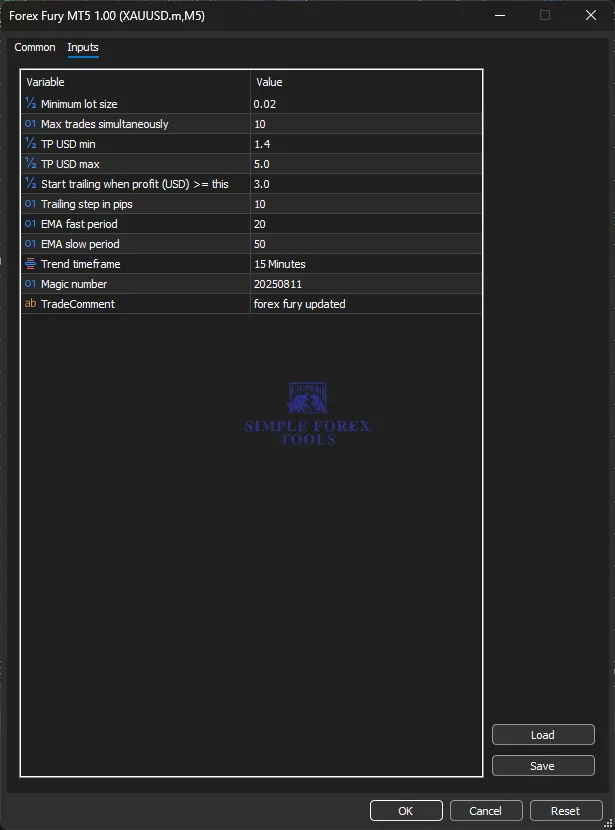
The Forex Fury MT5 setting panel is refreshingly compact compared to some EAs that overwhelm you with dozens of parameters. What you see in the Inputs tab is a clean list of variables covering strategy controls, indicator filters, take profit management, trailing stop behavior, and some basic account-related settings. There’s no complicated multi-tab configuration or hidden menus-everything you need is right there. The EA is designed to be attached to a single chart (XAUUSD,M5 in this case), and once you’ve set your parameters, it handles the rest automatically. That simplicity is one of the reasons Forex Fury keeps attracting beginners, though as we’ll see, there’s still plenty of room to customize based on your risk tolerance and trading style.
Core Strategy Settings
This is where the EA’s fundamental trading behavior is defined. The core settings control how many trades the EA can open at once, the minimum position size, and how it identifies trading opportunities. The “Max trades simultaneously” parameter is particularly important because it caps your market exposure-set this too high and you might find yourself overexposed during volatile moves; set it too low and you might miss opportunities. The minimum lot size setting determines the smallest position the EA can open, which directly impacts your risk per trade. These settings work together with the indicator filters to determine when and how the EA enters the market.
• % Minimum lot size → 0.02
• O1 Max trades simultaneously → 10
• O1 Magic number → 20250811
• ab TradeComment → forex fury updated
Indicator Settings
Forex Fury relies on a combination of exponential moving averages (EMAs) to filter its trading signals. The fast and slow EMA periods are classic trend-following tools-when the fast EMA crosses above the slow EMA, it suggests upward momentum; when it crosses below, downward momentum. The EA uses these to confirm entries rather than trading blindly. The “Trend timeframe” setting tells the EA which higher timeframe to use for trend analysis, which is a smart way to avoid trading against the larger market direction. For gold trading on M5, looking at the M15 trend context helps filter out noise and reduces the chance of getting caught in counter-trend moves.
• O1 EMA fast period → 20
• O1 EMA slow period → 50
• Trend timeframe → 15 Minutes
Take Profit / Exit Management Settings
This category controls how the EA manages exits, and it’s arguably the most important part of the setup for protecting your account. The TP USD min and max settings create a take-profit range-the EA won’t take a profit below the minimum or above the maximum, which helps standardize returns. The trailing stop feature is where things get interesting: once a trade reaches a certain profit level (Start trailing when profit USD >= 3.0), the EA activates a trailing stop that follows the price as it moves in your favor. The trailing step in pips determines how frequently the stop adjusts. This is a crucial risk management tool because it locks in profits while giving the trade room to breathe.
• % TP USD min → 1.4
• % TP USD max → 5.0
• % Start trailing when profit (USD) >= this → 3.0
• O1 Trailing step in pips → 10
Time Filter / Session Control Settings
While the visible settings panel for this particular configuration doesn’t show explicit session start/end times, it’s worth understanding that Forex Fury is fundamentally designed to trade during specific low-volatility windows-typically around the end of the US session (roughly 4-5 PM EST). The EA’s strategy relies on calmer market conditions where price movements are more confined. For gold trading, this timing consideration is especially relevant because XAUUSD can be highly volatile during major news releases and overlapping session hours. The M5 timeframe combined with the M15 trend filter helps the EA stay aligned with this session-based philosophy.
Grid / Recovery Settings
This is where things can get a bit controversial with Forex Fury. The EA employs what some describe as a martingale-style recovery mechanism-when a trade goes against you, the system may increase position sizes on subsequent entries to try and recover losses. While this approach can work well in ranging markets where price tends to revert to the mean, it can also lead to significant drawdowns if the market trends strongly in one direction. The “Max trades simultaneously” setting (set to 10 here) acts as a circuit breaker of sorts, limiting how many recovery positions the EA can open. Some independent tests have reported max drawdowns around 29% even with conservative settings, so this is definitely something to be aware of.
Recommended Timeframe & Currency Pair Settings
Based on the configuration we’re looking at, the EA is attached to XAUUSD on the M5 timeframe with the trend analysis set to M15. This is a specific choice-gold behaves differently from major currency pairs, and the M5/M15 combination allows the EA to capture shorter-term moves while keeping an eye on the broader trend. The developers generally recommend running one currency pair per account to minimize correlation risk and keep performance tracking clear. For traders who want to trade multiple pairs, the recommendation is to use separate accounts rather than attaching the EA to multiple charts on the same account.
Account Requirement & Risk Settings
The minimum lot size of 0.02 suggests this EA is designed to work with smaller accounts, though the actual minimum account size depends on your broker’s margin requirements and your risk tolerance. Some sources suggest you can start with as little as $100, though a more realistic starting point for gold trading would be higher given gold’s per-pip value and the EA’s potential for multiple simultaneous positions. The TP USD range of 1.4 to 5.0 means the EA is targeting relatively small dollar profits per trade, which aligns with its scalping/range-trading philosophy. This isn’t a system that aims for home runs-it’s built for singles and doubles.
VPS & Execution Settings
While not explicitly shown in the settings panel, VPS considerations are critical for any EA, and Forex Fury is no exception. The EA needs to run continuously to catch its specific trading window, and any interruption in execution could mean missed trades or partial fills. A reliable VPS with low latency to your broker’s servers is strongly recommended-especially for gold trading, where spreads can widen unexpectedly during low-liquidity periods. The EA is compatible with any VPS that supports MT4 or MT5, and the developers recommend using a VPS to ensure 24/5 uptime.
Practical Summary
So who is this EA actually for? Based on the settings and the strategy behind them, Forex Fury MT5 in this configuration is best suited for traders who prefer a moderate-to-conservative approach and are comfortable with the idea of smaller, more frequent gains rather than waiting for big moves. The range-trading logic works best in markets that are consolidating or moving sideways-if gold enters a strong trending phase, the EA’s recovery mechanism could get tested.
That said, there are some important caveats. Independent reviews have pointed out that while the EA has a high claimed win rate (around 93%), the risk-reward ratio isn’t always favorable-some tests showed a 29% max drawdown for only an 18% return over nine months. The martingale-style recovery adds another layer of risk that traders need to understand before going live.
My advice? Start with a demo account, use the default settings first, and watch how the EA performs across different market conditions. Pay close attention to how it handles losing streaks and whether the drawdown stays within your comfort zone. Only when you’re confident in the behavior should you consider moving to a live account-and even then, start with the minimum lot size and conservative settings.
Frequently Asked Questions (FAQ)
Q1: What’s the best currency pair for Forex Fury MT5?
The EA works on multiple pairs including EURUSD, GBPUSD, USDJPY, AUDUSD, and USDCAD. However, the developers recommend running one currency pair per account to maintain clear performance tracking. For gold (XAUUSD), the M5 configuration we analyzed is specifically optimized for that instrument.
Q2: What timeframe should I use?
The recommended timeframe is M15 for optimal signal clarity, though M5 works for more active trading styles. In the configuration we reviewed, the EA is attached to XAUUSD on M5 with trend analysis set to M15.
Q3: Do I need a VPS to run Forex Fury?
Yes, strongly recommended. The EA needs to run continuously to catch its specific trading window, and a VPS ensures 24/5 uptime and reliable execution.
Q4: Is Forex Fury using a martingale strategy?
The EA does employ a form of recovery trading that increases position sizes on subsequent entries after losses. This can be effective in ranging markets but carries significant risk during strong trends.
Q5: Is this EA suitable for beginners?
Yes, the setup is relatively straightforward compared to many other EAs, and the interface is beginner-friendly. However, beginners should absolutely start on a demo account to understand the EA’s behavior before risking real money.
Q6: What account size do I need?
The minimum lot size is 0.02, which suggests smaller accounts can work, though a more realistic starting point would be higher-especially for gold trading where per-pip values are larger. Always check with your broker about margin requirements.
Q7: What leverage should I use?
There’s no one-size-fits-all answer, but lower leverage (like 1:100 or 1:200) is generally safer when running an EA with recovery logic. Higher leverage amplifies both gains and losses, and with the EA’s potential for multiple simultaneous positions, caution is warranted.
Q8: Does Forex Fury work with all brokers?
The EA is compatible with any MT4 or MT5 broker. However, execution quality, spreads, and slippage vary between brokers, which can affect the EA’s performance-especially for scalping-style trades

Gold Trend X MT5 Settings Review & Analysis 2026
Quantum OmniGold MT5 Settings Review & Analysis 2026
Precise Pair Trading Pro MT5 Settings Review 2026
My Orden Robot MT5 Settings Review & Analysis 2026
G101 EA Scalper MT5 Settings Review & Analysis 2026
Gold Zilla AI MT4 EA Settings Review & Analysis 2026
