


GoldSniperBot5 MT5 Settings Review 2026: Safe & Practical Setup Guide
The GoldSniperBot5 MT5 has become a staple for XAUUSD traders in 2026. While the product page highlights low drawdown and consistent gains, the true performance of this robot depends entirely on how you configure the internal setting file. This review breaks down the logic behind the inputs to help you find a balanced risk profile.
➡️ Download Now: Available on the Download
➡️ Telegram Support: Join for updates, announcements, and support
📩 Free Support & Setup Help – Contact us 👉 Telegram Support
Quick Settings Summary Table
Before we dive into the technical details, here is a quick overview of what the GoldSniperBot5 MT5 setting panel offers in terms of risk and control.
| Setting Feature | Function | Risk Level |
|---|---|---|
| Lot Scaling | Fixed or Auto-Lot | Balanced |
| Grid Multiplier | Recovery trades | Aggressive |
| News Filter | Avoids high volatility | Conservative |
| Equity Stop | Capital protection | Safe |
Trader Note: This summary is based on the default .set file provided with the tool. Individual results will vary based on your broker’s spread and execution speed.
Setting Panel Overview
The GoldSniperBot5 MT5 Settings Review shows a clean, MT5-optimized interface. The settings are categorized into logical blocks: Money Management, Signal Logic, and Safety. This structure allows traders to isolate risk settings from entry signals, which is vital for managing Gold’s volatility.
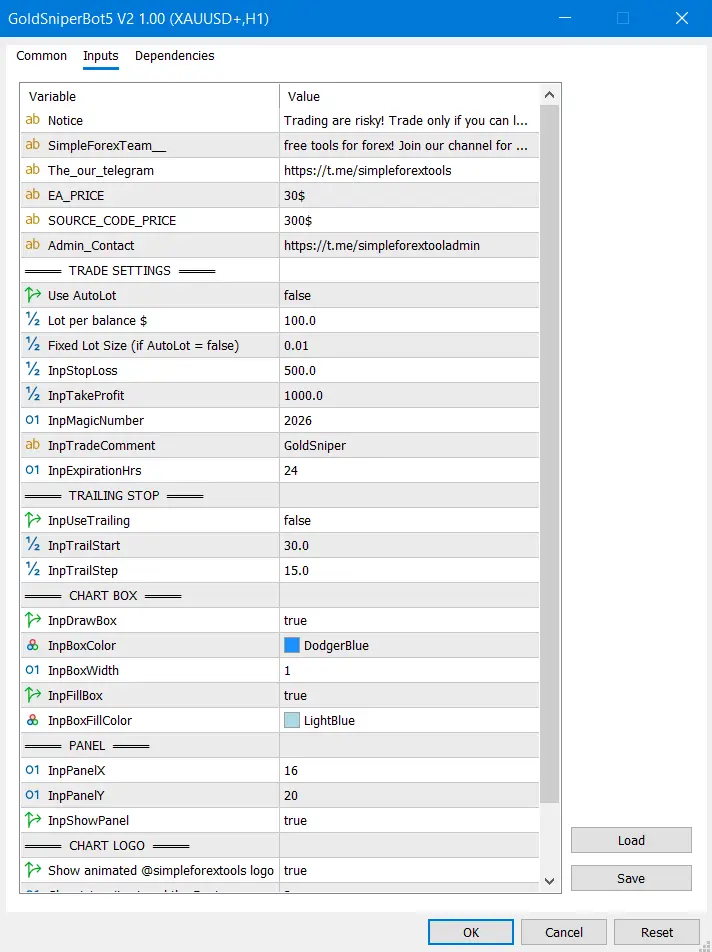
The image above displays the primary input window where users can toggle between conservative and aggressive modes. Note the specific filters for spread and news, which are critical for MT5 users.
>== GoldSniperBot5 MT5 Download ==<
Lot & Money Management Settings Review
The money management section is the most critical part of this setting file. It dictates how much of your balance is at risk during every trade sequence. Beginners should pay close attention to the lot scaling parameters here.
• Lots (Fixed) – Starts every sequence with a static value (e.g., 0.01).
• Money Management (True/False) – Enables automatic lot calculation based on balance.
• Risk Percent – Determines how much equity to use if Auto-Lot is enabled.
Trader Note: For anyone using our Forex EA MT5 tools, we recommend starting with Fixed Lots. Gold (XAUUSD) can move 2,000 pips in hours; auto-compounding can lead to over-leverage during these spikes.
Entry Logic Settings Review
This section controls the “Trigger” for the EA. The GoldSniperBot5 MT5 uses a proprietary trend-following algorithm to find entries that have a high probability of immediate momentum.
• Signal Sensitivity – Adjusts how strictly the EA follows technical indicators.
• Max Trades per Bar – Prevents the EA from opening multiple trades on the same price candle.
• Timeframe – Usually optimized for the 5-minute or 15-minute charts for XAUUSD.
Trader Note: If the signal sensitivity is too high, the EA will trade less frequently but with higher accuracy. If you are looking for a high-action setup, lowering this value is key, but it increases the chance of “fake-out” entries.
Exit & Profit Management Settings Review
Exit settings are designed to get the EA out of the market as quickly as possible once the profit target is met. This reduces the time your account is exposed to market reversals.
• Take Profit – The primary target for each individual trade.
• Basket Profit (USD) – A powerful feature that closes all trades once the total profit reaches a dollar amount.
• Trailing Start/Step – Protects accrued profits by moving the stop loss dynamically.
Trader Note: Using Basket Profit is the most efficient way to manage a grid. It allows the EA to exit a series of trades even if the earliest trades are still in drawdown, provided the net total is positive.
Grid / Recovery / Martingale Settings Review
The recovery logic is what allows GoldSniperBot5 MT5 to remain profitable even when the initial entry is wrong. However, this is also the highest risk area in the GoldSniperBot5 MT5 Settings Review.
• Lot Multiplier – The factor by which the next lot is increased (e.g., 1.5).
• Grid Distance – The minimum pip gap between recovery trades.
• Max Orders – Caps the total number of trades the EA can open in one direction.
Trader Note: Keeping the Lot Multiplier below 1.6 is advisable for most retail accounts. Anything higher is considered aggressive and requires a very large balance to sustain a trending market.
Safety Filter Settings Review
The safety filters are the “bouncers” of your trading account. They keep the EA from trading when conditions are unfavorable or dangerous.
• News Filter – Uses an economic calendar to pause trading during high-impact events.
• Max Spread Filter – Stops the EA from entering trades when the broker’s spread is too high.
• Equity Stop (%) – Hard-closes all trades if your account drawdown hits a specific percentage.
Trader Note: Set your Equity Stop to a level you are comfortable losing in a “worst-case” scenario. This prevents a total account wipeout during unprecedented market events.
Safer-Looking Settings
If you want a “Low Drawdown” experience as claimed on the product page, focus on these specific values within your setting file:
• Fixed Lot: 0.01 per $1,000 balance.
• Grid Distance: 400+ pips for Gold.
• News Filter: Enabled with a 60-minute pause before/after events.
• Max Orders: Limited to 5 or 7 trades.
Risk-Sensitive Settings
These settings are for “Aggressive” growth but can lead to rapid losses if the market trends without a significant retracement:
• Auto-Lot: Risking more than 2% per trade sequence.
• Lot Multiplier: 2.0 or higher (Martingale style).
• Grid Distance: Less than 200 pips on XAUUSD.
• Disabled News Filter: Trading during NFP or CPI releases.
Common Mistakes Traders Make With These Settings
Even with a great tool like GoldSniperBot5 MT5, human error can lead to poor results. Avoid these common pitfalls when configuring your settings.
• Underfunding the Account: Trying to run a grid-based EA with only $100.
• Ignoring the Spread: Running the EA on a broker with high spreads during the New York close.
• Manual Intervention: Closing trades early and breaking the EA’s internal recovery logic.
• Over-Optimization: Changing settings every two days based on yesterday’s performance.
Trader Note: Consistency is the key to automated trading. Once you find a setting that passes a backtest and a demo test, leave it alone and let the math work.
Recommended Beginner Setup Approach
For beginners, the best approach is to be a “defensive” trader. Load the default settings but change the Lot Size to 0.01. Ensure the News Filter is working by checking the “Experts” tab in MT5. Before going live, check our Forex EA collection for any updated setfiles that might be optimized for current market volatility.
Final Setting Verdict
The GoldSniperBot5 MT5 Settings Review concludes that this EA is a highly capable tool for XAUUSD specialists. The inclusion of a robust news filter and basket profit logic makes it superior to many basic grid bots. However, the user must remain disciplined with the Lot Multiplier and Grid Distance to ensure long-term survival.
Frequently Asked Questions (FAQs)
• Is GoldSniperBot5 MT5 safe for beginners?
Yes, provided the beginner uses fixed lot sizes and keeps the news filter active.
• What is the minimum balance for these settings?
While it can run on smaller accounts, $500–$1,000 is recommended for the recovery logic to have enough breathing room.
• Does this EA trade every day?
It depends on your signal sensitivity settings. On average, it will find multiple scalp opportunities daily on the XAUUSD M5 chart.
• Can I use the setting file on MT4?
No, this specific version is designed for MT5. MT5 handles high-frequency grid calculations more efficiently than the older platform.


Forex Fury MT5 Settings Review & Analysis 2026
Gold Trend X MT5 Settings Review & Analysis 2026
Quantum OmniGold MT5 Settings Review & Analysis 2026
Precise Pair Trading Pro MT5 Settings Review 2026
My Orden Robot MT5 Settings Review & Analysis 2026
G101 EA Scalper MT5 Settings Review & Analysis 2026
