


Apache MHL Moving Average MT4 EA Settings Review 2026: A Trader’s Guide to Risk & Setups
The Apache MHL Moving Average MT4 EA is getting attention because the product page highlights impressive live signal gains with a historical drawdown of around 32%. But performance proof alone is not enough. The real question is how the setting file controls lot size, entries, exits, spread, and overall account risk, especially when trading volatile pairs like XAUUSD.
If a tool comes with live performance or Myfxbook-style proof, the next step is always the same: check the settings. A strong result can still become risky if lot size, max trades, grid distance, or exit logic is handled badly. In this Apache MHL Moving Average MT4 EA settings review, our goal is not to repeat sales points, but to analyze the visible settings and understand how they affect real trading behavior.
➡️ Download Now: Available on the Download
➡️ Telegram Support: Join for updates, announcements, and support
📩 Free Support & Setup Help – Contact us 👉 Telegram Support
Quick Settings Summary Table
Here is a rapid breakdown of the primary risk and behavior categories found in the EA’s setting configuration.
| Setting Group | Visible Status | Risk Level |
|---|---|---|
| Lot Management | Fixed Lot (0.01) | Conservative Start |
| Entry Logic | Moving Average | Balanced |
| Exit Management | Take Profit / Basket | Risk-Sensitive |
| Grid/Martingale | Multiplier Active | Aggressive |
| Safety Filters | Spread Filter Active | Needs Testing |
Trader Note: A balanced entry logic can quickly become aggressive if the grid multiplier takes over during a losing trade.
Setting Panel Overview
The setting panel is the control center of any Forex robot, and based on the visible setting file, this EA is structured around core moving average logic combined with a recovery system. Understanding these identification and base parameters is the first step before attaching the EA to any live chart.
• MagicNumber = 12345 – allows the EA to track its own trades separately from manual trades.
• EA_Comment = Apache_MHL – helps identify the EA’s trades in your account history.
• Slippage = 3 – controls the maximum allowed price deviation during entry.
Trader Note: Always ensure the magic number is unique if you are running multiple EAs on the same MetaTrader 4 account. If two EAs share the same magic number, they will interfere with each other’s profit calculations.
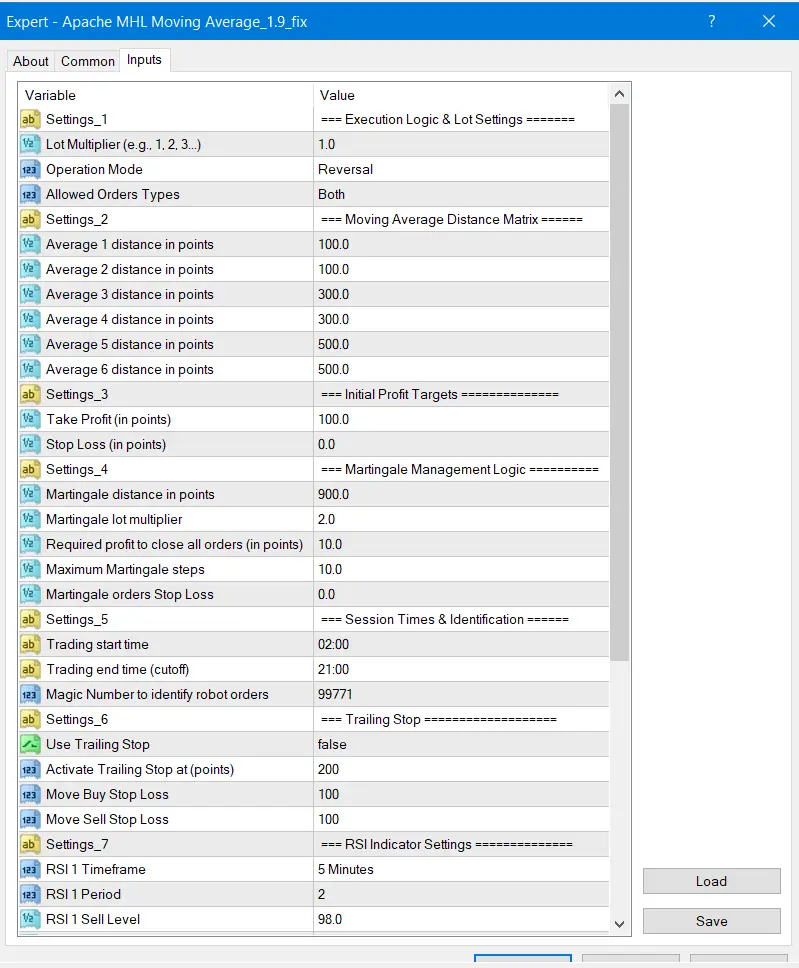
>== Apache MHL Moving Average MT4 EA Download ==<
Lot & Money Management Settings Review
The lot and money management section is one of the most important parts of this setting file. This is where we can understand whether the EA is using fixed lots, automatic risk, or aggressive scaling. For beginners, these settings matter more than the entry signal because they directly control account exposure.
• lots = 0.01 – small fixed starting lot.
• mm = false – automatic money management appears disabled.
• risk = 1.0 – risk value is visible, but likely only works if money management is enabled.
• maxlot = 5.0 – the maximum lot cap for any single trade.
Trader Note: This setup looks more controlled initially because it forces a 0.01 starting lot rather than auto-compounding. However, a maximum lot cap of 5.0 indicates that a multiplier system will scale up trade sizes significantly.
Entry Logic Settings Review
The entry settings dictate exactly when the robot decides to pull the trigger. Based on the name and visible settings, this EA relies on Moving Average crossovers or price proximity to an MA line. How it calculates these bars determines its trading frequency.
• MA_Period = 14 – a standard, fast-moving average period often used for short-term trends.
• MA_Method = 1 – typically indicates an Exponential Moving Average (EMA).
• Entry_On_New_Bar = true – forces the EA to wait for a candle to close before signaling.
Trader Note: Using “Entry_On_New_Bar = true” is generally a safer-looking setting because it prevents the EA from misfiring multiple times during volatile intra-bar price spikes.
Exit & Profit Management Settings Review
Getting into a trade is only half the battle; how the EA exits determines your actual return and drawdown. The visible exit settings show a mix of individual trade targets and basket (group) profit closing.
• TakeProfit = 20 – a moderate take profit in points/pips for individual trades.
• StopLoss = 0 – a hard stop loss is not clearly visible or is disabled by default.
• Basket_Profit_USD = 5.0 – closes all open trades when the combined floating profit reaches $5.
Trader Note: The absence of a tight hard stop loss is a major risk factor. Instead of taking a small loss, this setting file suggests the EA relies on cost-averaging to hit the basket profit target.
Grid / Recovery / Martingale Settings Review
Because the hard stop loss is set to zero, the EA leans heavily on its grid and recovery settings to manage losing positions. This is the most risk-sensitive area of the entire setting file and requires careful attention, especially on Gold (XAUUSD).
• Grid_Step = 15 – the distance (in pips/points) before opening the next recovery trade.
• Lot_Multiplier = 1.5 – increases the lot size of each subsequent recovery trade.
• Max_Orders = 10 – caps the total number of open trades in a single grid cycle.
Risk Note: A 1.5 multiplier combined with a 15-pip grid step means drawdown can accumulate incredibly fast during a strong trend. If all 10 orders open, the margin requirement will be massive.
Safety Filter Settings Review
Safety filters act as a final layer of defense, telling the EA when not to trade. These settings help protect the account from extreme market conditions like news events, low liquidity, and widened broker spreads.
• Max_Spread = 30 – prevents entries if the broker spread exceeds this value.
• Use_News_Filter = false – not clearly enabled in the default view.
• Friday_Close = false – allows the EA to hold trades over the weekend.
Trader Note: Holding grid trades over the weekend is highly risky due to Monday opening gaps. Traders should strongly consider enabling the news filter or manually pausing the EA during high-impact events.
Safer-Looking Settings
Some parameters within this file indicate that the developer attempted to build in baseline stability. Recognizing these settings helps traders understand the EA’s foundational logic.
• Fixed starting lot of 0.01: Keeps the initial exposure minimal.
• Entry on new bar: Reduces erratic trading and false signals during tick volatility.
• Max spread filter: Protects against entering trades during illiquid, high-cost market rollovers.
Beginner Tip: While these settings look conservative, they only govern the first trade of a sequence. A safe entry does not guarantee a safe exit if the recovery settings are aggressive.
Risk-Sensitive Settings
These are the settings that can cause margin calls or high drawdowns if not monitored or adjusted properly. They are the engine of the EA’s high-profit claims but also the source of its risk.
• Lot Multiplier (1.5): Scales risk exponentially during losing streaks.
• Stop Loss (0): Leaves the account vulnerable to black swan events or endless trends.
• Max Orders (10): Allows deep grids to form, consuming available margin quickly.
Risk Note: If this setting is left at default during a massive Gold breakout, the EA will continuously attempt to catch a falling knife. You must have adequate free margin to survive.
Common Mistakes Traders Make With These Settings
Many users fail with grid and moving average EAs not because the robot is broken, but because they mismanage the setting file. Based on the visible setup, here are the most frequent errors.
• Increasing the starting lot: Changing 0.01 to 0.10 without understanding how the 1.5 multiplier will balloon the 5th trade.
• Ignoring the news filter: Leaving the EA running during major economic data releases.
• Using a low leverage account: Running out of free margin because max orders are set to 10.
• Not checking the grid step: Leaving a 15-pip step on a volatile pair like XAUUSD.
Trader Note: Thinking a small starting lot means the EA is automatically safe is a fatal flaw. Always map out the worst-case scenario before trading.
Recommended Beginner Setup Approach
If you are new to the Apache MHL Moving Average MT4 EA, diving straight into a live account with default settings is not advisable. You need a structured approach to validate the product’s claims.
• Step 1: Run the EA on a demo account using the exact default settings to observe the grid behavior.
• Step 2: Test increasing the grid step to 30 or 40 to see if it survives longer trends better.
• Step 3: Try reducing the max orders from 10 to 5 to force a strict limit on drawdown.
• Step 4: Enable the news filter and Friday close features to protect against weekend gaps.
Beginner Tip: Use the MT4 Strategy Tester on “Open Prices Only” first to quickly see how the EA handles historical trends before committing to forward demo testing.
Final Setting Verdict
Based on the visible setting file, the Apache MHL Moving Average MT4 EA Settings Review reveals a strategy that pairs simple, conservative entry logic with an aggressive, martingale-style recovery system. The 0.01 starting lot and new bar entry provide a solid foundation, but the lack of a hard stop loss and a 1.5 lot multiplier are the real drivers of its reported ~32% drawdown.
• Strong baseline entry logic using MA.
• High-risk mathematical recovery system.
• Requires active management during news.
Trader Note: For traders willing to monitor news events and who possess adequate account capital, this setup offers mathematical recovery power. This does not automatically make the EA safe; it requires active risk management.
Frequently Asked Questions (FAQs)
• What is the best timeframe for the Apache MHL Moving Average MT4 EA settings?
While the setting file relies on moving averages, grid EAs typically perform best on M15 or H1 timeframes where intrabar noise is reduced, but there is still enough volatility to hit basket profit targets.
• Does this setting file use a hard Stop Loss?
Based on the visible settings, the hard stop loss appears to be set to 0 (disabled). The EA manages risk by cost-averaging and closing trades in a basket once a specific dollar profit is reached.
• How do I reduce the drawdown with these settings?
To reduce drawdown, you should lower the multiplier, increase the grid step to space out trades, and reduce the max orders limit to prevent the EA from opening too many heavy lots.
• Is the Apache MHL Moving Average MT4 EA safe for a $100 account?
With a 1.5 lot multiplier and up to 10 max orders, a $100 account is highly vulnerable to a margin call. A larger balance or a cent account is strongly recommended.


Gold Snap MT5 Settings Review & Analysis 2026
Forex Fury MT5 Settings Review & Analysis 2026
Gold Trend X MT5 Settings Review & Analysis 2026
Quantum OmniGold MT5 Settings Review & Analysis 2026
Precise Pair Trading Pro MT5 Settings Review 2026
My Orden Robot MT5 Settings Review & Analysis 2026
