


TFXS Titan Ultimate EA MT5 Settings Review & Analyze 2026
TFXS Titan Ultimate MT5 is a powerful automated trading system designed to capture consistent profits in the gold market (XAUUSD). But here’s the truth – your results depend more on your settings than the EA itself.
In this guide, you’ll learn how to properly configure the EA, manage risk, and avoid the common mistakes that destroy accounts. Whether you’re a beginner or experienced trader, this breakdown will help you unlock the real potential of Titan Ultimate.
➡️ Download Now: Available on Download
➡️ Telegram Support: Join for updates, announcements, and support
📩 Free Support & Setup Help – Contact us 👉 Telegram Support
Understanding the Tool
TFXS Titan Ultimate MT5 is primarily a trend-following + grid recovery hybrid EA.
This means it tries to:
• Follow the main market direction (trend)
• Use grid/martingale logic to recover losses
• Optimize exits using dynamic take profit (ATR-based)
📌 Core Trading Style
• Trend-following entries
• Grid-based recovery system
• Basket profit closing logic
• ATR-based dynamic TP
📌 Best Market Conditions
This EA performs best when:
• Gold (XAUUSD) is trending smoothly
• Volatility is moderate to high
• Spread is low and stable
Avoid using during:
• News spikes (NFP, CPI)
• Extremely sideways markets
📌 Who Should Use This EA
• Traders who want semi-passive income
• Traders comfortable with grid strategies
• Users who understand risk management
Settings Panel Explained
Let’s break down the most important settings from the panel.
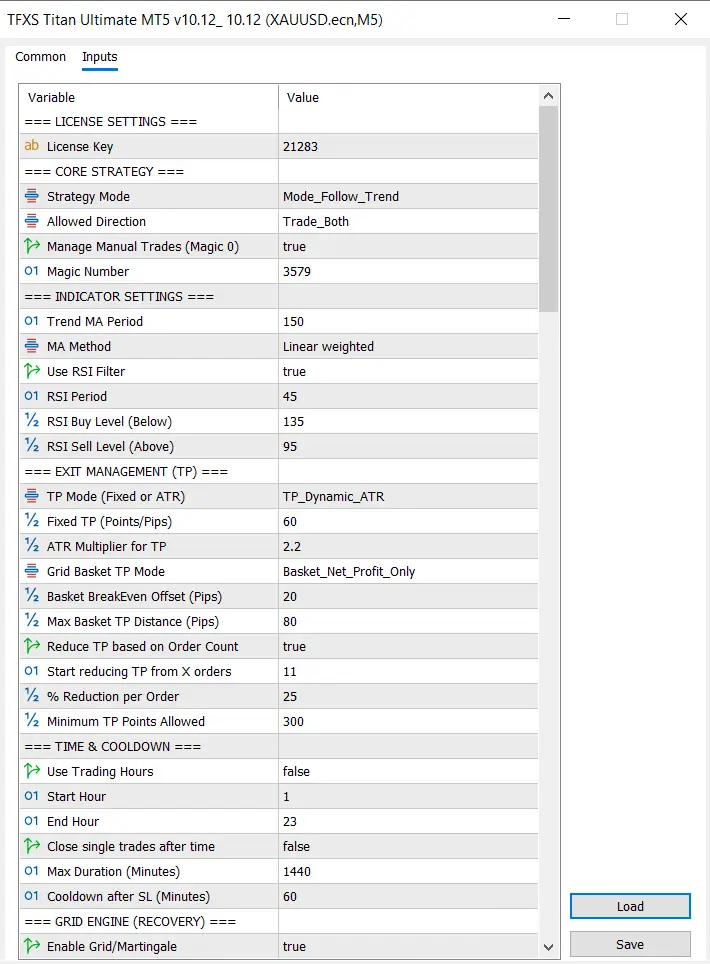
Core Strategy Settings
• Strategy Mode: Follow Trend
This tells the EA to trade in the direction of market momentum.
✔ Safer than counter-trend strategies
• Allowed Direction: Trade Both
EA can open both BUY and SELL trades.
✔ More opportunities
⚠ Slightly higher exposure
• Manage Manual Trades (Magic 0)
Allows EA to manage manual trades.
✔ Useful for hybrid traders
• Magic Number
Unique ID for trades.
✔ Important when running multiple EAs
Indicator Settings
This section controls entry accuracy.
• Trend MA Period (150)
Defines long-term trend direction.
✔ Higher value = stronger trend filtering
✔ Lower value = more signals but riskier
• MA Method: Linear Weighted
Gives more weight to recent price data → faster reaction
• Use RSI Filter: true
Adds confirmation before entry
✔ Reduces false trades
• RSI Period (45)
Slower RSI → fewer but stronger signals
• RSI Buy Level (135) / Sell Level (95)
These values are custom scaled RSI thresholds
✔ Helps avoid overbought/oversold traps
Exit Management (TP Settings)
This is where profits are controlled.
• TP Mode: Dynamic ATR
Take profit adjusts based on volatility
✔ Very powerful for gold trading
• Fixed TP (60)
Backup TP level
• ATR Multiplier (2.2)
Higher = bigger TP targets
Lower = faster exits
• Grid Basket TP Mode: Net Profit Only
Closes trades only when total basket is profitable
• Basket BreakEven Offset (20 pips)
Locks profit after recovery
• Max Basket TP Distance (80 pips)
Prevents holding trades too long
• Reduce TP Based on Order Count
✔ Smart feature
✔ Reduces TP when many trades are open
• Start Reducing From 11 Orders
Helps close baskets earlier
• Minimum TP Points Allowed (300)
Ensures minimum profit target
Time & Cooldown Settings
• Use Trading Hours: false
EA runs 24/7
• Start Hour / End Hour
Can restrict trading sessions
• Max Duration (1440 min)
Max time trades stay open
• Cooldown After SL (60 min)
Prevents revenge trading
✔ Very important for drawdown control
Grid Engine (Recovery System)
- Enable Grid/Martingale: true
This is the most important and risky part.
✔ Helps recover losing trades
⚠ Can increase drawdown significantly
Recommended Settings for Best Results
1. Conservative Setup (Low Risk)
Best for beginners or small accounts.
• High MA period (150+)
• RSI filter ON
• Lower lot size
• Limit grid levels
✔ Lower drawdown
✔ Slower growth
2. Balanced Setup (Recommended)
Best for most traders.
• Keep default settings
• Moderate lot size
• ATR TP enabled
✔ Good balance of risk and profit
3. Aggressive Setup (High Risk)
Only for experienced traders.
• Lower MA period
• Higher lot size
• Grid enabled fully
⚠ High profit potential
⚠ High drawdown risk
Common Mistakes Traders Make
Avoid these if you want long-term success:
• Using high lot sizes
• Running on low balance accounts
• Ignoring grid risk
• Trading during high-impact news
• Using bad brokers with high spread
• No VPS (connection issues)
👉 Biggest mistake:
Thinking EA = guaranteed profit
Risk Management Strategy
This is what separates winners from blown accounts.
Safe Risk Guidelines
• Leverage: 1:100 – 1:300
• Lot Size:
0.01 per $100–$200
• Account Size:
Recommended: $500+
Drawdown Control
• Limit grid levels
• Use cooldown after loss
• Avoid overtrading
✔ Always protect capital first
Smart Tips to Improve Profit Potential
These are real trader insights:
• Trade London & New York sessions
• Avoid major news events
• Use low spread ECN broker
• Run EA on a VPS (24/7 uptime)
• Use only XAUUSD (Gold) for best results
Pro Tip
Pause the EA when:
• Market is extremely sideways
• News volatility is high
Small Account Strategy
Yes, you can run it on small accounts — but carefully.
Minimum Balance
- $100 → very risky
- $300 → manageable
- $500+ → recommended
Scaling Strategy
- Start small
- Grow profit
- Increase lot size gradually
✔ Never rush growth
Final Verdict
TFXS Titan Ultimate MT5 is a powerful and flexible trading EA, especially for gold traders.
Strengths
• Trend + grid hybrid system
• Smart TP (ATR-based)
• Advanced recovery logic
• Customizable settings
Weaknesses
• Grid system can increase risk
• Requires proper configuration
• Not beginner-proof without guidance
Who Should Use It
• Intermediate to advanced traders
• Traders willing to manage risk
• Users running VPS + proper setup
👉 Final Thought:
If used correctly, this EA can be a consistent profit generator. But without risk control, it can also destroy accounts.
Frequently Asked Questions (FAQ)
1. What are the best settings for TFXS Titan Ultimate MT5?
The best settings depend on your risk level. Balanced settings with ATR TP and RSI filter enabled are recommended for most traders.
2. Is TFXS Titan Ultimate safe for small accounts?
Yes, but only with low lot sizes and conservative settings. Avoid aggressive grid usage.
3. What leverage should I use?
Use 1:100 to 1:300 for safer trading.
4. Can beginners use this EA?
Yes, but only if they follow proper risk management and avoid aggressive configurations.
5. Does this EA require VPS?
Yes. A VPS ensures 24/7 stable execution, which is critical for grid systems.
6. Which pair works best?
XAUUSD (Gold) is the best-performing pair for this EA.

Gold Snap MT5 Settings Review & Analysis 2026
Forex Fury MT5 Settings Review & Analysis 2026
Gold Trend X MT5 Settings Review & Analysis 2026
Quantum OmniGold MT5 Settings Review & Analysis 2026
Precise Pair Trading Pro MT5 Settings Review 2026
My Orden Robot MT5 Settings Review & Analysis 2026
