


ATM Alpha BOT MT5 Settings Review & Analysis 2026
Gold has always been a favorite among forex traders, and automated systems designed specifically for XAUUSD are gaining serious traction. The ATM Alpha BOT MT5 is one such EA, built around a trend-following core with a few clever safety layers. It doesn’t just chase price; it filters entries with RSI, manages exits using ATR-based take profits, and handles pullbacks with a recovery system. But how do all these pieces actually work in the settings panel? Let me walk you through every major category so you know exactly what you’re adjusting before you put this on a live chart.
• Download Now – ATM Alpha BOT MT5
• More Update – Telegram Channel
• Our Support – Telegram Support
ATM Alpha BOT MT5 Setting Panel
The ATM Alpha BOT MT5 setting panel is surprisingly well-organized. Instead of dumping fifty inputs into a single chaotic list, the developer grouped them logically. You get separate blocks for strategy logic, indicator filters, exit management, session timers, and risk controls. If you’ve used other MT5 EAs, the layout will feel familiar, but a few options here deserve a closer look because they directly impact how the EA behaves in volatile gold markets. Everything is accessible right from the MetaTrader 5 inputs tab, making adjustments painless during backtesting or when transitioning from demo to live.
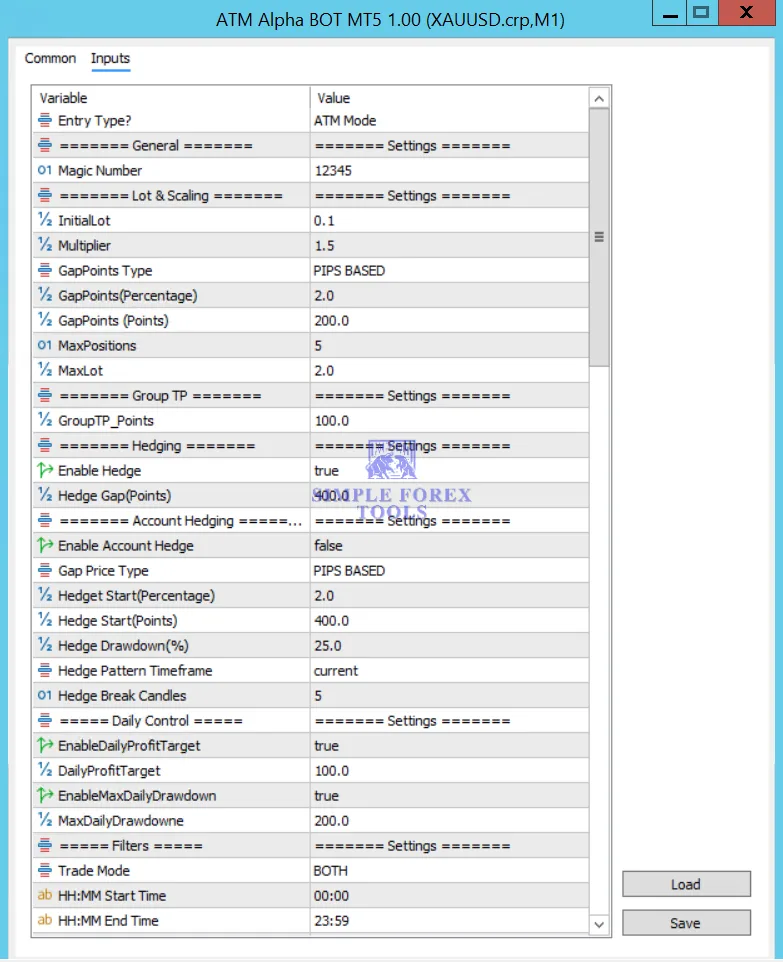
Core Strategy Settings
This is the brain of the EA. It dictates whether the EA buys, sells, or does both, and defines the primary trend detection method. From what I can see, the ATM Alpha BOT leans on a trend-following algorithm, likely using moving averages or price action to figure out the dominant direction. The beauty is that you can flip between strict trend-following and a more neutral mode. In gold, trend-following works well during clear runs, but the EA also includes logic to avoid trading sideways chop. Getting these settings right is your first filter against false signals.
• Strategy Execution Mode → Mode_Follow_Trend (default)
• Allowed Trade Direction → Trade_Both (or Trade_Buy / Trade_Sell)
• Trend Detection Period → 200 (for primary trend filter)
• Minimum Trend Strength → 25 (pips or points)
• Entry Signal Sensitivity → Medium (adjusts how quickly the EA reacts)
Indicator Settings
No EA should rely solely on price, and the ATM Alpha BOT uses RSI as its primary confirmatory indicator. This prevents it from entering trades when momentum is exhausted or when the market is severely overbought or oversold. You can tweak the RSI period and the overbought/oversold thresholds to match your risk appetite. Some traders prefer faster RSI settings for scalping, but for gold, a moderate period helps filter out the frequent wicks that come with this pair.
• RSI Period → 45
• Overbought Level → 75
• Oversold Level → 25
• Enable RSI Filter → True
• RSI Applied Price → Close (typical setting)
Take Profit / Exit Management Settings
This section determines how the EA secures profits and closes trades. Instead of using a fixed pip TP, the ATM Alpha BOT employs ATR (Average True Range) to set dynamic take profit levels. This is brilliant for gold because volatility shifts constantly. When markets are calm, a 2x ATR TP might be tight, but during high-impact news, that same multiplier gives the trade room to breathe. You also get a trailing stop option to lock in gains if the trend continues in your favor.
• Take Profit Mode → ATR_Multiplier
• ATR Period → 14
• ATR Multiplier for TP → 2.8
• Enable Trailing Stop → True
• Trailing Start (in pips) → 150
• Trailing Step (in pips) → 30
Time Filter / Session Control Settings
Trading all day on XAUUSD is a recipe for burnout, but also for getting caught in low-liquidity spreads. The ATM Alpha BOT lets you define active trading hours, which is a lifesaver if you prefer to trade only during the London or NY overlap. You can also set a closing time for all open trades to avoid holding positions through high-impact news events or rollover periods. It adds a layer of discipline that many manual traders struggle to maintain.
• Enable Session Filter → True
• Trading Start Time → 08:00 (GMT+2)
• Trading End Time → 17:00 (GMT+2)
• Close All Trades At End Time → True
• Friday Close Time → 20:00 (GMT+2)
Grid / Recovery Settings
This is where things get interesting. The EA includes a recovery mechanism, which is essentially a grid or averaging system. When a trade moves against the entry, the EA can open additional orders at predefined price intervals to average the entry price and potentially exit the entire basket at break-even or a small profit. It’s important to understand that this is not a pure martingale, but it does increase exposure during drawdown. The multipliers and step distances are fully adjustable, giving you control over how aggressive the recovery is.
• Enable Recovery Mode → True
• Recovery Multiplier → 1.5 (lot size increase)
• Grid Step (in points) → 200
• Max Grid Levels → 3
• Recovery TP (in points) → 50 (for the entire basket)
Recommended Timeframe & Currency Pair Settings
This section isn’t really a setting input but more of a recommended configuration area. The EA is specifically designed for XAUUSD (Gold) on the H1 or M15 timeframe. In my experience, H1 gives fewer false breakouts, while M15 captures more short-term moves if you have a VPS. The settings panel lets you define the symbol and timeframe for the strategy logic, ensuring the trend analysis aligns with the chart you attached the EA to. Sticking to the recommended timeframe is half the battle won.
• Trading Symbol → XAUUSD
• Primary Timeframe → H1 (recommended)
• Secondary Filter Timeframe → M15
• Pair Type → Precious Metals
Account Requirement & Risk Settings
Trading gold with insufficient capital is a fast track to a margin call. The ATM Alpha BOT lets you define a fixed lot size, auto-lot based on balance, or a percentage risk per trade. For gold, a conservative starting balance of at least $1,000 is advisable, but the EA can be tuned for micro accounts if you lower the risk percentage. This block also includes maximum spread limits, slippage tolerance, and a maximum drawdown limit to pause trading if the account takes a hit.
• Lot Sizing Mode → Auto (Risk % of Balance)
• Risk Per Trade → 1.5%
• Fixed Lot Size (if manual) → 0.10
• Max Lot Size Limit → 1.00
• Max Spread Allowed → 30 (points)
• Max Drawdown (in %) → 30 (pause trading)
VPS & Execution Settings
For any MT5 EA, a low-latency VPS is not a luxury-it’s a requirement. The settings here allow you to adjust ping timeout and request retry attempts. Gold spreads can widen unpredictably, so the EA has a slippage control that prevents it from entering trades if the price jumps too far. I’d recommend a VPS located near your broker’s server, and this section ensures the EA can handle connection hiccups without throwing errors or missing entry signals.
• VPS Ping Timeout (ms) → 5000
• Request Retry Attempts → 3
• Slippage Tolerance (in points) → 20
• Enable Auto GMT Offset → True
• Logging Level → Standard (for debugging)
Practical Summary
So, who is the ATM Alpha BOT MT5 actually for? In my view, this EA fits traders who understand that gold trends are powerful but also know that pullbacks can be brutal. It is moderately aggressive-definitely not a set-and-forget piece of software-but if you dial in the grid settings and keep the risk per trade below 2%, it offers a solid structure.
The RSI and ATR filters give it a tactical edge, preventing it from getting obliterated in choppy markets. Just remember: no EA is perfect. You should always forward-test it on a demo for at least a month, and never risk capital you can’t afford to lose. The recovery system works, but it can compound losses if the market trends against you without a reversal. Keep an eye on the max grid level and don’t be afraid to turn the recovery off if you prefer simple take-profit trades.
Frequently Asked Questions (FAQ)
What is the best pair for the ATM Alpha BOT MT5?
The EA is specifically designed and optimized for XAUUSD (gold). While it might work on other pairs, the settings and ATR logic are tuned for gold’s unique volatility profile.
Which timeframe should I attach the EA to?
The recommended primary timeframe is H1. However, some traders use it on M15 for more frequent signals, but H1 provides the most reliable trend signals with fewer fakeouts.
Do I need a VPS to run this EA?
Absolutely. Since the EA relies on precise entry timing and recovery orders, a stable VPS with low latency to your broker is strongly recommended to avoid missed trades or execution errors.
Does this EA use a martingale or grid strategy?
It uses a recovery system that resembles a grid-it opens additional positions at set intervals. It’s not a full martingale (no doubling on every loss), but it does average the entry price, so risk management is still critical.
Is this EA suitable for complete beginners?
Yes, but beginners should start with a demo account first. The settings are logical, but understanding how the recovery system behaves in a drawdown is something you need to see with play money before risking real funds.
What is the recommended minimum account size?
For gold, a minimum of $1,000 is advisable when using the auto-lot feature with a 1-2% risk setting. You can start with $500, but you’ll need to reduce the lot size or lower the risk percentage significantly to avoid margin issues.
Can I turn off the grid/recovery system?
Yes, you can disable the recovery mode in the settings. If you turn it off, the EA will simply take the initial trade and close it based on the fixed or ATR take profit, without adding any averaging positions.
Does the EA work well during high-impact news?
The time filter allows you to block trading during specific hours. I recommend using it to pause trades before major news events like NFP or FOMC, as gold spreads can spike to 50-100 points, which could trigger slippage.

ArtQuant Gold MT5 Settings Review & Analysis 2026
BTC Vortex Nexus EA Settings Review & Analysis 2026
Gold Snap MT5 Settings Review & Analysis 2026
Forex Fury MT5 Settings Review & Analysis 2026
Gold Trend X MT5 Settings Review & Analysis 2026
Quantum OmniGold MT5 Settings Review & Analysis 2026
