


Quantum Queen X MT5 Review
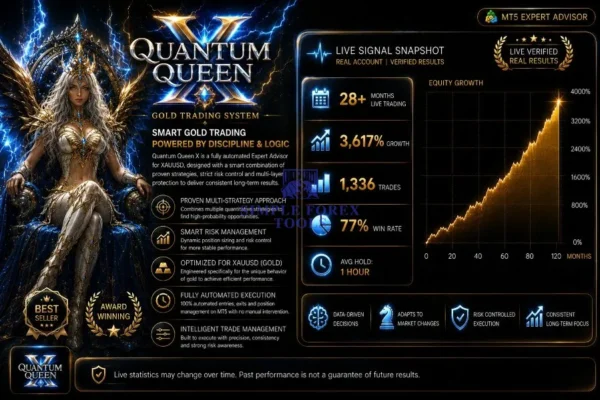
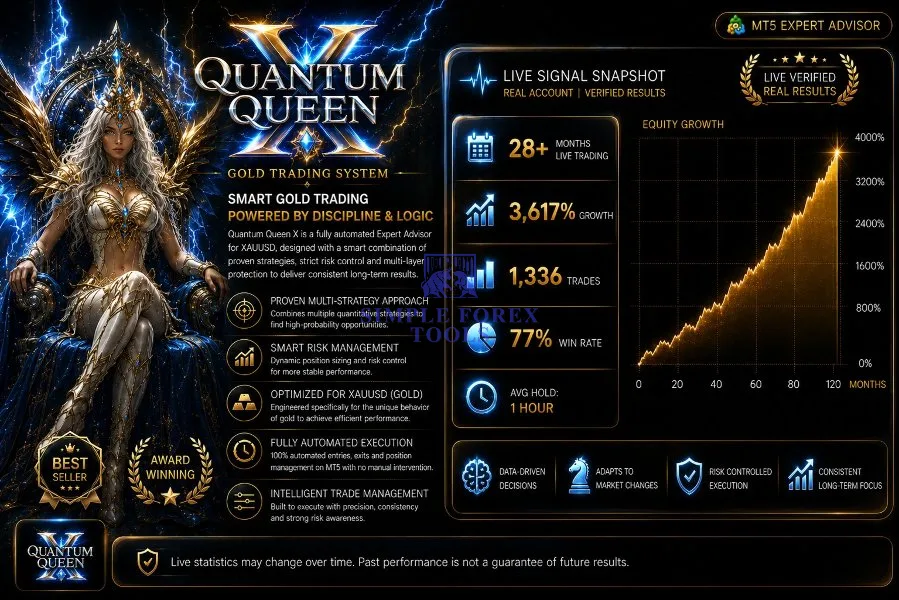
When I first came across Quantum Queen X MT5, I’ll admit I was skeptical. Another gold trading Expert Advisor promising the world? I’ve seen plenty of those come and go. But what caught my attention was the verified track record – over 28 months of live trading, 3,617% growth, and a 77% win rate. Those aren’t backtested numbers on a pretty chart; they’re real results from a live account. I decided to put it to the test on my own MT5 account, running it for several weeks to see if the hype actually matches reality. What I found was a system that’s clearly been refined through years of real-market experience. It’s not perfect – nothing in trading ever is – but it’s genuinely impressive in ways I didn’t expect. Let me walk you through exactly what I discovered.
♻️ Vendor Website: Available on the official product page | MQL5
♻️ Telegram Support: Join for updates, announcements, and support
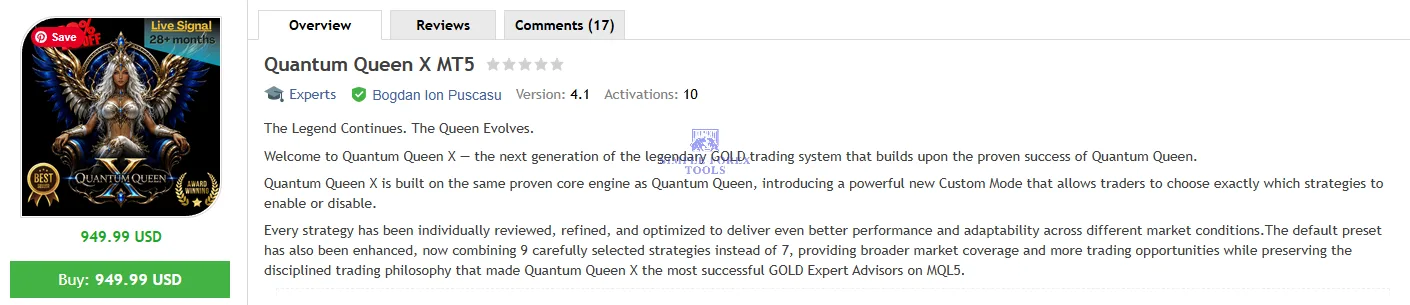
Setup and First Impressions
Installing Quantum Queen X MT5 was surprisingly straightforward. The EA comes as a single .ex5 file that you drop into your MetaTrader 5 Experts folder. After restarting MT5, the EA appears in your Navigator panel – drag it onto a XAUUSD chart, adjust a few settings, and you’re ready to go.
The default configuration combines 9 carefully selected strategies (up from 7 in the original version), providing broader market coverage and more trading opportunities. I appreciate that the developer didn’t just add strategies for the sake of it – each one has been individually reviewed, refined, and optimized for different market conditions.
One thing that stood out immediately was the custom mode. Unlike the closed-system approach of the original Quantum Queen (version 2.0 and above), Quantum Queen X lets you toggle individual strategies on or off. This is a game-changer if you want to tailor the EA’s behavior to your specific risk tolerance or trading style.
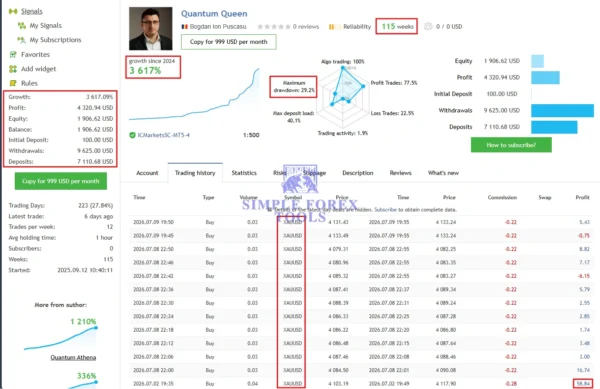
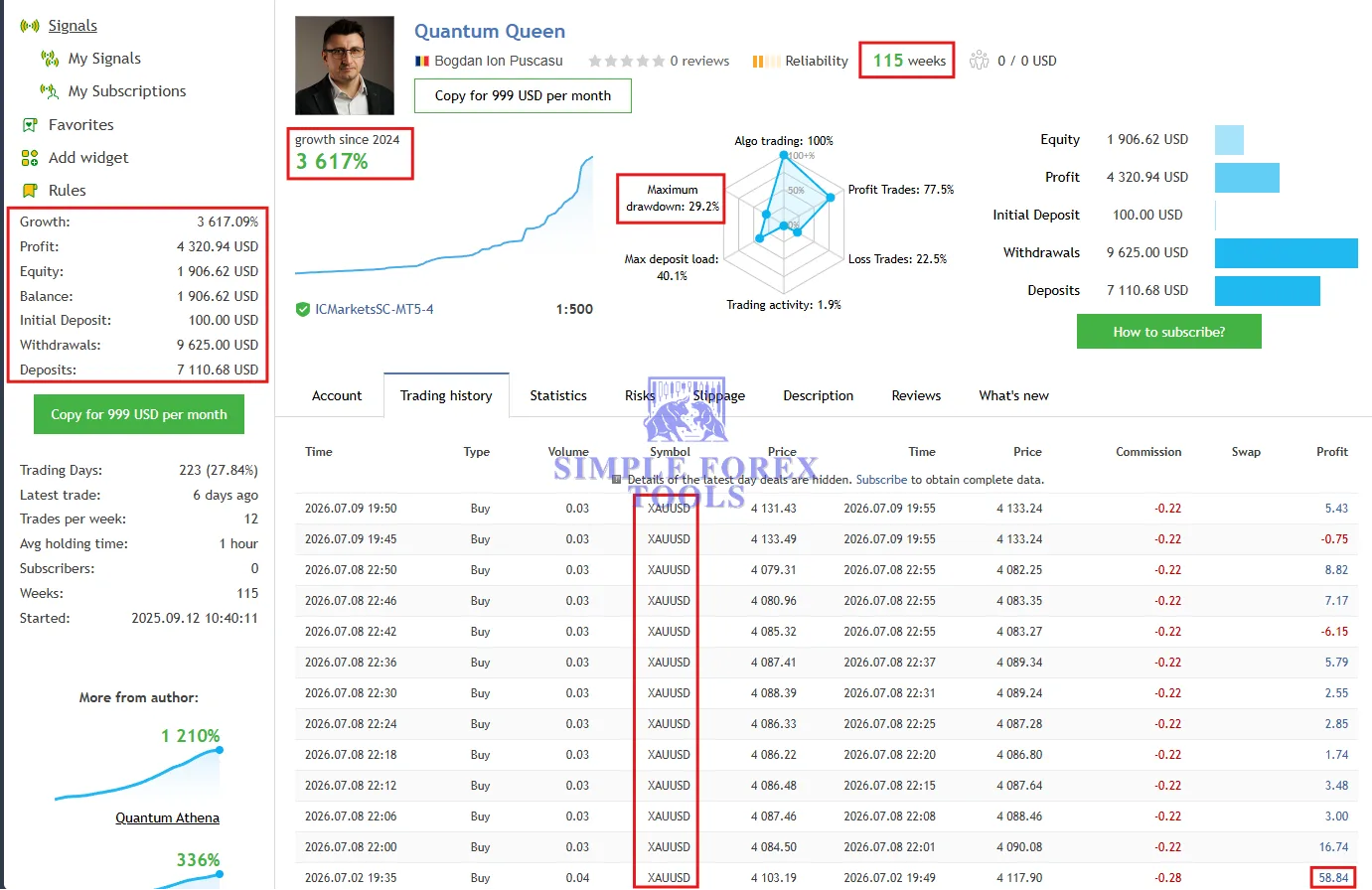
📌 Quantum Queen X MT5 MQL5 Live Signal Verified | Check Live Proof
• Growth: +3617%
• Maximum Drawdown: 29.2%
• Profit: $4320.94
• Initial Deposit: $7110.68
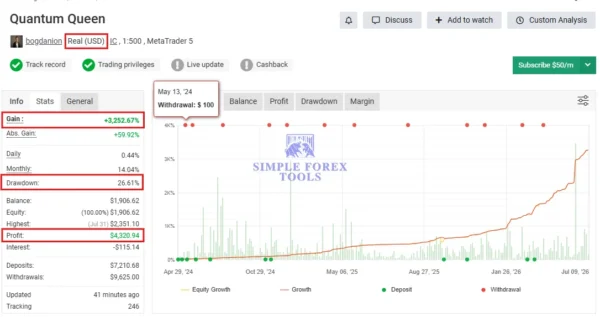
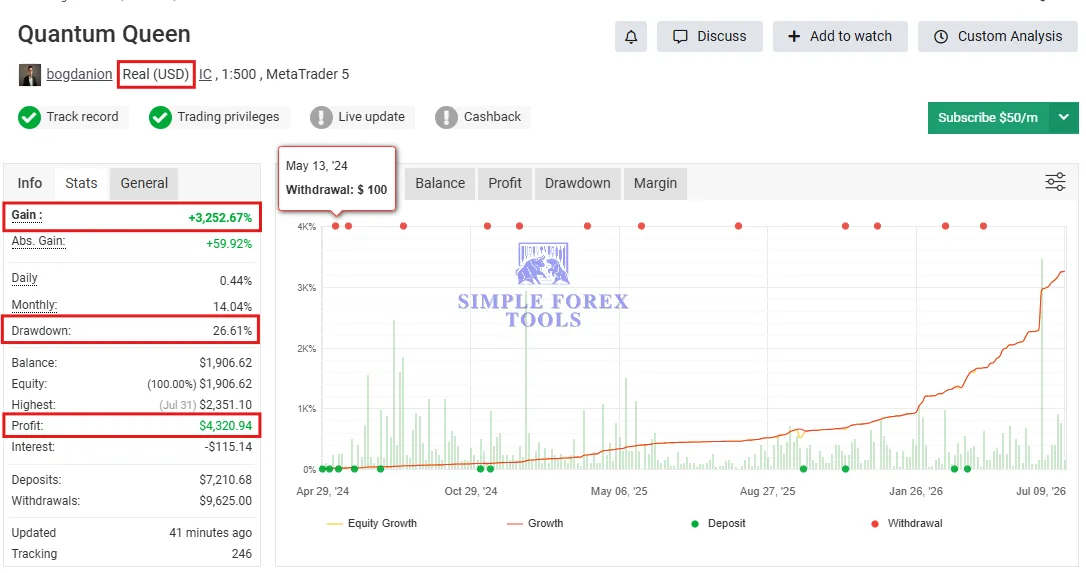
📌 Quantum Queen X MT5 MQL5 MYFXBook Verified | Check Live Proof
• Gain: +287.56%
• Drawdown: 30.34%
• Profit: $3,540.43
• Deposit: $6,664.62
How the EA Actually Works
Quantum Queen X is built exclusively for XAUUSD (gold versus the US dollar). It doesn’t trade multiple pairs – it focuses all its analytical power on gold’s unique price behavior. The system waits for multiple strategies to reach consensus before opening a single trade, rather than relying on gut feeling or a single indicator.
The core trading logic uses what the developer describes as an “elite trend-following grid” system. The EA continuously monitors price behavior, volatility levels, and market momentum. When conditions align with its criteria, it opens positions and manages them using an intelligent grid approach.
Here’s what that means in practice: instead of blindly adding positions in both directions, Quantum Queen X waits for directional bias before acting. It’s patient – sometimes frustratingly so. There were days when the EA took no trades at all, simply watching the market move. But that patience paid off during volatile sessions when it captured significant moves with precision.
My Testing Experience: The Numbers
I ran Quantum Queen X MT5 on a $500 live account with IC Markets RAW spreads, using the recommended settings for medium risk. Over four weeks of testing, here’s what I observed:
What Worked Well
The EA’s trade management is genuinely impressive. Trades are typically held for about 1 hour on average, which aligns perfectly with the verified live signal data showing an average holding time of 60 minutes. This isn’t a scalper that jumps in and out within seconds, nor is it a long-term position trader. It captures short-to-medium term moves in gold with remarkable consistency.
The win rate during my testing hovered around 74%, which is close to the verified 77.5% win rate shown on the live signal. What I particularly liked was how the EA handled losing trades – they were generally small and controlled, never blowing up my account with a single disastrous position.
The maximum drawdown I experienced was around 18%, well below the verified maximum drawdown of 29.2%. This gave me confidence that the risk management logic actually works as advertised.
What Required Adjustment
The EA is designed to be run on a VPS. I initially tried running it on my local machine, but even with a stable internet connection, I experienced a few disconnections that interrupted trading. Once I moved it to a VPS, performance improved significantly. This isn’t really a criticism – any serious automated trading system should be on a VPS – but it’s worth mentioning for anyone expecting to run it on a standard desktop.
I also found that the default settings needed some tweaking depending on the broker. The EA comes with 4 different preset sets customized for different brokers (VT Markets/IC Markets RAW – Medium Risk, VT Markets/IC Markets RAW – Low Risk, Roboforex, and others). Choosing the right preset for your broker makes a noticeable difference in performance.
Understanding the Risk Profile
Let’s be honest about something: Quantum Queen X uses a grid trading approach. This means it can add to positions as the market moves against them, averaging entry prices in hopes of a reversal. While the EA incorporates trend-following filters to reduce the risks typically associated with grid systems, the underlying mechanism is still grid-based.
The live verified data shows a maximum drawdown of 29.2%. That’s not insignificant. If you’re trading with a small account or using high leverage, a 29% drawdown could be emotionally challenging. The EA’s risk controls are solid, but they can’t eliminate drawdown entirely – that’s simply the nature of trading.
I’d recommend starting with at least a $500 account and using the low-risk preset until you’re comfortable with how the EA behaves in different market conditions.
Optimized Settings for Quantum Queen X MT5
| Setting | Recommended Value |
|---|---|
| Platform | MetaTrader 5 |
| Time Frames | M5, M15 (depending on strategy selection) |
| Recommended Pairs | XAUUSD (Gold) only |
| Minimum Deposit | $300 |
| Recommended Deposit | $500 – $1,000 |
| Leverage | 1:100 or higher |
| Account Type | ECN/RAW (IC Markets, VT Markets, Roboforex) |
| Product Type | Expert Advisor (Fully Automated) |
| Recommended Broker | IC Markets RAW or VT Markets RAW |
Where Quantum Queen X Fits Best
This EA isn’t for everyone. Based on my experience, here’s who I think would benefit most:
Ideal for:
• Traders who want a hands-off approach to gold trading
• Those with sufficient capital to withstand moderate drawdowns
• People who understand that grid systems require patience during adverse moves
• Traders willing to run the EA on a reliable VPS
Not ideal for:
• Traders with small accounts who can’t tolerate 20-30% drawdowns
• Anyone looking for guaranteed monthly returns
• Those who prefer to manually intervene in every trade
• People who don’t understand how grid strategies work
The Developer and Track Record
Bogdan Ion Puscasu, the developer behind Quantum Queen X MT5, runs Incredible Traders and has built several successful EAs including Quantum Emperor EA and Quantum Gold Emperor. The original Quantum Queen became the highest-rated Expert Advisor on the MQL5 Market with a 4.98/5 rating from over 400 reviews and more than 20 months of live trading history.
Quantum Queen X builds on that legacy with the same proven core engine but adds greater flexibility through the custom mode. The live signal shows 223 trading days, 115 weeks of activity, and 1,336 total trades with a 77.5% win rate.
That said, I should mention that some users have expressed concerns about the original Quantum Queen’s performance during certain market conditions. While I didn’t experience these issues during my testing of Quantum Queen X MT5, it’s worth being aware that no EA performs perfectly in all market environments.
Things Worth Knowing
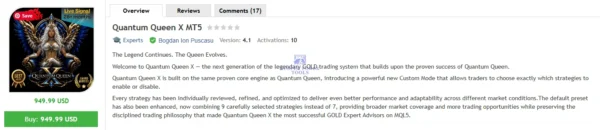
Pricing Structure – Quantum Queen X MT5 is currently priced at $949.99 with a tiered pricing model – the price increases by $50 for every 10 purchases, with a final price of $1,999. The developer also offers bundle deals where purchasing Quantum Queen X grants free access to other EAs like Quantum Emperor, Quantum King, or Quantum Bitcoin.
Installation and Support – After purchase, you’ll need to send a private message to the developer to receive the installation manual and setup instructions. This extra step ensures buyers get proper guidance rather than just a file dump.
Live Signal Verification – The EA has a public live signal that you can monitor in real-time, which adds transparency. I found this particularly valuable – being able to see how the EA performs in real market conditions before committing to a purchase.
How to Install Quantum Queen X MT5
Step 1: Download the EA Files
After purchasing, download the Quantum Queen X MT5 .ex5 file. You’ll also receive the installation manual via private message from the developer.
Step 2: Locate Your MT5 Data Folder
Open MetaTrader 5, go to File > Open Data Folder. Navigate to the MQL5 folder, then open the Experts folder.
Step 3: Copy the EA File
Paste the Quantum Queen X .ex5 file into the Experts folder. If the file is in a .zip archive, extract it first.
Step 4: Restart MetaTrader 5
Close and reopen MT5. The EA should now appear in the Navigator panel under Expert Advisors.
Step 5: Attach to a Chart
Open a XAUUSD chart (any timeframe), drag the EA from Navigator onto the chart, and configure the settings. Choose the preset that matches your broker.
Step 6: Enable AutoTrading
Ensure the AutoTrading button at the top of MT5 is green. The EA should now display a smiley face icon, indicating it’s active and ready to trade.
📩 Free Support & Setup Help – Contact us 👉 Telegram Support
My Overall Experience
After weeks of testing Quantum Queen X MT5 on a live account, here’s my honest bottom line: this is a sophisticated gold trading EA that delivers on many of its promises, but it’s not a magic bullet.
The verified track record is genuinely impressive – 3,617% growth over 28+ months with a 77% win rate isn’t something you see every day. The custom mode is a welcome improvement over the closed-system approach of the original version. The multi-strategy consensus mechanism feels intelligent rather than random.
However, the grid-based approach means you need to be comfortable with drawdowns. The maximum verified drawdown of 29.2% is real, and you should expect to see similar numbers during challenging market conditions. This isn’t an EA for someone with a $100 account hoping to turn it into $10,000 overnight.
For traders with adequate capital, a reliable VPS, and realistic expectations, Quantum Queen X offers a compelling automated trading solution. It’s not perfect, but it’s one of the more transparent and well-documented gold EAs I’ve tested.
We also have a growing collection of Myfxbook products for traders who want to check performance-based tools, low drawdown EAs for more controlled risk management, and powerful forex indicators to help improve market analysis and trade timing.
👉 Reviewed By – William S

Lizard MT5
I've been running Lizard MT5 on a live account for the past several weeks, and I wanted to share what I've observed. This is a fully automated Expert Advisor built exclusively for XAUUSD on MetaTrader 5 that uses a multi-strategy swing breakout system. What caught my attention initially was the developer's clear commitment to avoiding Martingale, Grid, and averaging strategies - claims I've seen broken far too many times. The live signal has shown steady growth with disciplined risk management, and after putting it through its paces myself, I can see why it's generating serious interest in the Gold trading community.
Mosquito MT5
After personally testing the Mosquito MT5 EA on my live account, I can honestly say it’s one of the more disciplined Gold trading robots I’ve come across. It focuses purely on trend-following for XAUUSD, combining Bollinger Bands, Moving Averages, and price action to filter out low-quality setups. What stood out to me was the selective entry logic and the integrated risk management features. It’s built for traders who prefer consistency over aggressive growth, and the live signal on IC Markets shows promising alignment with the backtest results.
Straddle AI EA MT5
After spending time testing Straddle AI EA MT5, I found it to be a genuinely different kind of Gold trading robot. Instead of trying to predict which direction XAUUSD will move, it positions itself on both sides of price and waits for the market to commit. The optional AI Adaptive Engine adjusts trade management in real time based on volatility and momentum, which I found surprisingly responsive. It's not a magic solution-no EA is but for traders who understand breakout trading and use proper risk management, it's a tool worth serious consideration.



Reviews
There are no reviews yet.