



What is the EA SouthEast MT4?
EA SouthEast MT4 is an automated forex trading robot for MetaTrader 4 designed for traders who want to run a structured, rules-based strategy instead of manually watching charts all day. Based on the official product information, the Expert Advisor (EA) is presented as a system built from manual trading experience and adapted into an automated workflow, with a focus on small-deposit growth, simplified setup through set files, and risk-control tools that help organize multi-pair trading more efficiently. The product page also positions it as a grid-style EA with features such as news filtering, virtual trade logic, money management, and smart multi-symbol control.
➡️ Vendor Website: Available on the official product page | MQL5
➡️ Telegram Support: Join for updates, announcements, and support
EA SouthEast MT4 Review
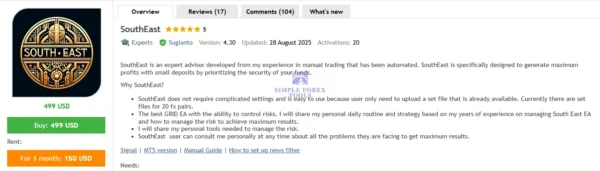
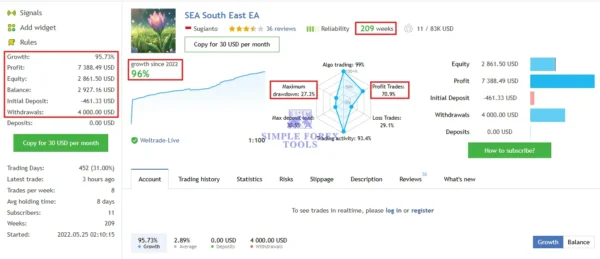
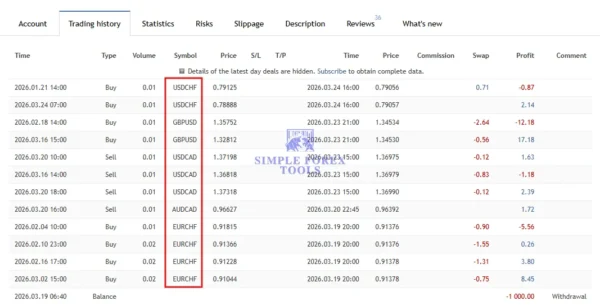
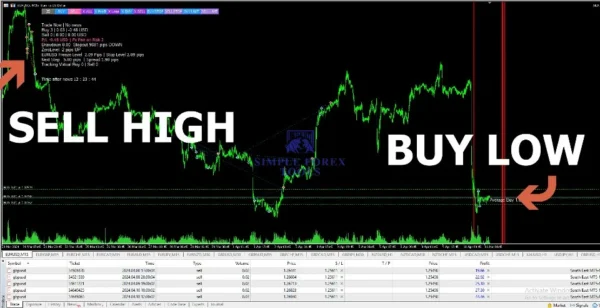
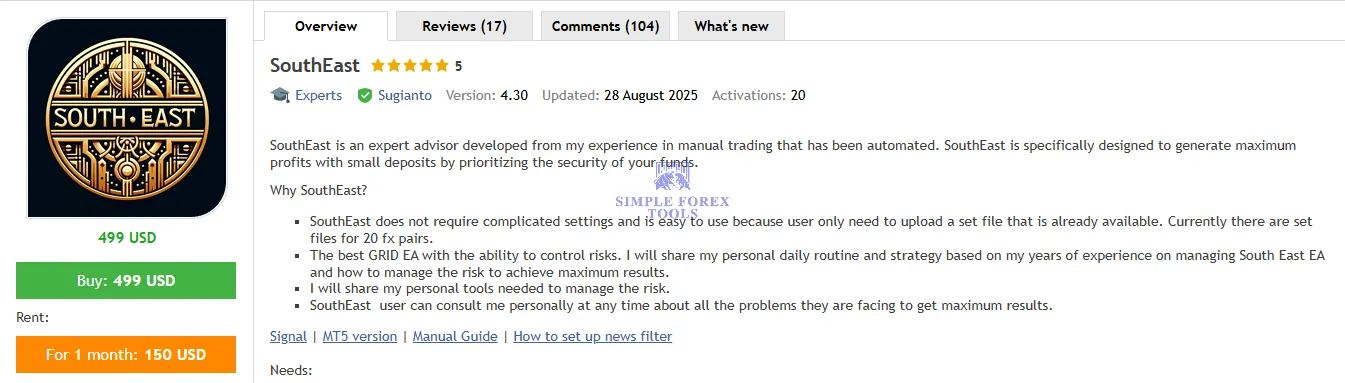
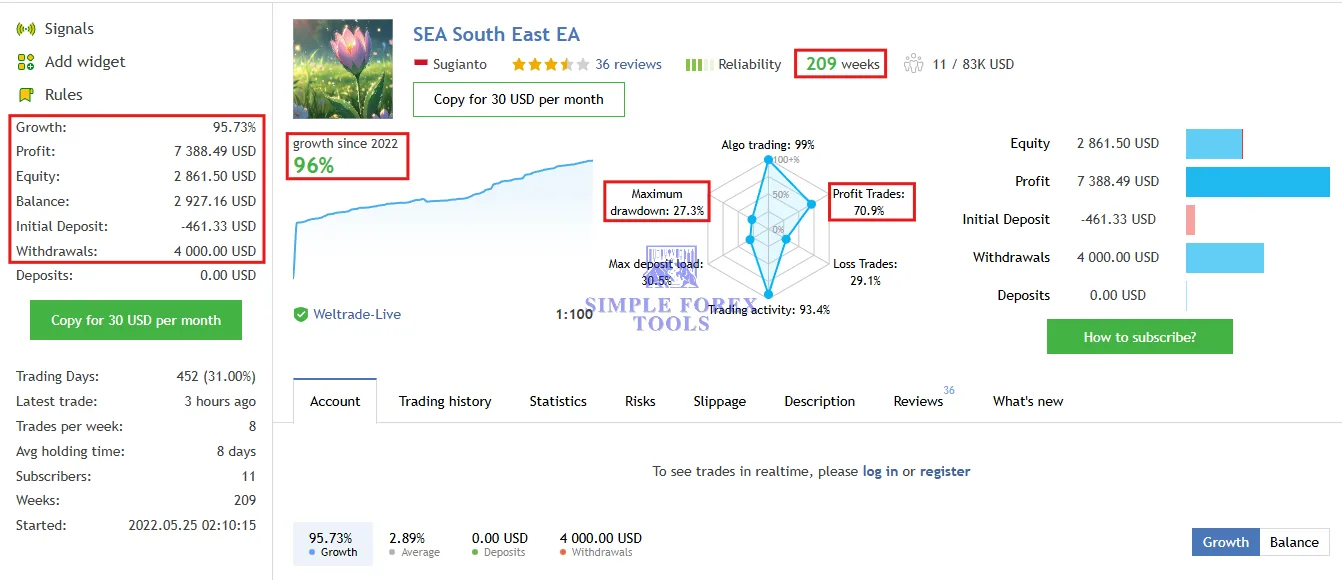
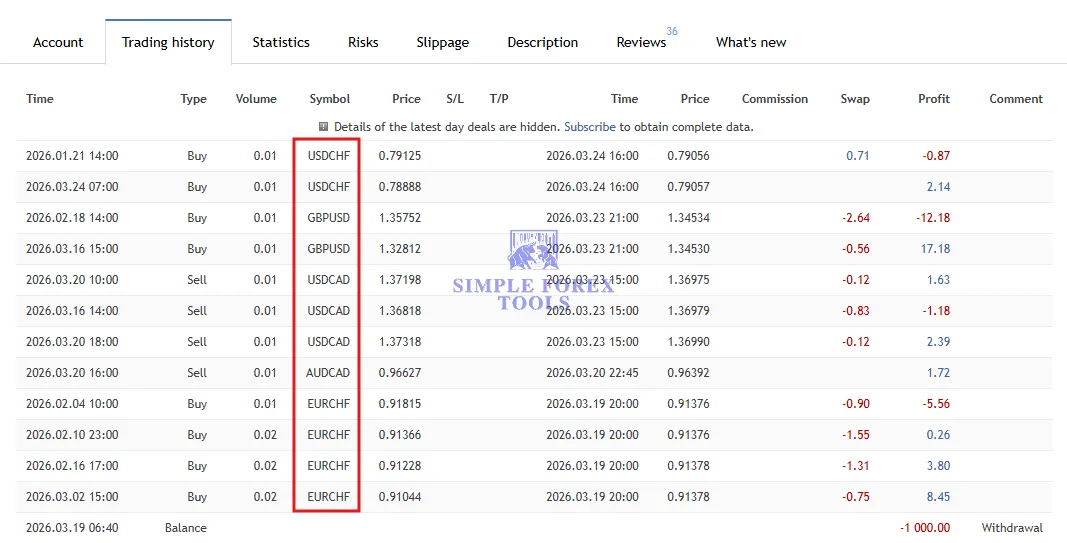
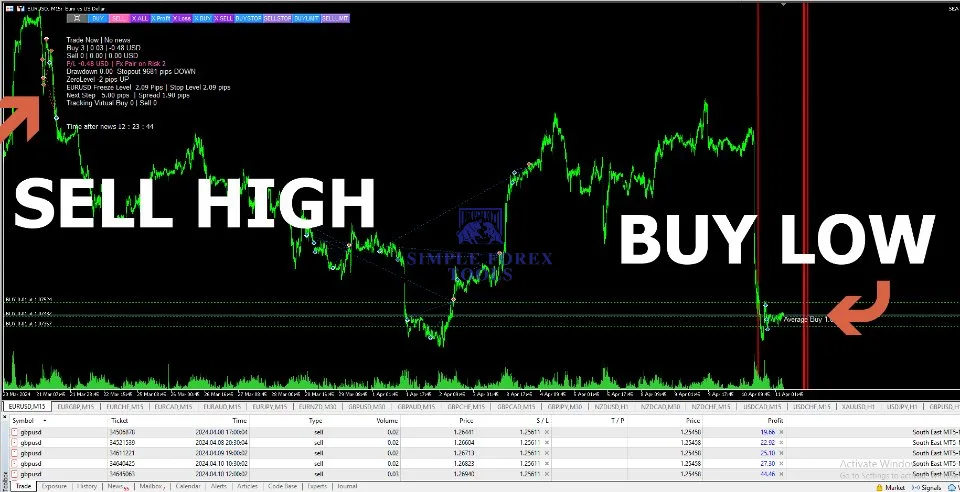
EA SouthEast MT4 clearly looks like a tool made for traders who prefer seeing logic on the chart rather than relying on a black-box system. One image shows large visual “SELL HIGH” and “BUY LOW” guidance on the chart, which immediately suggests an entry style that tries to avoid chasing bad prices. Another screenshot shows a live signal-style page with long operating history, visible profit metrics, drawdown data, and trade win-rate visuals, which helps create a stronger trust angle for buyers comparing real-world usage rather than only looking at backtests. The trade-history screenshot also suggests that the tool is not limited to one symbol, while the product screenshot highlights an established presentation with reviews, updates, and a premium EA positioning. Overall, the visual story is simple: this is a multi-pair MT4 expert advisor built for traders who want automation, control, and a more deliberate entry process.
EA SouthEast MT4 MQL5 Live Signal – 209 Weeks | Check Live
Gain: +96%
Drawdown: 27.3%
Profit: $70.9
Key Features
EA SouthEast MT4 stands out because it combines several practical functions into one workflow instead of relying on a single entry trigger.
Main features highlighted by the source material include:
• Ready-made set files to reduce setup complexity
• Support for many forex pairs, with official setup notes listing a broad symbol range and even metals
• Grid-style trading logic with risk-control emphasis
• News filter to help avoid high-volatility event periods
• Money management with fixed lot or auto lot options
• Virtual trade logic for more selective entries
• Smart multi-symbol control to manage exposure across pairs
• Drawdown reduction tools, including partial-close style loss control
• MT4 platform support
• VPS recommendation for stable running conditions
This mix matters because many traders are not just searching for “an EA.” They are searching for an EA that feels usable in real conditions. That means easier deployment, manageable risk structure, and enough flexibility to fit different account sizes and pair selections.
Main Benefits
1. Easier start for non-technical traders
The official page emphasizes that the EA does not require complicated settings and can be run with prepared set files. That is a major advantage for buyers who want to install and test quickly instead of spending days optimizing random inputs.
2. Better structure for multi-pair trading
SouthEast is marketed with smart multi-symbol control, which is useful for traders who do not want too many correlated positions opening at the same time. That makes the EA more appealing than a basic single-pair robot.
3. More selective trade handling
The product and comments indicate that virtual trade logic is part of the entry process. In the comments, the seller explains that actual trades begin when pending orders are touched, and that pending orders appear when virtual tracking conditions trigger. That suggests the EA is built to filter entries before committing real orders.
4. Risk-management support
The product page specifically mentions drawdown reduction, money management, and a news filter. These are the kinds of practical protections traders usually look for when choosing an MT4 EA, especially in grid-based systems where exposure management matters more than marketing slogans.
5. Time-saving automation
In general, EAs can help save time and remove emotional decision-making by monitoring charts and executing rules automatically, which is one reason many traders use MT4 automation in the first place.
How It Works
EA SouthEast MT4 appears to follow a controlled multi-pair workflow rather than a simplistic one-click signal style.
At a practical level, the process looks like this:
- You install the EA on MT4.
- You load the correct set file for the pair and timeframe.
- The EA starts collecting internal market information through its virtual trade logic.
- Real orders are considered only when its tracked conditions are met.
- Exposure is managed with money management rules, multi-symbol limits, and filtering options.
- News filter settings can reduce trading during unstable conditions.
This is important because the official notes also warn that traditional backtesting is not a complete way to judge this EA, since real behavior is influenced by virtual trade data collection, max-pair-on-risk limits, and news filters. That is a useful trust signal because it sets more realistic expectations instead of pretending a backtest alone tells the full story.
Who Should Use This Tool
EA SouthEast MT4 may suit:
• Traders who prefer automated MT4 trading
• Users looking for a multi-pair forex EA
• Traders who want set files instead of complex manual optimization
• Buyers interested in grid logic with added control layers
• Traders comfortable with managed risk rather than unrealistic promises
• Users willing to run an EA on a VPS for more stable execution
It may be less suitable for traders who only want ultra-low-frequency swing trading or who dislike any system that uses grid-style trade management.
Trading Style / Market Compatibility
EA SouthEast MT4 is best understood as a multi-pair automated forex EA for traders who want broad market coverage rather than a single-chart robot. The setup notes on the official page list many major and cross-currency pairs, plus XAUUSD and XAGUSD, and mention timeframes including M15, M30, and H1. The same setup notes list minimum deposit 500 for high risk and recommended deposit 2000 for medium risk, with standard accounts and leverage from 1:100 to 1:500.
That does not mean every broker or account will produce identical results. It simply means the EA is structured for flexible, portfolio-style MT4 deployment across several instruments.
Setup / Usage Overview
The uploaded screenshots help tell buyers what they can expect after installation.
• The annotated chart image suggests a trading model centered around better-priced entries, visually framed as buying lower and selling higher.
• The signal-style performance screenshot supports the idea of long-term operational use and shows a track-record style layout with growth, drawdown, and trade-quality metrics.
• The trading-history image reinforces the multi-symbol nature of the system.
• The product overview screenshot adds credibility by showing reviews, versioning, recent update information, and a premium expert advisor presentation.
Combined with the official product notes, the strongest usage angle here is simple: install, load the correct set file, run it on the supported chart environment, enable automated trading, and let the EA manage scanning plus execution according to its internal logic.
EA SouthEast MT4 Installation Guide
1. Download the EA files and the included set files.
2. Open MetaTrader 4 and go to the Experts folder.
3. Paste the EA file into the folder, then restart MT4.
4. Drag EA SouthEast MT4 onto the correct chart and timeframe.
5. Load the recommended set file and review risk settings.
6. Make sure AutoTrading is enabled so the EA can execute trades.
📩 Free Support & Setup Help – Contact us 👉 Telegram Support
Why Traders Choose It
Traders usually choose a tool like EA SouthEast MT4 for practical reasons, not just for flashy screenshots.
Why this EA can attract buyers:
• It looks structured and mature, not rushed
• It offers multi-pair capability
• It includes risk-related features, not only entry logic
• It is presented as easy to start with set files
• It uses virtual trade logic, which can appeal to traders wanting more filtered entries
• It is built for MT4, which remains popular among retail forex traders
• It is supported by a product page with reviews, update history, and setup notes
From a conversion point of view, that matters because buyers want to feel they are purchasing something organized, tested, and usable rather than a random EA with vague promises.
Important Notes Before Using
No EA should be treated like a guaranteed profit machine.
Before using EA SouthEast MT4, keep these points in mind:
• Grid-style systems always require risk discipline
• Broker conditions, spread, slippage, and VPS quality matter
• Results can differ between accounts
• Backtests alone are not enough for judging this type of EA
• You should test on demo or conservative settings before scaling
• Use deposit size and lot sizing that match your own risk tolerance
That kind of balanced expectation actually builds more trust than exaggerated claims.
Final Review Summary
EA SouthEast MT4 is a strong fit for traders who want a multi-pair MT4 expert advisor with more than just basic auto-entry. Its biggest strengths are the practical features around set files, virtual trade logic, news filtering, smart multi-symbol control, and money management. The uploaded screenshots also help position it as a serious product with visible chart logic, broad symbol activity, and a track-record style presentation.
If you are looking for an MT4 EA that aims to combine automation with structured risk handling, EA SouthEast MT4 is worth serious attention. It is especially appealing for traders who want a ready-to-deploy system, prefer portfolio-style exposure across pairs, and understand that long-term EA success comes from disciplined setup, suitable capital, and realistic expectations.
Frequently Asked Questions (FAQs)
1. What is EA SouthEast MT4?
EA SouthEast MT4 is an automated trading robot for MetaTrader 4 built for multi-pair forex trading. It uses set files, virtual trade logic, money management, and filtering tools to help traders automate entries and manage exposure.
2. Is EA SouthEast MT4 beginner friendly?
It can be beginner friendly compared with more technical EAs because it is designed to work with prepared set files. A new user still needs to understand lot size, risk, broker conditions, and how to enable AutoTrading correctly.
3. Does EA SouthEast MT4 support multiple currency pairs?
Yes. The official setup information lists many forex pairs and also mentions metals, which makes it more suitable for traders who want broader market coverage instead of a single-pair setup.
4. What timeframe is recommended for EA SouthEast MT4?
The official setup notes mention M15, M30, and H1. The right choice depends on the set file you use and how aggressive or conservative you want the trading behavior to be.
5. Does EA SouthEast MT4 use a news filter?
Yes. The product features mention a news filter that is intended to avoid unnecessary exposure during high-volatility news events. That can be useful for traders who want more controlled automated execution.
6. Why can this EA show virtual trades before real trades?
According to the product comments, the EA may track virtual conditions first and only place actual trades when pending-order conditions are triggered. This is part of its entry logic and helps explain why live behavior may differ from a simple always-on entry model.
7. What minimum deposit is suitable for EA SouthEast MT4?
The official setup section lists 500 as high risk and 2000 as medium risk. That should be treated as a starting guideline, not a guarantee, because actual capital needs depend on risk tolerance and broker conditions.
Best Alternatives
AI Correlation EA 2024 MT4 – MYFXBook 493% Gain + SetFile | Low DD | Unlimited
A strong 2026 alternative for traders who want high-growth potential with more controlled risk. AI Correlation EA 2024 MT4 stands out with impressive MYFXBook performance, low drawdown behavior, and ready-to-use set files for easier setup.
Poseidon EA MT4 – MYFXBook 41% Gain + SetFile | Unlimited
Poseidon EA MT4 is a balanced 2026 option for traders who prefer a steadier growth style with simple deployment. Its MYFXBook gain record and included set file make it attractive for users looking for a more stable MT4 EA solution.
Gecko EA MT4 – MYFXBook 57% Gain With SetFile | Unlimited
Gecko EA MT4 is a solid 2026 alternative built for traders who want reliable MT4 automation with verified growth potential. With 57% MYFXBook gain and an included set file, it offers a practical mix of performance, convenience, and usability.
EA SouthEast MT4 Free Download ( FREE for VIP Members )
Get instant access to your EA directly from our website – no delays, no complications.
Looking for complete access to 500+ high-quality Forex robots in one place?
👉 Unlock everything with our VIP Membership:
🔗 https://simpleforextools.com/membership-plans/
When you become a VIP member, you receive:
Unlimited downloads of all available EAs
Access to exclusive premium indicators
Lifetime membership benefits
Regular weekly updates
Fast-track and Live priority support
Take your trading to the next level with all tools included under one powerful membership.
We also have a growing collection of MYFXBook products for traders who want to check performance-based tools, low drawdown EAs for more controlled risk management, and powerful forex indicators to help improve market analysis and trade timing.


Reviews
There are no reviews yet.