



What Is Market Master EA MT5?
Market Master EA MT5 is a professional automated Forex trading system built specifically for the MetaTrader 5 platform. It removes emotional trading decisions by executing trades automatically based on a structured strategy that combines adaptive grid logic, strict risk management, and time-filtered execution.
This expert advisor is designed for traders who prefer steady growth over aggressive speculation. By limiting over-trading and focusing on controlled market conditions, Market Master EA MT5 aims to provide predictable and stable behaviour across varying market environments.
➡️ Vendor Website: Available on the official product page
➡️ Telegram Support: Join for updates, announcements, and support
Market Master EA MT5 Review – Verified Performance
The performance of Market Master EA MT5 has been tracked and verified through live trading accounts, giving traders transparent insight into its behaviour and risk profile.
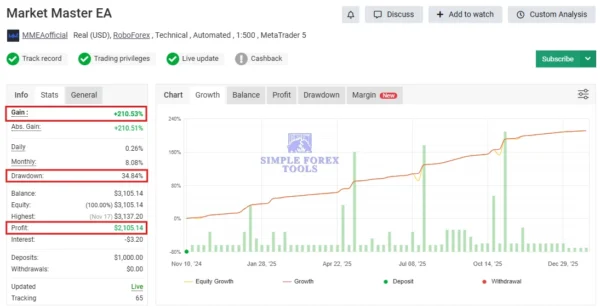
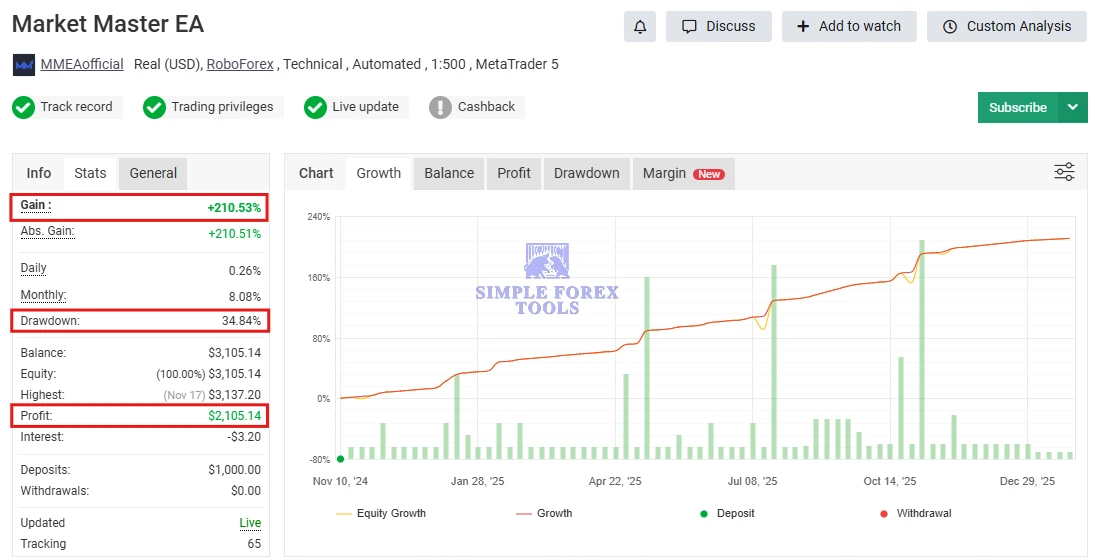
Market Master EA MT5 MYFXBook Verified Review 1 | Check Live
-
Gain: +210.53%
-
Drawdown: 34.84%
-
Profit: $2,105.14
-
Deposit: $1,000
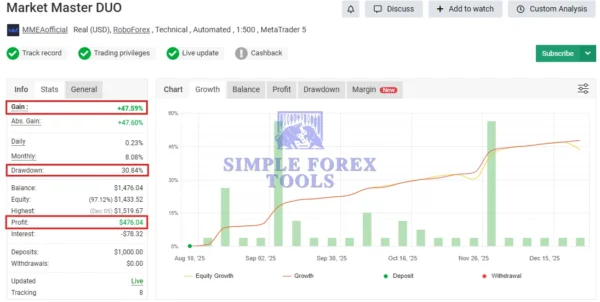
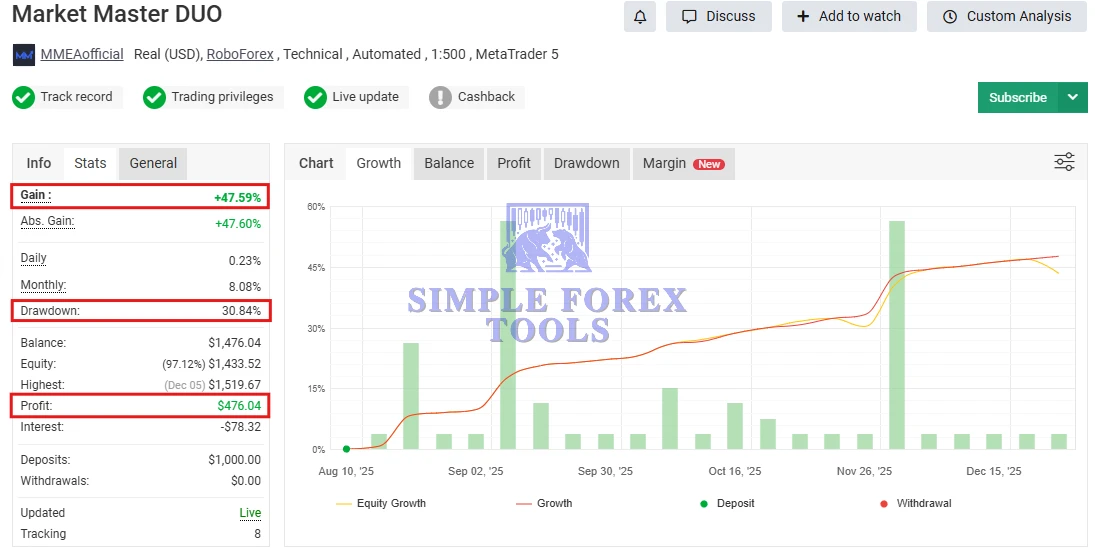
Market Master EA MT5 MYFXBook Verified Review 2 | Check Live
-
Gain: +47.59%
-
Drawdown: 30.84%
-
Profit: $476.04
-
Deposit: $1,000
Key Features of Market Master EA MT5
-
Fully Automated Trading – Executes buy and sell trades automatically without manual input.
-
Adaptive Grid Strategy – Uses structured grid spacing to capture retracements while controlling exposure.
-
Time-Filtered Execution – Avoids low-liquidity trading hours for better order execution.
-
Bidirectional Trading & Hedging – Supports both buy and sell positions, including simultaneous trades where allowed.
-
Risk-Aware Position Management – Controls the number of open trades and uses fixed lot sizing for stability.
-
Multi-Pair Compatibility – Optimized for EURUSD, NZDCAD, and AUDCAD on the H1 timeframe.
-
Lifetime License & Updates – Includes long-term usage with ongoing improvements.
How to Install (Simple Steps)
-
Download the EA file
Get the Market Master EA MT5 file after purchase. -
Open MetaTrader 5
Launch your MT5 trading platform. -
Open Data Folder
Click File → Open Data Folder in MT5. -
Copy the EA File
Go to MQL5 → Experts and paste the EA file there. -
Restart MT5
Close and reopen MetaTrader 5. -
Attach EA to Chart
-
Open a supported pair (e.g. EURUSD)
-
Set timeframe to H1
-
Drag Market Master EA MT5 onto the chart
-
-
Enable Auto Trading
-
Turn AutoTrading ON
-
Allow Live Trading in EA settings
-
-
Check Smiley Face 😊
A smiley icon on the chart means the EA is running correctly.
📩 Free Support & Setup Help – Contact us 👉 Telegram Support
Market Master EA Trading Strategy Explained
Market Master EA MT5 is based on a mean-reversion grid strategy, not trend chasing or martingale. The system aims to profit from price pullbacks using:
-
Controlled adaptive grid distances
-
Progressive spacing to reduce fast exposure build-up
-
Small but frequent profit targets
-
Trades placed only during active market sessions
This approach helps maintain balance between profitability and drawdown, making it ideal for traders seeking consistency. Many traders comparing Market Master EA review results appreciate this conservative strategy design.
Recommended Settings & Best Practices
| Setting | Recommendation |
|---|---|
| Platform | MetaTrader 5 (MT5) |
| Timeframe | H1 (60-Minute Chart) |
| Currency Pairs | EURUSD, NZDCAD, AUDCAD |
| Minimum Deposit | $200 |
| Recommended Leverage | 1:30 or higher |
| VPS | Strongly recommended |
Expert Tip: Always test Market Master EA MT5 on a demo account first. Adjust risk parameters carefully before moving to a live environment.
Market Master EA MT5 Price & Availability
Traders often search for Market Master EA MT5 price, Market Master EA MT5 for sale.
Final Verdict
Market Master EA MT5 stands out as a disciplined, automated Forex trading robot that prioritizes stability over reckless growth. With verified performance data, adaptive grid logic, and time-filtered execution, it appeals to both beginner and experienced traders seeking a hands-off trading solution.
Before purchasing, traders should demo test, fine-tune risk settings, and ensure proper broker conditions for optimal results.
Frequently Asked Questions (FAQs)
1. Is Market Master EA MT5 fully automated?
Yes. Once installed, the EA handles trade entries, exits, and management automatically.
2. Does Market Master EA use martingale?
No. It uses a controlled grid strategy without classic martingale risk escalation.
3. Is Market Master EA MT5 suitable for beginners?
Yes. Default settings are beginner-friendly, but demo testing is highly recommended.
4. Can I use Market Master EA on multiple pairs?
Yes. It works best on EURUSD, NZDCAD, and AUDCAD, but settings can be adjusted.
5. Do I need a VPS to run Market Master EA MT5?
A VPS is not mandatory, but it is recommended for uninterrupted 24/5 operation.
Best Alternatives
-
MFXT GOLD AI X1 MT5 – MYFXBook +1088% Gain | Low Drawdown | Download Now
-
Gold Hunter V8 EA MT5 – MYFXBook Verified | Download Now
-
Mystical EA Pro MT5 – Advanced Gold Trading EA with | Download Now




Reviews
There are no reviews yet.