
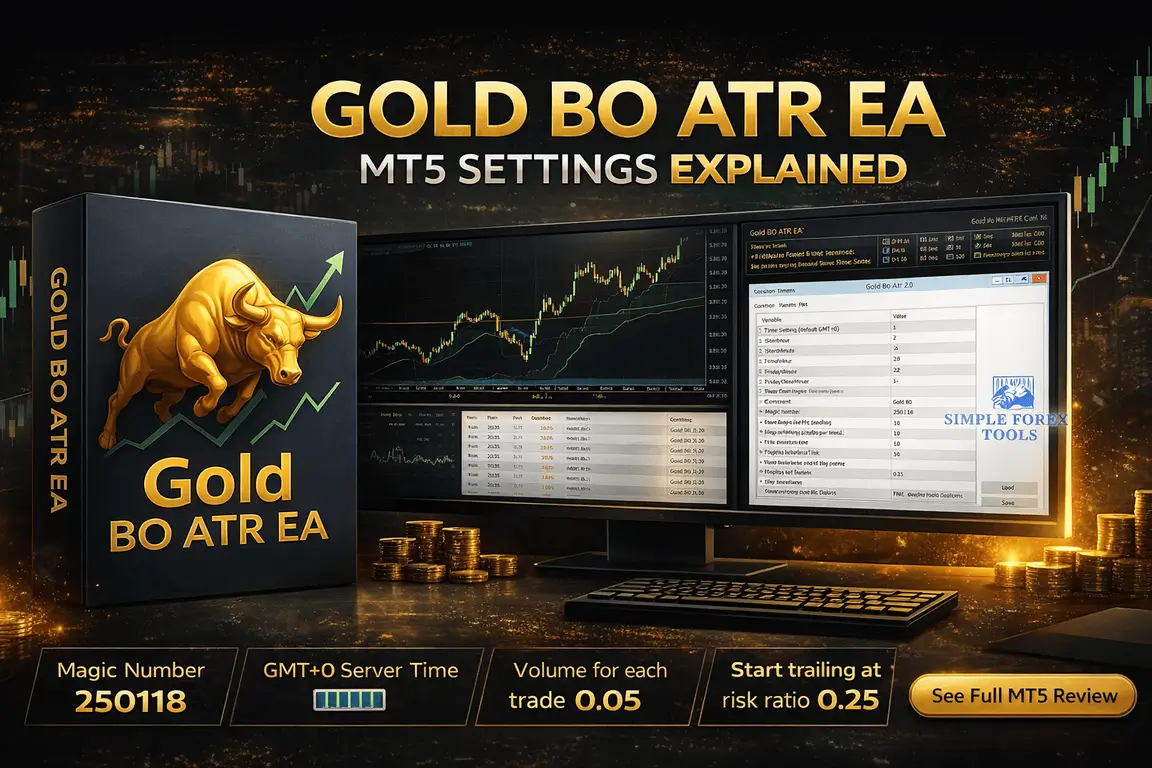
Gold BO ATR EA MT5 Setting Review 2026
A lot of traders buy an EA with high expectations, install it in five minutes, leave the default values untouched, and then wonder why the results do not match the screenshots they saw online. That is usually where the real problem starts. An EA is only as good as the way it is configured for your account, broker conditions, and risk tolerance.
That is exactly why this Gold BO ATR EA MT5 Setting Review matters. This is not just a general opinion piece about the robot. It is a practical look at the actual setting panel, what the visible values suggest, and how a trader can understand the bot more intelligently before going live. If you are searching for best settings for Gold BO ATR EA MT5, setup help, or a beginner-friendly explanation of the panel, this guide is built for that purpose.
➡️ Telegram Support: Join for updates, announcements, and support
Why EA Settings Matter More Than Marketing Claims
Before looking at the panel itself, it helps to understand one simple truth: the same bot can behave like two completely different systems depending on the settings.
A trader using a fixed lot with limited entries may see relatively stable behavior. Another trader using scaling, more open orders, and loose protection may experience much higher drawdown. The bot did not magically become bad. The setup changed.
With gold trading bots, this matters even more because XAUUSD is fast, volatile, and sensitive to timing. A small change in entry spacing, trade count, trailing logic, or session time can completely change the trade profile.
That is why smart traders do not ask only, “Is this EA good?”
They ask better questions like:
-
What does each setting do?
-
Which values are aggressive and which are safer?
-
How does this setup affect frequency, risk, and drawdown?
-
Should I keep the default structure or test variations first?
That mindset alone already puts you ahead of many EA buyers.
Gold BO ATR EA MT5 Setting Panel
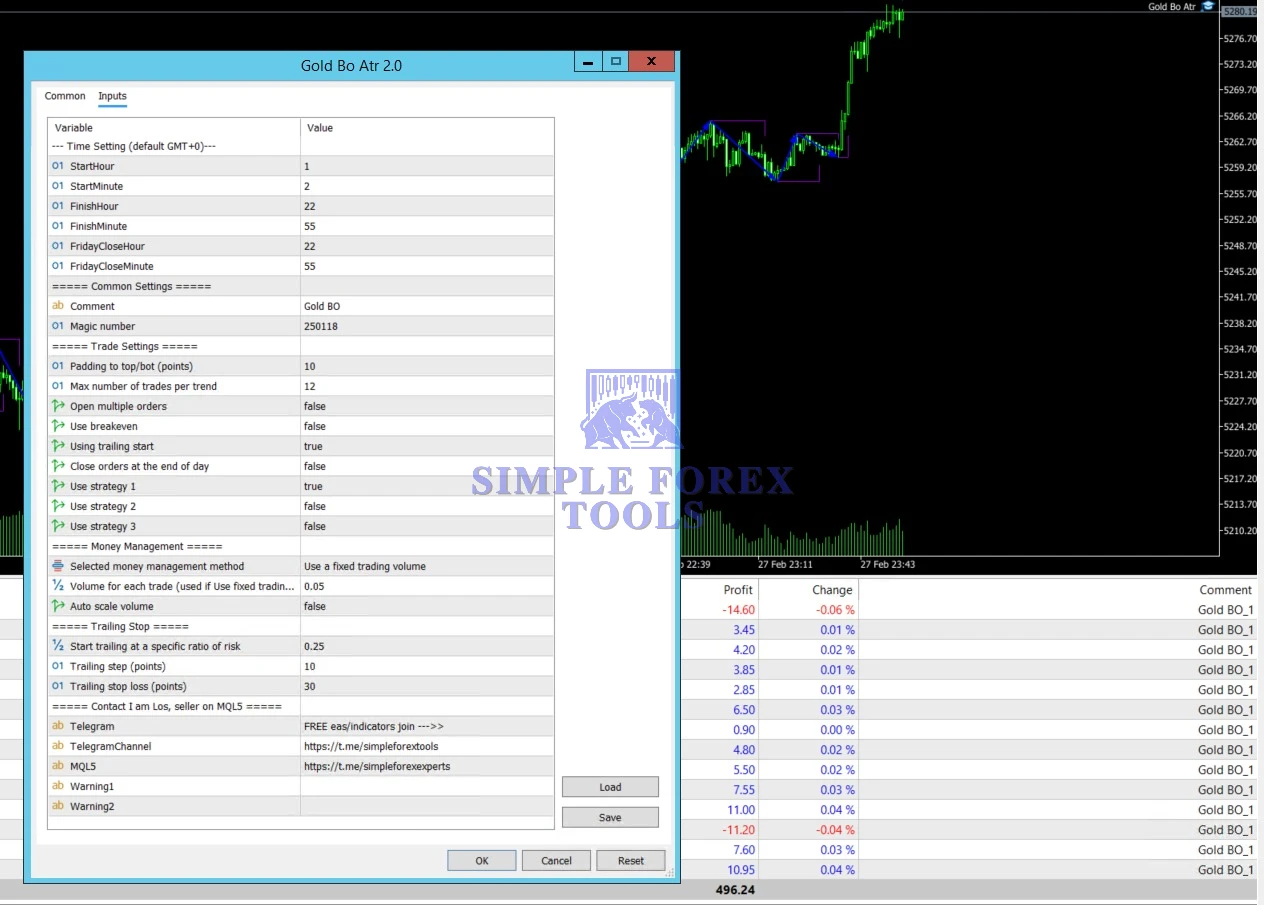
The visible panel shows that this bot is designed with a fairly structured layout. Instead of throwing random technical terms at the user, it separates the logic into clear groups such as time settings, trade settings, money management, and trailing stop. That is a good sign because it means the user can understand the strategy behavior step by step.
From the visible values, the bot appears to be configured as a controlled breakout-style gold system with a limited trading window, fixed lot management, and a trailing-based profit protection approach rather than an overly aggressive scaling model.
Let’s break the panel down properly.
>== Gold BO ATR EA MT5 Download ==<<
1. Session / Time Settings
The first block in the panel is:
-
StartHour = 1
-
StartMinute = 2
-
FinishHour = 22
-
FinishMinute = 55
-
FridayCloseHour = 22
-
FridayCloseMinute = 55
The panel also notes that the time setting is based on default GMT+0.
This section is more important than many beginners realize. Time filters do not just tell the bot when it can trade. They also decide which market conditions the bot is exposed to.
📌 What these values suggest
This setup allows the EA to operate during most of the trading day, starting just after 01:02 GMT and stopping at 22:55 GMT. That means the bot is active through a large part of the global market cycle, but still avoids running into the very late rollover period or unwanted end-of-day behavior.
The Friday close at 22:55 is especially important. Many experienced traders prefer not to hold automated gold trades deep into Friday close because:
-
-
spreads can widen
-
liquidity changes quickly
-
price can become unstable before the weekend
-
weekend gaps can create unnecessary risk
-
So even before looking at the other options, this tells us the bot has at least some attention to time-based discipline.
📌 Practical meaning for traders
If your broker server time differs from GMT+0, you should not ignore this. A time mismatch can cause the bot to trade at the wrong sessions. That means a bot meant to catch high-quality moves could end up opening positions in weaker or noisier periods.
📌 Beginner tip:
The first thing to verify after installing the EA is server time vs GMT+0 logic. This is one of the easiest ways to accidentally ruin a good setup.
2. Common Settings
The next visible block includes:
-
Comment = Gold BO
-
Magic number = 250118
These may look minor, but they still matter.
📌 Comment
The comment label helps identify trades placed by the EA in the terminal history. That is useful if you run multiple tools or want to track this bot separately.
📌 Magic Number
The magic number is essential for MT5 EAs. It acts like the bot’s internal trade ID. With 250118, this EA can identify its own positions and manage them correctly.
📌 Why this matters
If you run more than one EA on the same account, using unique magic numbers is important. Otherwise, one bot can interfere with another bot’s trades, especially if both are trading gold.
📌 Practical advice:
If you are using Gold BO ATR EA MT5 alongside another gold robot, keep the magic number unique. That is not optional. It is basic account hygiene.
3. Trade Settings
This is where the personality of the bot starts to show. The visible values are:
-
Padding to top/bot (points) = 10
-
Max number of trades per trend = 12
-
Open multiple orders = false
-
Use breakeven = false
-
Using trailing start = true
-
Close orders at the end of day = false
-
Use strategy 1 = true
-
Use strategy 2 = false
-
Use strategy 3 = false
This section deserves close attention.
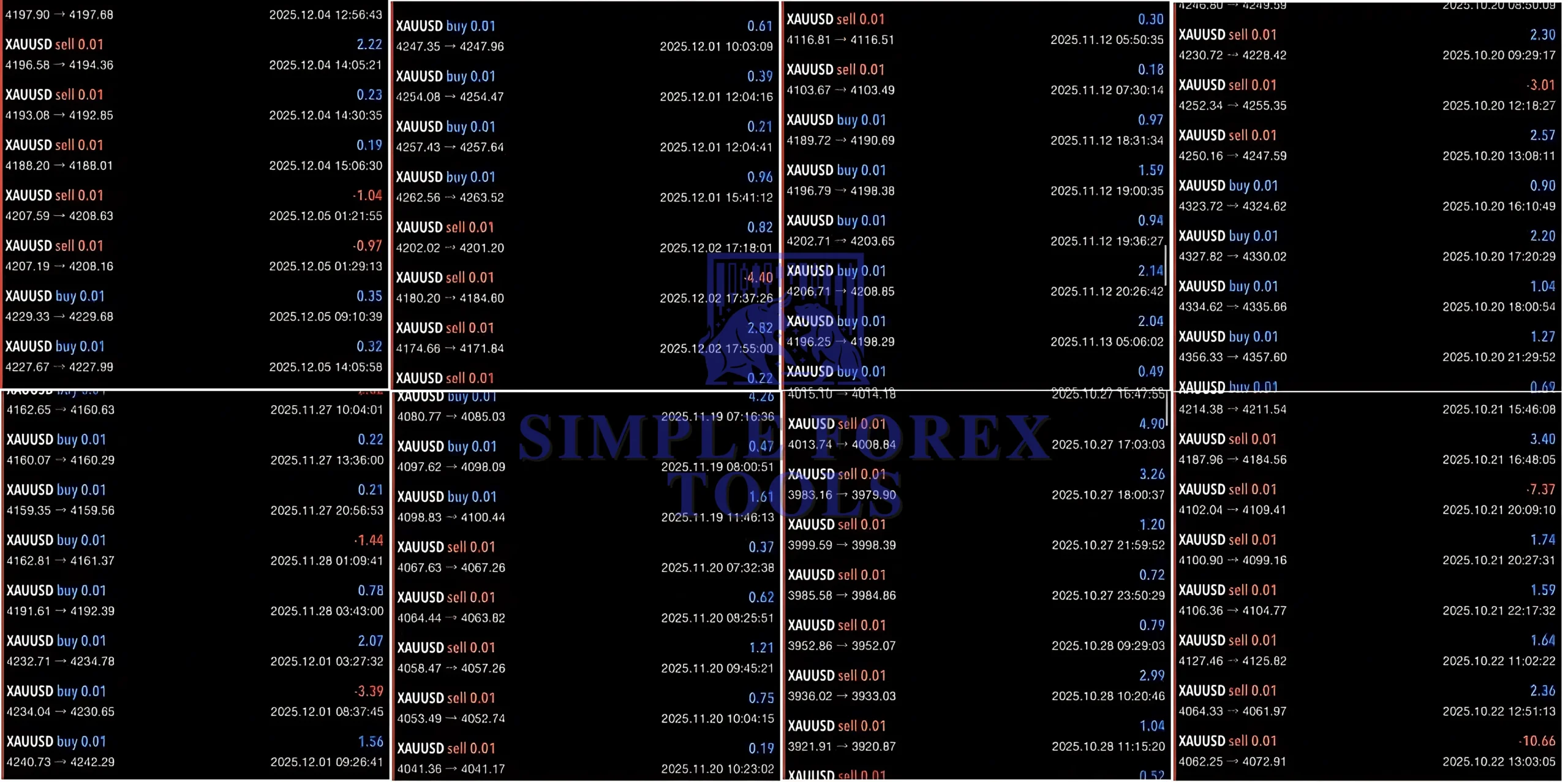
Gold BO ATR EA MT5 V2 Review: Performance Metrics
Based on comprehensive backtesting (2020–2025), the Gold BO ATR EA MT5 V2 review data shows a consistent Profit Factor of 1.92. While many traders still search for the Gold BO ATR MT5 V2 MT4 version, this MT5 upgrade offers significantly faster execution speeds and better handling of Gold’s tick data, which is essential for the 1:2 average Risk:Reward ratio targeted by the system.
>== Gold BO ATR EA MT5 Free Download ==<<
Money Management Settings
This section may be the most important one for long-term survival.
Visible values:
-
Selected money management method = Use a fixed trading volume
-
Volume for each trade = 0.05
-
Auto scale volume = false
This is a very clear message: the setup is currently configured with a fixed lot model, not an automatic account-growth model.
Use a fixed trading volume
This means the EA will place trades using a set lot size rather than dynamically increasing position size based on balance growth.
That is one of the easiest ways to keep behavior predictable during testing.
• Why fixed lot is useful
For setup reviews, forward testing, and account control, fixed lot sizing is often the smartest place to begin because:
-
-
results are easier to compare
-
risk is easier to understand
-
drawdown behavior is more visible
-
you avoid hidden aggression from auto-compounding
-
This is especially useful for traders still learning forex EA settings explained in a practical way.
Volume for each trade = 0.05
This is the actual per-trade volume used in the visible setup.
Whether 0.05 lots is conservative or aggressive depends on:
-
your account size
-
leverage
-
broker contract size
-
how many trades the EA can open during a trend
-
how volatile gold is during the session
Because the bot allows up to 12 trades per trend, this number cannot be judged in isolation. A 0.05 fixed lot may feel acceptable on one account and much too large on another.
• Important beginner lesson
Never copy a lot size blindly from screenshots.
The right lot size is always tied to your own balance and risk tolerance.
Auto scale volume = false
This is another conservative signal.
With auto scaling turned off, the EA will not increase lot size automatically as the account changes. That reduces the chance of a trader accidentally moving from comfortable risk into dangerous risk without noticing.
For many traders, this is exactly how a first setup should be handled:
-
start with fixed volume
-
study the trade behavior
-
test under live-like conditions
-
only then consider advanced scaling
Trailing Stop Settings
Visible values:
-
Start trailing at a specific ratio of risk = 0.25
-
Trailing step (points) = 10
-
Trailing stop loss (points) = 30
This section helps explain how the bot tries to protect and extend trades.
Start trailing at a specific ratio of risk = 0.25
This suggests the bot begins trailing once price reaches a threshold equal to 25% of the defined risk condition.
That is relatively early. It means the system does not wait too long before starting to manage profit protection.
• Why this can be useful
Gold moves quickly. If a breakout starts working, an early trailing trigger can help reduce the chance of a winning trade turning back into a full loss.
• The trade-off
Early trailing can also mean the bot gets shaken out more easily in choppy movement. So this setting leans toward protection, but it may reduce the ability to hold messy trends.
Trailing step = 10 points
This likely means the stop updates in 10-point increments.
A smaller step makes the trailing more responsive. A larger step gives trades more breathing room.
A value of 10 suggests the setup is trying to stay reasonably active without becoming too hypersensitive.
Trailing stop loss = 30 points
This defines the trailing distance. In plain terms, once trailing becomes active, the stop follows price with a 30-point cushion.
• Practical interpretation
-
-
Tighter trailing stop = more protection, but more early exits
-
Wider trailing stop = more room for trend continuation, but more profit giveback
-
A 30-point trailing stop suggests a middle-ground approach rather than an ultra-tight scalp profile.
Together, the trailing settings imply the bot is trying to do three things:
-
-
activate protection fairly early
-
trail in manageable steps
-
keep enough room to survive normal price movement
-
That is a sensible structure for a gold breakout system.
What Beginners Should Pay Attention to First
If you are new to MT5 robots, do not try to optimize everything at once. Start with the settings that have the biggest real-world effect.
The first settings to review are:
1. Lot size
The visible 0.05 fixed lot matters more than almost any other value.
2. Max trades per trend
This setting can change how much total exposure builds during a move.
3. Trading hours
Wrong time alignment can destroy the strategy logic.
4. Trailing behavior
This affects both protection and profit capture.
5. Strategy selection
Since only strategy 1 is enabled, do not casually activate the other strategies without testing.
That is how traders stay disciplined. They adjust the high-impact controls first instead of changing random settings just because they sound advanced.
Safer vs More Aggressive Setup Thinking
One mistake traders make is searching for a magic setting. In reality, settings reflect a style.
📌 A safer approach usually means:
-
-
smaller lot size
-
fewer trades per trend
-
fixed volume instead of scaling
-
careful session alignment
-
demo testing before live use
-
📌 A more aggressive approach usually means:
-
-
larger lots
-
more active order participation
-
possible volume scaling
-
tighter profit chasing
-
higher exposure during fast sessions
-
The visible setup leans more toward controlled participation than reckless aggression, especially because multiple orders are disabled and auto scaling is off. That said, the 12 trades per trend setting still deserves caution.
Common EA Setting Mistakes Traders Make
Even good bots fail in the wrong hands. Here are the mistakes I see most often with gold EAs:
1. Copying settings without checking account size – A lot size that works on one balance may be terrible on another.
2. Ignoring time zone differences – If the bot is designed around GMT+0, that matters.
3. Turning on every strategy at once – More options enabled does not always mean better performance.
4. Using live money before forward testing – A week of demo or cent-account testing can save a lot of pain.
5. Focusing only on profit, not drawdown – A beautiful backtest means little if the account cannot survive the bad periods.
6. Running gold robots without a stable VPS – Gold can move fast. Delayed execution is not a small issue.
Recommended Setup Conditions for Gold BO ATR EA MT5
To give this bot a fair chance, the trading environment matters.
• Use a reliable broker – Gold spreads and execution quality make a major difference.
• Use a VPS – For any trader serious about automation, a VPS is strongly recommended. It helps keep the EA running continuously with lower interruption risk.
• Match the symbol carefully – Make sure your broker’s gold symbol and contract conditions are compatible with the EA.
• Test before scaling – Start with the visible fixed-lot logic, observe behaviour, then adjust carefully.
• Track results by comment and magic number – This helps you separate the bot’s trades cleanly and review performance honestly.
Who This Setup Style May Suit Best
From the current panel, this bot may suit traders who prefer:
-
gold breakout-style trading
-
a structured session-based EA
-
fixed lot control instead of instant compounding
-
trailing-driven exits
-
a setup that can be analysed without too much complexity
It may be less suitable for traders who want ultra-high-frequency action or those who expect the bot to work perfectly without understanding any of the settings.
That may sound obvious, but it is important. This kind of EA rewards traders who pay attention.
Final Verdict
As a settings-focused review, Gold BO ATR EA MT5 looks more interesting than the average “plug and pray” robot. The visible panel shows a setup with defined session control, fixed volume money management, one active strategy mode, and trailing-based trade handling. Those are all useful signs for traders who care about structure.
The strongest part of this setup is not that it promises miracles. It is that the settings give you enough control to understand how the bot behaves. That matters far more than hype.
The areas to watch most carefully are lot size, max trades per trend, and session alignment. Get those wrong, and even a decent system can perform badly. Get them right, and you give yourself a much better chance of using the EA intelligently.
Before going live, it is smart to check the product page, review the current setup carefully, test the bot on demo or a low-risk environment, and compare results across your broker conditions. If you want more setting ideas, optimization updates, and access to free tools and trading discussions, joining the Telegram channel can also be a practical next step.
Frequently Asked Questions (FAQs)
1. What is the best setting for Gold BO ATR EA MT5?
There is no single best setting for every trader. The best setup depends on account size, broker conditions, and risk tolerance. Start by reviewing lot size, max trades per trend, and session time settings first.
2. How do I use Gold BO ATR EA settings correctly?
Use the bot with the correct GMT-based trading hours, keep the magic number unique, start with fixed lot sizing, and test the trailing logic before using real money.
3. Is Gold BO ATR EA MT5 good for beginners?
It can be beginner-friendly if the user focuses on the main controls and does not over-optimize. The layout is readable, but beginners should still test on demo before going live.
4. Can I use Gold BO ATR EA on a small account?
Yes, but you must be careful with the 0.05 lot example shown in the setup. That size may be too large for some smaller accounts, especially if the bot can take multiple trades in a trend.
5. Do I need a VPS for Gold BO ATR EA MT5?
A VPS is highly recommended. Gold can move quickly, and stable execution matters for automated trading.
6. Are default settings safe for Gold BO ATR EA?
Default-style settings are a starting point, not a guarantee of safety. Traders should always review risk settings, lot size, timing, and trade frequency before trusting them on a live account.
7. Which settings help reduce drawdown in Gold BO ATR EA MT5?
The most useful drawdown controls are usually smaller fixed lots, fewer trades per trend, disciplined session settings, and careful trailing behavior. Avoid aggressive scaling until the bot is fully tested.

Baryonyx Robot Trading MT4 Setting Review 2026
Eyes Storm MT5 EA Setting Review 2026
Golden Mirage MT4 Setting Review 2026 - Best Setup & Optimization Guide

Comments (2)
Good breakdown on the risk controls here. I’ve tested 20+ gold EAs over the years and the hard lesson is that no single bot handles both breakout and ranging conditions – that’s why most end up in the EA graveyard. What finally clicked for me was ditching the search for one magic system and instead rotating tools based on market regime, which is exactly what you’re hitting on with session timing. I’ve been using Ratio X Toolbox for that reason – it’s got specialized gold bots plus breakout and scalp variants, so you’re not forcing one EA through every market phase like the article warns. Do you backtest your Gold BO settings across ranging periods too, or mainly focus on the breakout scenarios?
Thanks, really appreciate that insight. You’re absolutely right – no single EA handles every market condition perfectly. That’s why I focus a lot on session timing and controlled settings rather than expecting one setup to survive all regimes. For this bot I usually test both breakout and ranging periods, mainly to understand how the trailing and entry padding behave during slower markets. Breakouts are obviously where it performs best, but testing the ranging phases helps keep expectations realistic.