
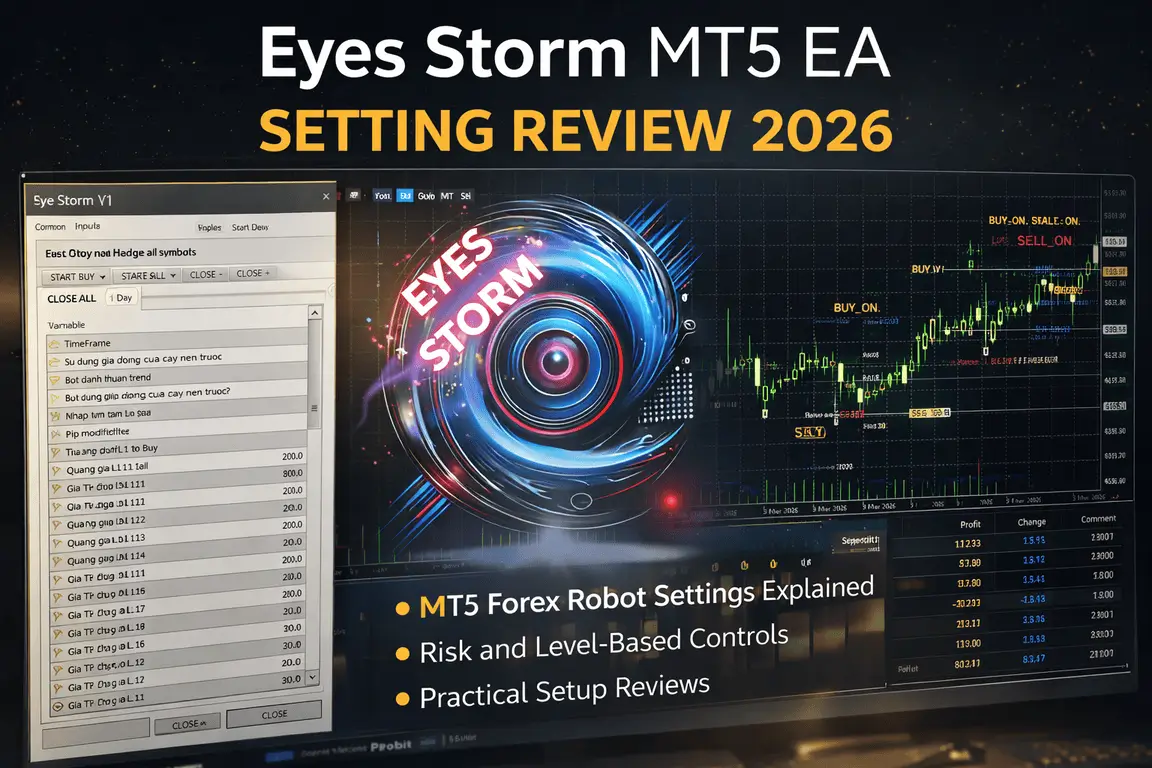
How to Setup Best Setting on Eyes Storm MT5 EA – Eyes Storm MT5 EA Setting Review
A lot of traders buy an Expert Advisor (EA), attach it to a chart, leave the default values untouched, and then wonder why the results do not look anything like the screenshots. That is usually where things go wrong. With most forex robots, especially gold-focused systems, the difference between a manageable setup and a dangerous one often comes down to how the settings are understood and applied.
Eyes Storm MT5 EA is one of those tools where the setting panel matters a lot more than the marketing around it. From the visible setup, this is not a “click once and forget forever” type of robot. It appears to use direction control, level-based entries, spacing logic, and take-profit values, which means the user needs at least a basic understanding of how the engine behaves before going live.
This review focuses on exactly that: the Eyes Storm setting structure, what the visible values likely control, how they affect risk, and how a beginner can approach the setup more safely in 2026.
➡️ Vendor Website: Available on the official product page | MQL5
➡️ Telegram Support: Join for updates, announcements, and support
Why EA Settings Matter More Than Most Traders Think
Most traders do not lose with bots because the bot is “fake.” They lose because they use a real tool in the wrong conditions.
Here is the usual pattern:
-
They run the EA on the wrong pair
-
They pick the wrong timeframe
-
They increase position exposure too quickly
-
They do not understand entry distance or TP spacing
-
They ignore how multi-level entries can increase drawdown
With gold EAs, this becomes even more serious because XAUUSD moves fast, trends hard, and can punish poor spacing settings very quickly. A setup that feels calm in a backtest can become stressful in live conditions if the market stretches beyond the expected zone.
That is why a setting review is more useful than a hype review. The panel tells you how the bot thinks. Once you understand that, you can start deciding whether the tool fits your account, your risk tolerance, and your trading style.
Eyes Storm MT5 EA Setting Panel
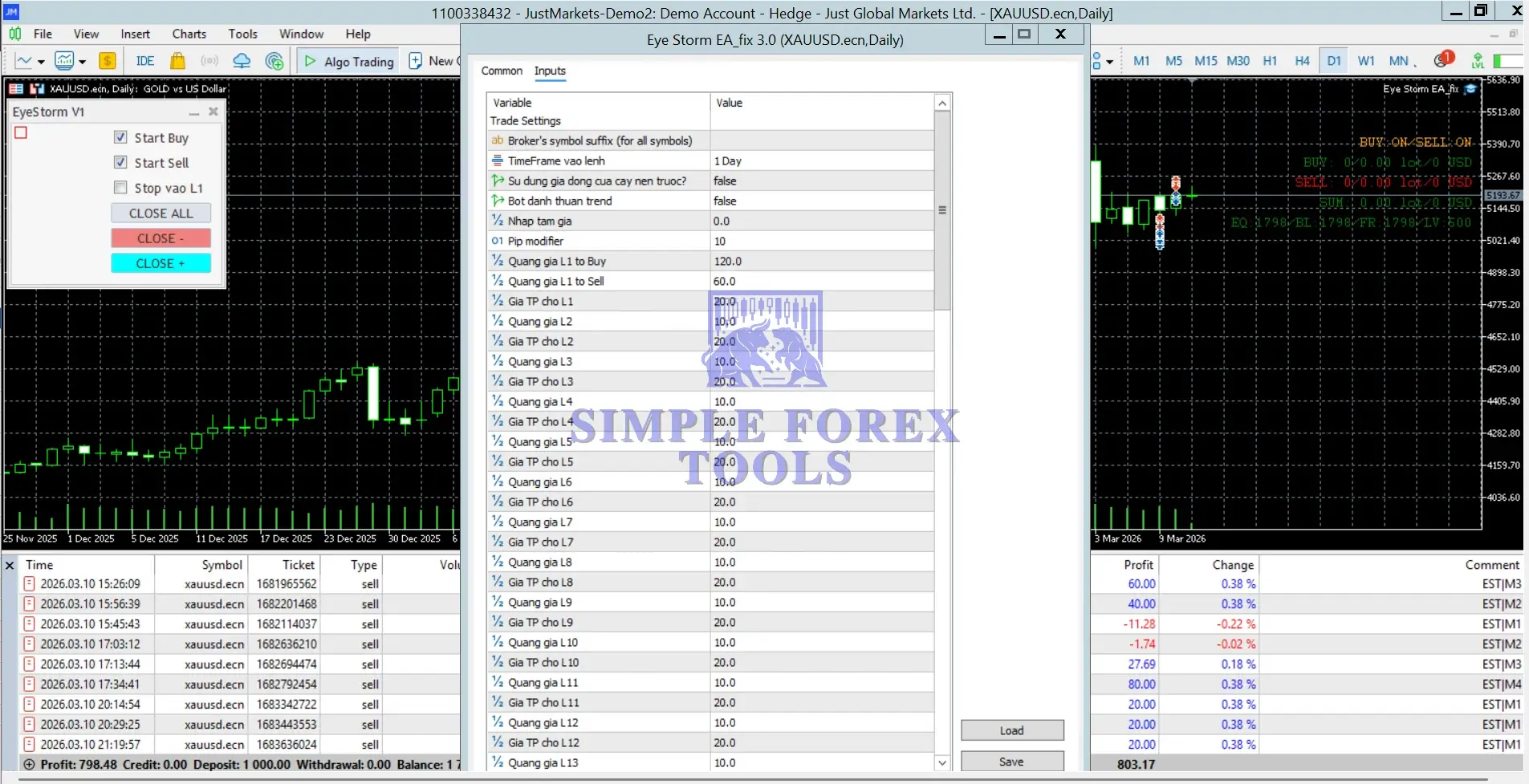
The visible panel shows a setup running on XAUUSD with the chart on Daily timeframe. On the left side, there are manual control options such as:
-
Start Buy
-
Start Sell
-
Stop vao L1
-
CLOSE ALL
-
CLOSE –
-
CLOSE +
On the chart itself, there are also status texts showing that Buy and Sell are both ON, plus values such as EQ, BL, FR, and LV 500, which strongly suggests the setup is being used on a leveraged account and the EA is displaying account status information directly on the chart.
The main inputs area shows several important settings. Some labels appear in
>== Eyes Storm MT5 EA Download ==<<
Pair and Chart Context
From the screenshot, the bot is attached to XAUUSD and the visible entry timeframe is set to:
TimeFrame vao lenh = 1 Day
That tells us something important straight away.
This is not being configured like a fast scalper on M1 or M5. Instead, it looks like the bot is being guided by a higher timeframe entry structure, which usually means:
-
fewer but more filtered entries
-
wider price movement tolerance
-
less noise compared to lower timeframes
-
stronger importance of level spacing
For beginners, this is usually easier to manage mentally because the bot is not firing every few minutes. But the trade-off is that Daily-based setups on gold can still face large floating drawdowns if the distance and layering logic are too aggressive.
Direction Controls: Buy and Sell Handling
The left control panel clearly shows:
-
Start Buy
-
Start Sell
And on the chart, the EA status also shows both directions as active.
This means the robot likely allows the user to:
-
run buy-side logic only
-
run sell-side logic only
-
or allow both directions
This is one of the first settings traders should respect.
• Why this matters
When both sides are enabled, the EA may respond to market movement in a more flexible way, but it can also create more complexity. If the system is level-based or recovery-based, activating both sides without understanding the entry model can make behavior harder to predict.
• Safer beginner approach
A beginner may prefer to start by:
-
-
testing one direction at a time on demo
-
checking how the bot behaves in a trending week
-
comparing buy-only, sell-only, and both-side logic
-
• More aggressive approach
Running both buy and sell can be useful for experienced users who understand the internal style and want more opportunity, but it should not be used blindly on a small account.
Timeframe Entry Setting
The visible setting:
TimeFrame vao lenh = 1 Day
This likely means the EA uses the Daily chart as a reference for entry logic, candle filters, or setup structure.
• Practical meaning
A Daily entry framework often aims to:
-
-
reduce false signals from intraday noise
-
rely on larger price zones
-
make the bot less reactive and more selective
-
• What to watch
If you are using a Daily-based system on gold, remember:
-
-
entries may be slower, but position recovery distances can be wider
-
you need patience
-
your account must tolerate floating movement better than with micro-scalping systems
-
For traders with tiny balances, a Daily gold setup can feel safe at first because it trades less, but one badly sized cycle can still do damage. So lower trade count does not always mean lower risk.
Candle and Trend Filters
Two important visible settings are:
Su dung gia dong cua cay nen truoc? = false
Bot danh thuan trend = false
The exact labels suggest something close to:
-
Use the previous candle close?
-
Trade with the trend?
• What this likely means
Use previous candle close = false
If this interpretation is correct, the EA is not forcing confirmation from the previous candle close in this setup. That can make entries more flexible, but also more sensitive.
1. When false:
-
-
-
the bot may react earlier
-
entry speed may improve
-
false positioning risk can be slightly higher
-
-
2. When true:
-
-
-
entries may become more filtered
-
trade frequency may drop
-
confirmation may improve in some market conditions
-
-
3. Trade with trend = false
This is very important.
If the bot is not restricted to trend-only trading, it may be willing to take setups that are not purely aligned with the broader directional move. That can be useful for systems designed around pullbacks, reversals, or level-based re-entry logic, but it can also increase stress during strong gold trends.
• What beginners should learn from this
A lot of drawdown comes from fighting momentum. So even if the bot allows non-trend logic, many traders will feel safer testing whether trend-filtered behavior gives better emotional and account stability.
Price Input and Pip Adjustment
The visible settings also include:
Nhap tam gia = 0.0
Pip modifier = 10
• Nhap tam gia = 0.0
This looks like a manual price input or reference price field. When set to 0.0, it often means the EA is working without a manually forced anchor and is instead using its own live logic.
That is usually normal. But it also means the trader is trusting the bot to determine its entry framework automatically.
• Pip modifier = 10
This is a very common type of conversion setting in EAs. It usually adjusts the bot’s internal point or pip calculation depending on the symbol format or broker pricing structure.
• Why it matters
On gold, price precision can vary by broker. If pip or point conversion is wrong:
-
-
spacing becomes inaccurate
-
TP targets become distorted
-
the whole level system may behave differently than expected
-
This setting often gets ignored, but it is actually one of the most important technical values in the whole panel. Wrong pip conversion can ruin an otherwise good strategy.
Level-Based Entry Structure: The Core of the Setup
This is where the Eyes Storm panel becomes interesting.
The visible settings show repeated level logic such as:
Quang gia L1 to Buy = 120.0
Quang gia L1 to Sell = 60.0
Gia TP cho L1 = 20.0
Quang gia L2 = 10.0
Gia TP cho L2 = 20.0
Quang gia L3 = 10.0
Gia TP cho L3 = 20.0
continuing in the same pattern through L12 and beyond
Even if the original labels are not in English, the structure is clear: the bot uses level-based price distances and TP targets.
• What this likely means
-
-
L1 is the first entry level
-
L2, L3, L4… are additional levels
-
Quang gia likely refers to distance / gap / spacing
-
Gia TP likely refers to take-profit value for that level
-
This strongly suggests a multi-layer entry model, often seen in grid, recovery, or structured averaging systems.
Understanding L1: The First Entry Matters Most
The first level is visibly different:
L1 to Buy = 120.0
L1 to Sell = 60.0
TP for L1 = 20.0
• Why this stands out
The buy and sell distances are not equal. That means the bot is not using a perfectly symmetrical setup.
• Possible meaning
-
-
Buy entries require wider spacing
-
Sell entries trigger with closer spacing
-
The developer may expect different behavior on the buy side versus sell side for gold
-
This is actually sensible in many gold systems because XAUUSD does not always behave the same way on upward and downward swings. Some traders prefer wider filters for longs and faster participation for shorts, or vice versa, depending on how the bot is designed.
• Takeaway
The first level controls the personality of the EA. If L1 spacing is too tight, the bot becomes more active and may enter too often. If L1 spacing is too wide, it becomes more selective but may miss trades.
In the screenshot, L1 Buy at 120.0 looks relatively cautious compared with L1 Sell at 60.0. That suggests the setup may be giving buy entries more room before activation.
Understanding L2 to L12: Recovery or Expansion Layers
From L2 onward, the pattern looks mostly like this:
-
Distance = 10.0
-
TP = 20.0
repeated across multiple levels.
• What this tells us
The system likely adds structured levels after the first entry using fixed spacing and fixed TP logic.
• This affects several things at once
-
-
Trade frequency
-
Basket behavior
-
Recovery speed
-
Floating drawdown
-
Margin usage
-
• What can go wrong
A repeated level structure may look neat on paper, but if the market trends hard in one direction, multiple layers can stack. That is where many traders get trapped. They see a nice TP value like 20.0 and think the system is conservative. But the real question is not only the TP. The real question is:
How many positions can build before price comes back?
That is why level-based bots should always be judged by exposure behavior, not just by single trade targets.
Aggressive vs Safer Setting Logic
Based on the visible panel, here is how traders can think about risk style.
• More aggressive setup traits
-
-
tighter level spacing
-
both buy and sell enabled without testing
-
no trend filter
-
small account with larger lot exposure
-
live trading without demo validation
-
• Safer setup traits
-
-
wider first entry spacing
-
smaller lot size relative to balance
-
one direction at a time during testing
-
trend-aligned filtering when possible
-
strong VPS and broker execution
-
demo or cent-style evaluation before real funds
-
• What beginners should pay attention to first
If you are new, do not start by obsessing over every level from L2 to L12. Start with these:
-
-
Direction control
-
Timeframe
-
Pip modifier
-
L1 distance
-
Whether the bot is trend-filtered or not
-
Those five areas usually shape the biggest part of the EA’s real-life behavior.
Manual Control Features: A Useful but Often Ignored Layer
The visible side buttons are not just cosmetic. They matter.
CLOSE ALL
CLOSE –
CLOSE +
These buttons suggest the EA allows some form of manual intervention, such as closing all positions or closing a side selectively.
That is helpful for traders who do not want to be completely passive.
• Why this matters in practice
If gold becomes unusually volatile around:
-
-
major USD news
-
CPI
-
NFP
-
central bank events
-
geopolitical spikes
-
manual controls can help reduce exposure before things get uncomfortable.
A bot with manual override is often easier to live with psychologically. You are not fully trapped inside automation.
Recommended Setup Conditions for Eyes Storm MT5 EA
Even a good setting panel can perform poorly in bad trading conditions. For a bot like this, the setup environment matters a lot.
• Broker
Use a broker with:
-
-
stable gold pricing
-
low execution delay
-
reasonable spreads during volatile sessions
-
reliable handling of XAUUSD
-
• VPS
For any EA that uses level-based logic, a VPS is strongly recommended. Stable execution matters more than people think, especially when the system needs precise order management.
• Account size
Do not force this style onto an account that is too small for the spacing model. A layered gold EA can need breathing room.
• Leverage
The chart shows LV 500, which means leverage is part of the environment here. Higher leverage can help margin flexibility, but it does not reduce strategy risk. It only changes how much exposure the account can carry before margin pressure appears.
Common Mistakes Traders Make With This Kind of EA
Mistake 1: Using default values without understanding level spacing
A repeated level structure can feel safe until gold runs in one direction for longer than expected.
Mistake 2: Increasing risk before understanding L1
The first level often determines how frequently the cycle starts. That is where many problems begin.
Mistake 3: Ignoring symbol precision
If Pip modifier is wrong, the whole system may behave differently than intended.
Mistake 4: Running buy and sell together immediately
This is fine only after you understand how the EA behaves under pressure.
Mistake 5: Going live too early
The smartest way to use an EA is still the old-fashioned way: demo first, observe, adjust, then scale slowly.
Eyes Storm MT5 EA Review


>== Eyes Storm MT5 EA Free Download ==<<
Who Is Eyes Storm MT5 EA Best Suited For?
This kind of setup is better suited for traders who:
-
want a bot with structured entry levels
-
are comfortable learning the setting panel
-
trade gold
-
prefer a more controlled, planned setup instead of random signal chasing
-
understand that automation still needs supervision
It is less suitable for traders who:
-
want a totally hands-off EA
-
have no patience for testing
-
want to run big risk on a tiny account
-
panic when floating drawdown appears
Practical Beginner Walkthrough
If you are just getting started with Eyes Storm MT5 EA, a reasonable workflow would look like this:
Step 1 – Attach the EA to XAUUSD and confirm the symbol format matches your broker.
Step 2 – Check the Pip modifier and make sure the bot’s spacing logic makes sense for your broker’s gold pricing.
Step 3 – Use the visible timeframe logic carefully. Since the current setup shows 1 Day, treat the bot as a higher-timeframe system, not a fast scalper.
Step 4 – Start with lower exposure and observe how L1 behaves before worrying about deeper levels.
Step 5 – Test one directional mode first if you want more control.
Step 6 – Run the setup on demo long enough to see
Final Verdict
Eyes Storm MT5 EA looks more like a structured level-based gold trading system than a simple one-click robot. That is neither good nor bad by itself. What matters is whether the user understands the mechanics.
The visible setup suggests a bot that relies on:
-
Daily-based context
-
direction control
-
multi-level spacing
-
fixed TP values across several layers
-
manual override options
That means the EA can be useful for traders who want more control and are willing to learn the panel. But it also means blindly using default settings is a bad idea.
The most important part of this setup is not the sales angle. It is the relationship between L1 spacing, repeated level entries, pip conversion, and directional filtering. Get those right, and the bot becomes much easier to manage. Ignore them, and even a promising setup can become stressful very quickly.
Before going live, it is worth reviewing the product page carefully, testing the current values on demo, and joining the Telegram community for setting updates, optimization ideas, free tools, and strategy discussions. That is usually where traders learn the small adjustments that make a big difference over time.
Frequently Asked Questions (FAQs)
1. What is the best setting for Eyes Storm MT5 EA?
There is no single best setting for everyone. The safest starting point is a lower-risk setup with careful L1 spacing, correct pip modifier, and demo testing on XAUUSD before live trading.
2. How do I use Eyes Storm EA settings correctly?
Start by understanding direction controls, timeframe logic, pip conversion, and the level-based entry distances. Those settings shape how often the bot trades and how much drawdown it can create.
3. Is Eyes Storm MT5 EA good for beginners?
It can work for beginners only if they treat it as a learning tool first, not a magic income machine. The panel is manageable, but the level structure means users should learn the basics before using real money.
4. Can I use Eyes Storm EA on a small account?
You can, but caution is needed. Gold EAs with layered entries can become risky on small balances, especially if spacing is tight or exposure grows too quickly.
5. Do I need a VPS for Eyes Storm MT5 EA?
Yes, a VPS is strongly recommended. Stable execution helps the EA manage entries, exits, and basket logic more reliably.
6. Which timeframe works best for Eyes Storm MT5 EA?
The visible setup shows 1 Day, which suggests the bot may be designed to work with higher-timeframe structure. That can help reduce noise, but users should still test performance under different market conditions.
7. Are default settings safe for Eyes Storm EA?
Not automatically. Default settings are only a starting point. Traders should always test them against account size, broker conditions, and gold volatility before trusting them live.
Best EAs Setting Review
-
Gold BO ATR EA MT5 Setting Review | Free Download Now
-
Golden Mirage MT4 Setting Review | Free Download Now
Best Alternatives For Eyes Storm EA
-
Alpha Striker F1 MT5 EA New – MYFXBook Gain 538% | Download Now
-
Local Trade Copier MT4 MT5 | Download Now
-
Prop Farming Blueprint – EA Titan X MT5 V21.48 With SetFile | Download Now

Baryonyx Robot Trading MT4 Setting Review 2026
Gold BO ATR EA MT5 Setting Review 2026
Golden Mirage MT4 Setting Review 2026 - Best Setup & Optimization Guide

Comments (2)
You nailed it – most traders blame the EA when really they’re just running the wrong tool for the market regime. I spent months trying to force generic bots to work on XAUUSD before accepting that gold needs specialized logic. Ratio X Toolbox has two dedicated gold EAs that actually account for geopolitical volatility and safe-haven flows, and switching between them based on market structure has cut my drawdown significantly compared to the one-size-fits-all approach. The difference between a bot that “doesn’t work” and one that’s just mismatched to conditions is exactly what separates profitable traders from the EA graveyard.
Thanks for sharing your experience!
You’re absolutely right – using the right EA for the right market condition makes a huge difference, especially with gold. XAUUSD is very volatile, so specialized strategies can definitely help reduce drawdown. Appreciate the insight!